
Introducing our new Employer Portal
Thanks for being a valued partner of AustralianSuper and volunteering to be part of the new Employer Portal1 Pilot program. Your participation in the pilot will give us valuable insights to help us deliver a seamless transition when we officially launch the new Employer Portal for all AustralianSuper employers.
At AustralianSuper, we’re committed to delivering world-class domestic service and support for our employer partners. To help us achieve this goal, we’re excited to be offering you single log in access to the new Employer Portal1 – an integrated clearing house platform and self-service administration solution provided by Wrkr.
The new Employer Portal is more than just a software update. It provides simplified super admin tools for compliance management – designed to help you meet your super obligations so you can focus on running your business.
Employer Portal pilot webinar
-
Show transcript
Thank you everyone for joining us today.
My name is Erin, and I'll be your moderator for the session.
AustralianSuper acknowledges the Traditional Custodians of country throughout Australia and their connections to land, sea and community.
We pay our respects to Elders past and present and extend that respect to all Aboriginal and Torres Strait Islander peoples.
Today I'm coming to you from the lands of the Turrbal people on the north side of the Brisbane River, or the Brown Snake as we affectionately refer to it.
I'll be joined by presenters on the lands of the Yuggera people on the South side of the Brisbane River and on the lands of the Boonwurrung people of the Kulin Nation.
Before we begin, I'd like to draw your attention to some important information about today's session.
This content has been prepared for employers who have agreed to be part of the pilot group for the Employer Portal.
The information is correct at the date of preparation and may be subject to change.
This may include general advice which doesn't take into account your personal objectives, situation or needs.
The Clearing House is a financial product offered by Clicksuper Pty Ltd, trading as Wrkr PAY.
Please read the relevant Product Disclosure Statement and Financial Services Guide before making a decision.
I'd now like to pass over to Luke Fraser who will begin the session for today.
Thanks so much, Erin, and welcome everyone.
Thanks for joining us this afternoon for AustralianSuper's information session on the new Employer Portal.
We were only just talking as a team earlier.
How excited we are to be talking with you today.
It's a significant milestone both for ourselves and you as well.
Thanks so much for agreeing to participate.
Your agreement in participating is going to afford you a few things.
One, you're going to get an advanced look at the Employer Portal and also access to high touch support and that's going to place you really well for the upcoming Payday Super changes that are on their way.
I'll talk about that soon.
It'll also help us get valuable insights from you to deliver a seamless transition when we officially launch the new portal to all AustralianSuper employers.
As Erin mentioned, my name is Luke Fraser. I'm the Head of Workplace Partnerships at AustralianSuper and my team work really closely with employers, with bookkeepers, with payroll providers and really our goal is to make the day-to-day superannuation processes as straightforward as possible.
Supporting us aptly in the background are your Partnership Management team, the clearing house or Employer Portal project team, representatives from Wrkr and the AustralianSuper Member Experience and Marketing team.
So today you'll have Mike Collins, Product Owner of B2B Channels here at AustralianSuper.
He'll take you through a live demonstration, giving you an overview of the Employer Portal, its key features, what to expect when you first log in, the steps to make your first contribution and where you can find help and support within the portal.
And then after Mike, we'll have Brent Caldow, Manager of Business Payments and Support. He'll run you through the key transition milestones. He'll share a readiness checklist with you and also where you can go for support and resources.
We will have time for Q&A at the end, which is good. So, start thinking of your questions as you go through. Feel free to drop them into the chat and we'll circle back to them at the end and make sure we answer them in Q&A if we can.
A recording of the session will also be made available through the pilot program web page in the next few days.
So, why are we here?
Well, just like consumers, we know that digital adoptions by businesses like yourselves on the call are accelerating.
We're really seeing businesses invest in their digital ecosystems to streamline their operations, to automate routine tasks and to enhance their productivity.
And welcome to those that are joining now.
In line with increasing expectations, we're committed to delivering world-class local service and support for our business partners. Like everyone that's joined today.
This includes providing a dedicated service team, educational resources and investing in digital administration tools like the Employer Portal to support your compliance management of superannuation.
Really, our aim is to make things nice and simple for you to meet your obligations so that you can focus on running your business.
So, the requirements for improvements in digital systems is further underpinned when we think about the payday super reforms. These reforms will see super payments aligned with pay runs, with contributions generally expected to reach the fund within seven business days of payday.
There are some limited extensions for new starters or for existing employees making a choice of fund or for irregular payments. But commencing on 1 July 2026, Payday Super will be one of the most significant shifts to how super is administered for years.
It's really designed to tackle unpaid super and improve retirement outcomes, but we've all got a role to play. We're expecting at AustralianSuper to see a 350% increase in payment volumes and super funds like AustralianSuper will have much tighter deadlines to either allocate the contributions or return those contributions to a business if they can't be allocated.
So, that sounds like a lot of change, but the good news is that we're here to help. And a key part of this is our new Employer Portal. So, it's being built to help make super payments easier in a few different ways.
First, supporting the easy capture of data and cutting rework. So, it'll enable real time validation, clearer error messages, reducing the likelihood of those rejections I was talking about when speeding up reconciliation. It'll also help in handling stapling and choice of fund really cleanly.
The portal allows you to request an employee's stapled fund details from the ATO, capture employee choice, and have a really solid digital audit trail that you can rely on.
It'll also help with validating employees details with super funds upfront. So, in line with SuperStream standards that are coming in on 1 July 2026, the platform will be able to confirm a member and fund details before you make contributions and they land for the first time. This will be dependent on the rollout of the SuperStream changes, but it will help manage rejections. Also, it will support the new SuperStream file and error messaging framework. So, issues are easy to spot and then conversely, easy to fix as well.
Over the next 20 minutes, Mike Collins will walk you through the new Employer Portal, how it brings all of this together and what good looks like in a Payday Super environment.
So, with all that said, I'll hand over to Mike over to you.
Thank you very much, Luke, and thank you very much everyone for joining us today.
It's been, as Luke was saying, a very exciting milestone that we've had in the calendar for some time. And I couldn't quite believe that we've got here.
And I am just jumping out of my skin to really share what we've been working on for a little while with our Employer Portal with you.
And I really look forward to receiving lots of feedback and I'm sure lots of questions. I think one of the best things to do if you do have a question is to pop it into the chat. And we can certainly circle back at the end of the session and make sure we've answered those for you.
What I'm gonna take you through and over about 20 minutes or so, we're gonna go into some depth about what the Employer Portal looks like and how it works.
So, we'll start out with a login and I'll show you the main portal and the dashboard and then I'll go through the process of actually setting up an organisation for you.
So this will mimic what you'll be asked to do when we send out the confirmation and the invitation email to get everything set up so you know exactly what to expect when you go through that process yourself.
We will look at the process of making contributions. Obviously a very important part of any clearing house is the ability to make contributions.
So, we'll show you what's involved in that and a few of the nuances there.
Employees is a very interesting and important part of the Employer Portal because it enables you to manage those employees if they were to leave or indeed to onboard new starters in a few different ways that that can happen.
Lastly, we'll touch on things such as administration reporting and how to get support within the portal and beyond before we hand over to Brent to go through the next steps and beyond.
So, what I might do, I might share my screen here and get on with the fun stuff because I know everyone likes to see how it all behaves. So, we'll just switch on here and we can see that.
So, as you can see, we've got a login page, username and password.
I'll just pop in my password and I want to show you this from the beginning because you'll notice something as soon as we pop in the password there that I am prompted to enter in a code. Now multi factor authentication is built into the platform and indeed you'll see some security features as we go through and the security is front in mind, in front and centre and is an important part of a modern digital platform that we are protecting data and we're protecting money and protecting those members and employers who are with us. So, I'll touch back on the multi factor authentication shortly.
When I log in, I would automatically default to my organisation unless I've got multiple organisations configured and we do have multiple here.
So, I'll click into this one and then we can see what's known as the dashboard.
And this is very simply a quick glance view of key information that is present for you when you login until everything is properly set up.
There will be a Contributions QuickStart Guide here and I'll go into that in a little bit more detail.
When we sit up and mimic that experience that you will go through.
You can also see recent contributions that have been made and also recent employee activity.
There are some helpful guides on the right-hand side, particularly when you've got an upcoming contribution, so little reminders and then access your further information through to resourcing that we have available in the Fund.
And then on the left-hand side, a nice simple, intuitive menu of various options and we'll go into those in a little bit more detail shortly.
As promised, what I'll do now is I'll set up another organisation.
So, there's a few different ways that we can do this, but new organisation is usually a button on most pages. If you're able to add something new.
So new organisation up here now for you, you will receive an email with this link. So you won't be starting just here, you'll be starting via the link in the email and you'll be asked to go through some steps.
First of all to set up your username and password and your multi factor authentication. I've already done that, so I can't demonstrate that for you. But as like any other online system, you'll be asked to enter in that password and confirm it.
There needs to be password rules configured and so forth and adhered to the multi factor authentication.
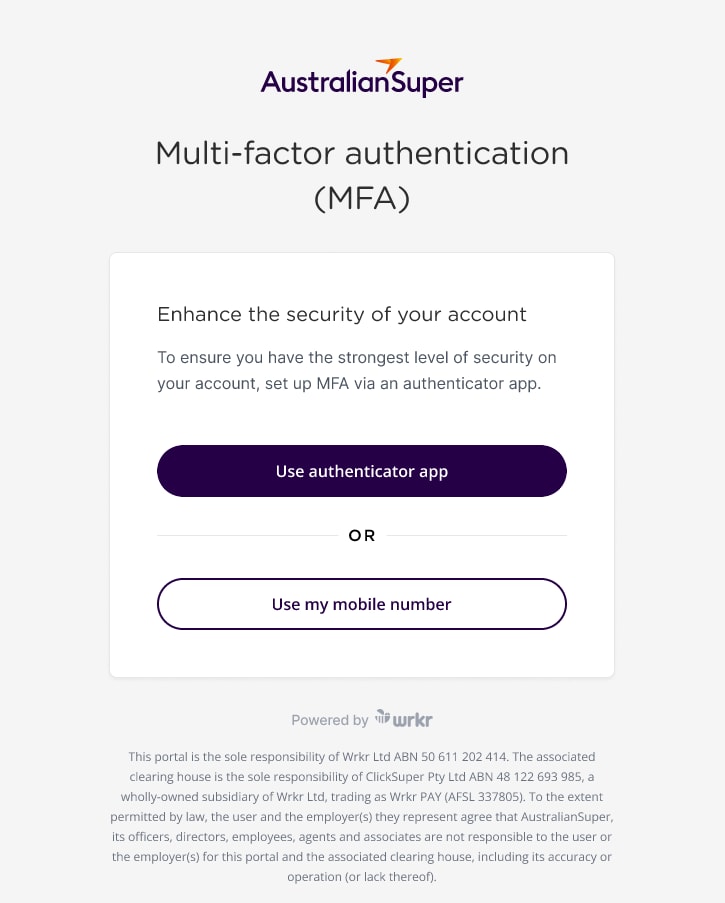
You have two options available.
You have the ability to use an authenticator app, and I use the Google Authenticator app to log in.
Or you can use a six-digit code sent via SMS to your mobile phone. So, either of those options are available to you.
I like the Google Authenticator because it's nice and straightforward and simple, and all of those steps will be available and laid out nice and easily. But let's assume that I've already done that and we'll continue here.
So, the next step is I'm confirming that I'm the right person and I'll need to enter an ABN. So let me just see if I can do this without any fail whatsoever. A copy from my listing here. So, I have this ABN and it's just have a think while it does a lookup in the background and it recognises the 'Truck City' there.
So, I'll add an address that will do and for you and the same as this with this employer here, you'll need to select the existing account because you're already accessed with AustralianSuper. And you'll need to enter in your Employer ID so that when you click that, the Employer ID field comes up.
So, I'll enter that in now.
And this just helps confirm that you are indeed the right employer. Clicking next, I will then be asked for a few additional pieces of information, the number of employees, the industry type, say manufacturing. And if I had a website address, I could pop that in there as well. But just in the interest of time, I will go through to the next page, which is to read and accept the declarations.
Now I won't go into these, but they are there and they are important to have acknowledged and accepted in order to move forward. What I will say is you can download these, you can read these and you can save and resume your application process. If you did want time to read these in detail or share them within the organisation so you can pick this up later. Equally in the portal down the track, you can get access to these documents in the latest versions of them. So, you will always be able to refer to this information as appropriate.
So, I'll go through to the review page here. This will ask me to make sure everything was correct. I've just had a quick scan. Yes, it is and submit. So, it's had a good think. It's now set up and then I go through to the Employer Portal. So that's as simple as the onboarding or the initial setup aspects to get the portal up running and activated.
Now I need to go through and do some additional setup for being able to be ready for that first contribution.
So, if I click on this Contributions Quickstart button, there's a checklist on the right-hand side here that I will step you through. So first is setting up the contribution payment. There are three different contribution payment methods available at the moment. And Luke talked about Payday Super coming up and we are working with our technology partners to add additional options around Pay ID to speed the process and that will be coming in the coming months.
But at the moment there are three payment options, direct debit, EFT or direct credit if you will, and BPay.
If you select direct debit, you'll need to go through a process of validating the bank account and that involves us sending a 1 cent transaction to the account and you'll need to enter in the payment reference number.
There'll also be a security check where the person doing the process needs to confirm their identity through a selfie video and a photo of their driver's licence or passport.
So again, that security flavour really coming to the fore in this process. For simplicity, I'm gonna select EFT here. And what that means is whenever I need to make a contribution, I am making that contribution or funding that contribution to a BSB and account number. And that BSB and account number is set based on or is unique to me as an employer. And I'll go and touch on that shortly.
The next thing I need to do, and we can see the green tick there for contribution payment, is to set up a refund account. Now similar to direct debit, we need to go through a process where we're adding that. So we have to select in adding new accounts. I will be the account holder, but you can get someone else in the organisation if appropriate. And then it does talk about needing to do that verification process.
So again, the identity check via a driver's licence or a passport and you step through the process, it's very intuitive and it's similar to if you've used MyGov, you're going through and verifying the identity. Again, this is for security purposes and to protect you as an employer.
The refund account is where any unpaid monies go to. And so it's really important that we appropriately associate that to the correct organisation and make sure that account ownership is validated.
I won't go through that here because the steps are quite detailed or will take a little bit of time to go through, but rather I'll go back through to that dashboard and show you some of the other things you'll need to know.
We'll go through a contribution shortly, so we'll touch on that there.
Stapling service, you can link in with the Australian Tax Office and there is a process here to do so. And what that means is any employee that you don't know their accounts or their fund details, you can look it up and through the stapling service and make sure that you're adhering to their wishes.
So, it's something I would encourage you to do, not 100% essential to do in order to make a contribution, but it's still a worthwhile activity to go through.
And the last thing on contribution checklist I will talk to here is the authorisation settings.
These are automatically set to no authorisation step in place. But for larger organisations, perhaps yourself included, you might want to consider adding these. So there are three different rules that are available.
You can have one contribution authoriser, you could have two or three. And so essentially what that means is someone sets up the contribution file and someone comes and approves it and says that this is what is indeed intended.
So this rule will apply to any contributions that you then upload and you'll need to make sure that you've got the right users to come in and authorise a payment if necessary.
Again, for simplicity's sake, I'm gonna toggle it off so that I can show you some detail going through in the contributions that I'm going to actually switch back to the organisation that I've already got set up here.
In the contributions, I can quickly and easily set up a new contribution.
So again, the nice purple button with the plus on it and you'll see there's a consistent approach there to whenever there's something new.
There are a couple of options that I have available to me here.
Either I can use a manual grid, which is essentially a list of employees that I've paid previously and I can go through and just enter in manually the amounts. I need to put in the end date there...So let's take that to the next week. And so I can prepopulate here with the amounts and adjust them as required.
That's the manual option.
Perhaps the more common one that we would expect is to, I'll delete that draft, to go through the file upload.
So, this is certainly what most employers, certainly I think everyone here in our pilot group will be using.
So, contribution period, again, we'll need to select that and it's as simple as clicking on a file upload, browsing for that.
And here's one I've prepared earlier.
Upload there and I hit next and it will just interrogate that file and make sure everything is in the places that it needs to be. As we can see, it populates that same grid with all the amounts. It's gonna be exactly as per the file. It will not be tinkered with from there. And then hit next and then I will need to submit contribution.
So, at this point, if there is any other payment, payments due, sorry, authorisation's due, that's where they will be requested.
So, at this point it goes to awaiting payment and this particular one was configured to be paid via BPAY and so I'll go through those instructions. But if I had authorisers, they would be notified and asked to authorise that payment so I can return to the contributions there.
So that's gonna be awaiting me to pay it. So that's where the status of awaiting payment shows. So that's a quick circle through contributions and I'm sure there might be some questions later that we can come back to.
The next thing I wanted to quickly touch on was employees.
And as I mentioned, there's the ability to manage your employees. So, you'll notice when you've set up that contribution file that all of those employees in that contribution file come through into the employee listing and their onboarding method is shown as contribution.
So, there are three methods of onboarding an employee through one being through a contribution file, another to manually enter the details. And for those that use our Business Portal currently very similar to that process. And there's a third option here around online onboarding.
So with the online onboarding, essentially you're entering in a few personal details of the new starter and then you're referring them or sending an invite to them so that they can complete the other information types.
So TFN declaration, bank account details and super choice are things that you can collect from them as part of that process. And this is brand new to AustralianSuper and not something we've offered before.
You don't have to necessarily ask for this information. If you already have it, you don't need to ask them to supply it again. But it can be a very useful and secure way of capturing that information that you're going to need for payroll processes and assist with everything in relation to managing super.
The beauty of using this as well, is that the individual, your new employee is making sure that the details into them are correct and obviously you're not having to source those in another fashion. I won't go through the end-to-end steps, but it is suffice to say a very new and what we think is quite an exciting feature in the Employer Portal.
Manual input, if I were to do that, it's essentially the same, but I'm adding all of those details myself. So you might have a new starter form and have already captured that and you won't and don't feel the need to get reach out to that new starter and do it again.
You can do so using this form here and there's a few different pages to capture all of that. One thing I will point out, if you are wanting that employee to default into AustralianSuper and they've consented to that, you would say yes, you do have that employees fund details. You would add fund and you would select default. Otherwise the employee when they're going through it in the online onboarding will choose that themselves.
So, I'll leave without saving.
I'll go back to the employees listing.
As I mentioned maintenance, it's not just about onboarding. We can cease employment as well.
So if someone has left, we can put it on an end date and the reason for that and then cease that employment. So that just keeps records nice and tidy and avoids any reminders about any contributions that may otherwise have been due.
I'll step through into reports. At the moment we do have an employee report and essentially enables an export of what was in the employee listing. And this is something that we will look to augment in terms of the reporting available in the platform as we work with our technology partners. But simply clicking 'Export' here enables me to take all of those records. And as you can see, various information like fund details are captured, but there's a lot of information per employee.
The next item here, VBA statement stands for virtual bank account. So in behind each employer account within the Employer Portal, there is an employer bank account, a virtual bank account, and it's got a BSB and account number associated with it. So this is unique to you as an employer.
And so if you were to make any payments via EFT or direct credit, you're paying it to this BSB and account number that's set up just for you.
And that's gonna assist with our prompt reconciliation and prompt funding of accounts.
And that's important in the Payday Super context.
But if there were to be any rejections or refunds, they also come back to this account for a period of 10 days and that's to enable you to make any corrections that might be necessary and resubmit those contributions. If at the end of the 10 days a refund has not been resubmitted then or contribution not resubmitted, then those funds will be paid out to the preset refund bank account that we went through earlier on.
And settings, one other thing that you want to do when you do set up the account is to invite on the users that are going to be necessary.
So there might be other members of your payroll team, perhaps a finance manager or an external accountant or bookkeeper in some cases.
So clicking on users enables you to invite a new user. And this, as I said, could be the new payroll officer that's just starting.
You'll put in their work email address here and then you would choose the permissions associated with that user.
So if you did have the contribution authorisation rule setting on, you need to make sure that you have a good number or an appropriate number of authorisers to conduct that role. Administrators very similar to the view that I've just shown you, but you can also be multiple roles.
So you'll want to make sure that you're applying this appropriately in terms of these permissions to what you need your team to have access to. And there is a little bit of information about what each role means in this handy little eye icon or tool tip.
I won't send that invite because as you can see, we've got plenty of users already set up on this organisation, so we don't need any more just for now. But if I go back to the settings, there are a few other things that you're able to do.
So organisation details are captured here. So whatever's been added in previously, we can go through and edit that as appropriate. Again, only administrators will be able to take these steps.
Default funds, there we go. AustralianSuper in this case is set as a default fund. If you had more than one default fund, you would be able to configure that here.
And lastly, on the contribution setting, so things that I've already touched on in terms of enabling the stapling service and contribution rules, all of that can be adjusted here.
So once you've set it up that's fine, but you're not locking things in for the long term if you don't want, you can amend it here so you can set up change that to EFT if you want. Every time I do that, someone changes it back to the BPAY. So I probably shouldn't muck around with this account too much, but adding the or changing the contribution authorisation rule set as well as possible here.
There are different files that can be ingested here the SuperStream file format or SAF file is the standard. We are enabling QuickSuper file format to be to work out of the box and so you shouldn't need to configure that at all.
It should work just the same as it does with QuickSuper, but if you had an exotic file, it is possible to use a file mapping software so that it so that your file is compatible with this platform and it will remember the settings that have has been set up.
So we know that the vast bulk of employers do use either the QuickSuper or the SAF file format and we we're confident that those will work without any mapping required there.
One last thing that I wanted to touch on, and might be getting sick of my voice now, is how do I get support?
How do I do something that all looked pretty straightforward and simple, but I know that when I go to do it, I'm going to need some help. Well up in the little icon up here with the question mark is the help icon. If you click on that, you come through to the in-application support.
So, there are frequently asked questions, but I might say, look set up a branch. How do how to set up branch? How do I add a branch? There we go. And there's a help guide there.
There is an interactive demo available, so you can click on that and it'll go through it. But there's also a transcript or a step by step of each of the steps.
So pretty much every topic, or at least the common things that you would need to do within the portal are demonstrated in this way. So, it's a really, really helpful guide to how to do additional things such as setting up a branch or a subsidiary.
How would I do that? It shows you and steps you through that process. So, lots of topics there that support is configured to.
I might pause there. I know there might be some questions and we can always come back to those in the Q&A. But I do want to hand over to Brent Caldow now to talk through what the next steps will be in terms of, you know, what to expect and how to get support beyond the in-app support, of course.
Awesome. Thanks for that, Mike. It was a great demo and gidday everyone.
My name is Brent Caldow and I'm the manager of the new Business Payments and Support team here at AustralianSuper. My team will work closely with employers like yourselves and internal partners to ensure your contribution processes run smoothly, especially as we transition to the new Employer Portal and clearing house.
To wrap up today's session, I'll walk you through what's next, how the transition will unfold, what you can do before the program begins, and the key dates and support you can expect from us.
This slide gives you a high-level indication of the different stages of the transition and when they'll occur.
We begin with the preparation and due diligence, followed by piloting the new Employer Portal. After incorporating feedback, we'll begin the broader transition from QuickSuper to the Employer Portal, working through all our employees in various stages.
Our goal is to complete the transition ahead of Payday Super starting on 1 July 2026. That way, when SG contributions need to align with payday, if you don't already have them aligning with Payday, you'll already be confident with the new processes and the clearing house.
These dates are indicative and will be refined as we go, but this gives you a sense of the journey from today through to the full adoption of the Employer Portal.
Let's move on to some of the things that will help set you up for success. We recommend nominating a pilot lead and a backup person. These will be your set up owners and our main contacts.
Then confirm the basics like your ABN or WPN and your AustralianSuper Employer number to avoid any surprises during registration. From there it's all about set up and testing.
Create your admin login in the Employer portal once you receive the invitation and enable multi-factor authentication. Add your users and assign roles so the right people can prepare, approve and reconcile contributions.
You'll also need to complete the Contributions QuickStart checklist as Mike showed which is shown on the dashboard of the Employer Portal.
Select your payment method and when ready, export a payroll file and upload a test file to validate the fields or work and there are no issues. Agree on your reconciliation process, who exports reports, who matches them to payroll and bank records, and make sure your internal team knows where to log in and who to contact with any questions.
Treat this checklist as your run sheet to ensure your first contribution in the new portal is smooth and on time.
There are a couple of key dates to keep in mind.
For example, on the 1st of December 2025, you'll receive an email inviting you to begin the Employer Portal registration process. That's when you'll register, log in and assign users, and complete the Contribution QuickStart checklist. Once you're set up, you can use the Employer Portal for your ongoing super contribution admin.
And finally, support and resources. We really want to reiterate that you're not doing this alone. We've created a dedicated Employer Portal pilot web page with transition information, timelines, FAQs and links to helpful resources.
In addition, we created a comprehensive email program to guide you through each stage and have access to dedicated support, including your Partnership Manager and our new Business Payments and Support team to answer any questions or troubleshoot any issues you may experience.
The portal itself also includes built in help prompts and alert guides, as Mike showed, to guide you through each step as you complete your super admin tasks.
So, the message I'd like to leave you here with is this. There's a clear plan, a clear timeline and strong support around you as we move to new Employer Portal and clearing house.
Really appreciate your ongoing partnership with the Fund.
We look forward to helping you make superannuation administration a lot faster, a lot simpler, and as Mike reinforced a few times there, far more secure.
So, thanks for your time today and wish you all the best for the rest of the week.
Key features
The new Employer Portal will offer the following features:
- available at no cost to registered AustralianSuper employers
- validates data digitally and in real time
- provides a user-friendly interface
- is multi-factor authentication enabled
- can display and record your employee’s stapled and choice of super fund during digital onboarding – supporting compliance with super stapling requirements, and
- planned integration with Payroll and HR systems (integration may vary by provider).
In addition to the features above, there’s the option of adding your logo and two brand colours to the employee digital onboarding process, providing continuity for new employees as they securely supply their details.
For more details and an overview of the key features, download the Key features of the new Employer Portal fact sheet.
Key dates
You’ll have access to the Employer Portal from early December 2025. Here are the pilot program’s key dates.
-
10 November 2025
You’ll be sent an invitation to register for a live Employer Portal webinar. -
17 November 2025
Join our webinar and we’ll walk you through the platform, the pilot timeline and information on how you can prepare. -
18 November 2025
We’ll send you an email with tasks that you’ll need to complete before the pilot starts. -
December 2025
You’ll be sent an email which will give you access to the Employer Portal registration process. You’ll need to register, set up MFA and complete the Contributions Quickstart checklist in the portal.
During the pilot, we’ll ask for feedback on:
- the registration process
- contribution management
- onboarding and offboarding staff, and
- other administrative actions.
Our Partnership Team will continue to provide support and remain available to ensure a smooth pilot period and answer any questions you may have.
-
Ongoing
Once you’re all set up in the Employer Portal, you can use it for all future super contribution admin requirements if you choose to.
What to expect throughout the new Employer Portal pilot program



Regular communication
A webinar session
Migration checklist tasks
Support
Getting started

Step 1
Watch out for an email with your personalised Employer Portal link which you can use to register for access.

Step 2
Log in to your account and set up MFA. You’ll need to download the Google authenticator app, or use your mobile number.

Step 3
Complete the action items in the Contributions Quickstart checklist.
Stay in contact with your Partnership Manager or Business Support Services contact for any instructions before upload of your first contribution file.
Frequently asked questions
-
Why is AustralianSuper making this change?
We’re moving to the new Employer Portal, which is a self-service administration platform with an integrated clearing house, provided by Wrkr. It’s designed to support employers in managing their super obligations, including changes under the Payday Super legislation. AustralianSuper’s arrangement with QuickSuper will come to an end in 2026 (we’ll provide the exact date on this webpage when it’s confirmed). -
When will AustralianSuper’s arrangement with QuickSuper end?
AustralianSuper will start the process in 2026 (the exact date is yet to be confirmed and we’ll update the answer to this question when it is). The first step will mean QuickSuper is placed into 'read-only' mode where your information is still available, but you won’t be able to make changes or contributions. You’ll have 12 months from the date 'read-only' mode is activated to access, download and store historical contribution records. After the 12-month period, QuickSuper will no longer be accessible via AustralianSuper. -
Will I still be able to view my contributions in QuickSuper?
The arrangement between AustralianSuper and QuickSuper will end in 2026. You’ll need to complete your transition before the arrangement ends and you can then use the portal for all future super contributions. After you’ve activated your new Employer Portal account, QuickSuper access will become ‘read only’. This means you won’t be able to make any changes in QuickSuper but you can see your contributions history for approximately 12 months from the date it becomes ‘read only’. We recommend you download any reports required for recordkeeping purposes. -
How long will I have access to QuickSuper after transitioning to the new Employer Portal?
Read only access to your contribution history will be available for approximately 12 months after you’ve activated your new Employer Portal account. We recommend downloading any reports required for recordkeeping purposes as part of your transition to the new portal. -
How does the Employer Portal simplify making super contributions?
It's a one-stop digital experience - you'll be able to create/find members, upload or enter contributions, validate data in real time, submit and track status, and export reports, all in one place, with clear prompts and alerts to keep you moving without needing to navigate multiple systems. -
What does a “single login” mean in practice?
The existing solution requires two different logins. With the new Employer Portal, access to clearing house and employer administration will be within one secure login, with MFA and role-based access. -
Is multi-factor authentication (MFA) required?
Yes, it is. The Employer Portal offers enhanced security through MFA. You can choose to authenticate your access using either the Google Authenticator app, or by receiving a one-time code via your mobile phone. If you don’t have access to a work device, you can use a personal device.
-
Can I set up multiple users?
Yes, you can. Each user needs to be set up with a unique, individual email address (not shared mailboxes). This supports MFA, audit trails and secure user management. This security feature is required by the Australian Tax Office to enable the Employer Portal to link to the employee stapling service. -
What do you mean by user-friendly interface?
The Employer Portal uses clean screens, guided forms and clear status labels to make the platform easier to navigate, reduce errors and assist with task completion. -
Who can use the Employer Portal?
Business owners, bookkeepers and payroll service providers acting on behalf of employers. -
What features help my business meet super obligations?
Real-time validation and clear status tracking are designed to help you resolve any entry exceptions (errors) quickly.
If your business, or the business you’re performing super admin for has many entities, multi-entity switching enables contributions to be made through a single log in.
Smart alerts and in-product guidance are provided to help you stay on track of your super obligations.
You can choose to bulk upload your contribution files for multiple employees in one go, then reuse templates next pay cycle if there have been no staff changes since the previous upload.
The portal is ready for the Payday Super legislation and is planned to evolve along with future legislative changes.
-
Are my payroll/HR systems compatible with the new Employer Portal?
The Employer Portal supports the industry standard SAFF file format, which most payroll and HR systems produce. Additionally the QuickSuper file format will be supported by the Employer Portal.
If your payroll or HR system produces a different contribution file or you use a custom file format, the Employer Portal offers a file mapping tool. To use the tool you need to save your contribution file in .csv format. It also needs to include the minimum data that SuperStream requires for contribution submissions. The relevant fields in your files can then be translated into SAFF format. The settings will be saved so it’s simple next time you need to upload a file using the same format.
-
Will there be downtime during the transition to the Employer Portal?
We aim to minimise any disruption, and there will be no planned downtime in your ability to access clearing house services. We’ll communicate timelines and provide support so contributions and other clearing house services can continue smoothly. -
What support, training materials and resources will you provide?
This web page will be updated with materials as they become available. The new Employer Portal has been designed to provide a user-friendly interface to guide you to take the next steps. If you choose to register to use the portal, you’ll have step-by-step guides that are accessible via the ‘Help’ icon within the Employer Portal. Alerts and real- time information will provide status updates as you complete your super administration tasks. -
Who can I contact for assistance or troubleshooting if there’s a problem during the transition to the Employer Portal?
AustralianSuper have dedicated resources to assist with any issues that may arise during the transition. You can contact the support team provided at BusinessHelp@australiansuper.com or your dedicated Partnership Manager. -
How will the Employer Portal reduce errors and processing effort?
As you work through the contribution process, built-in validation will highlight any issues or errors for correction before submission. This will reduce rework and processing efforts.
Help and resources
If you need assistance at any point, here’s how you can find support.



- The clearing house is a financial product offered by ClickSuper Pty Ltd ABN 48 122 693 985 (‘ClickSuper’) trading as Wrkr PAY (AFSL 337805), a wholly owned subsidiary of Wrkr Ltd ABN 50 611 202 414 (‘Wrkr’). Terms and conditions of Wrkr and ClickSuper apply and a Product Disclosure Statement for the clearing house is available from ClickSuper on request. AustralianSuper Pty Ltd doesn’t receive any commissions or other benefits from ClickSuper, nor is it recommending, endorsing or providing an opinion about the products or services offered by ClickSuper or intending to influence anyone to make a decision about them. AustralianSuper Pty Ltd is not liable for any loss or damage you incur in connection with the use of products or services provided by ClickSuper or Wrkr.
- QuickSuper is a financial service provided by Westpac. AustralianSuper doesn’t accept liability for any loss or damage caused by use of the QuickSuper service and doesn’t receive any commissions from Westpac if employers use this service. Terms and conditions apply. Visit quicksuper.westpac.com.au to learn more.