
Preparing for day one
Welcome to AustralianSuper!
Once you’ve accepted your offer, you begin a process known as ‘pre-onboarding’. This process ensures that everything is ready for your first day as an AustralianSuper colleague.


Task 1: Providing more information
Once you accept our job offer in the system, you will be sent an email asking you to log into the system to provide more information. You’ll also be sent a one-time passcode which will facilitate your system access.
Once you’re logged in, you’ll see all the information you already provided during the application stage, as well as a few new questions.
Specifically, you will be asked to provide:
- Your date of birth
- Details of any disability accommodations you require
- Your National Identifier (Tax File Number in Australia, National Insurance Number in the UK and Social Security Number in the US).
If a question is marked with a red asterisk it is mandatory.
Some of the demographic questions are mandatory but enable you to select ‘Prefer not to share’.
If you are having any issues with this task, please refer to the FAQs section.
Task 2: Setting up multi-factor authentication
Once you have completed the providing more information stage, you will complete your remaining tasks in the AustralianSuper employee HR system. (Up until now you have been using a separate recruitment system.) We are upgrading your security in order to facilitate this.
Up until this point you’ve been using single-use verification codes to access the system. From this point on you will need to set a password – and set up multifactor-authentication (MFA) – before you can access the system. You will receive emails asking you to perform these tasks.
Your User Name is your personal email address.
You will receive an email similar to the one below (Figure 1) asking you to activate your profile.
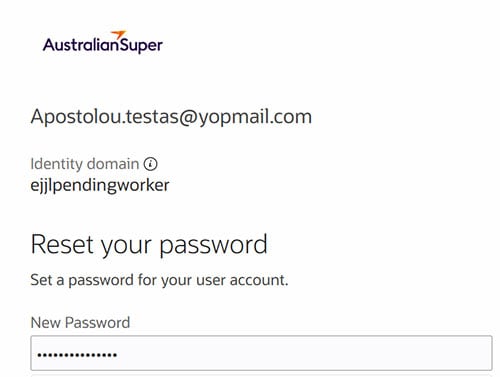
This email takes you to the password reset screen (Figure 2).
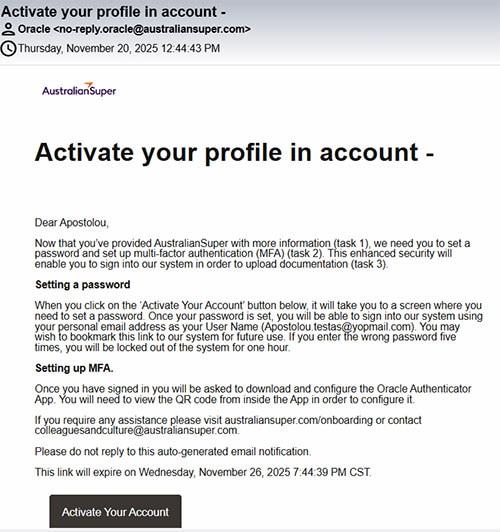
Figure 2
Once you have set a password, you will be emailed instructions to set up multifactor authentication (MFA). You will use MFA – together with your email (which is your User Name) and your password – when you access the AustralianSuper system.
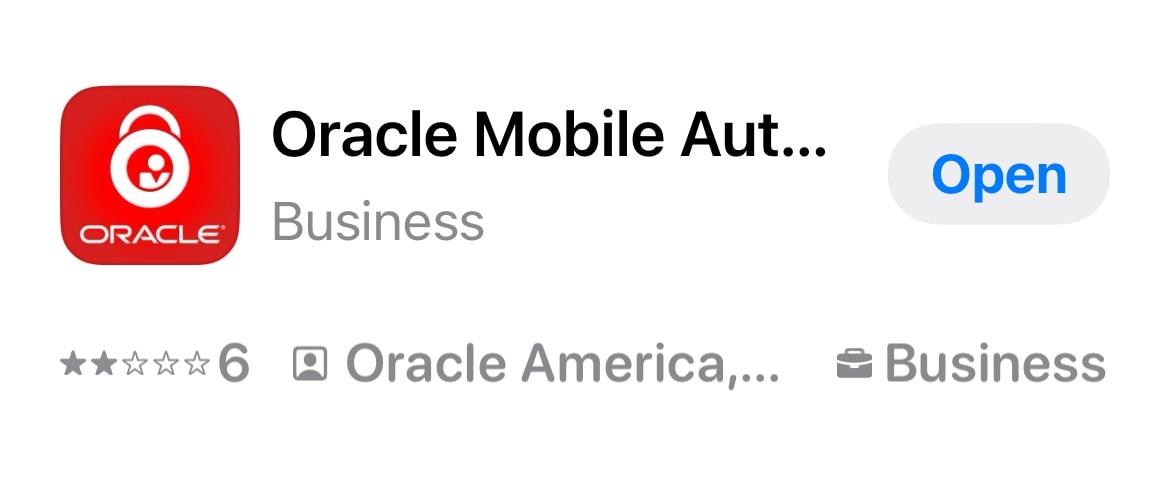
We recommend downloading the Oracle Authenticator mobile device app (Figure 3) rather than the Microsoft Authenticator app, although you can use the Microsoft app if you prefer.
If you are having any issues with this task, please refer to the FAQs section.
Task 3: Completing your pre-onboarding Journey
Once you’ve provided the additional information and you’re within 28 days of your start date, you’ll be asked to complete a set of pre-onboarding tasks known as a ‘Journey’ in our employee system.
To log into the system please use the link provided by email or this link. Your User Name is your personal email address. Your password is the one you have set yourself.
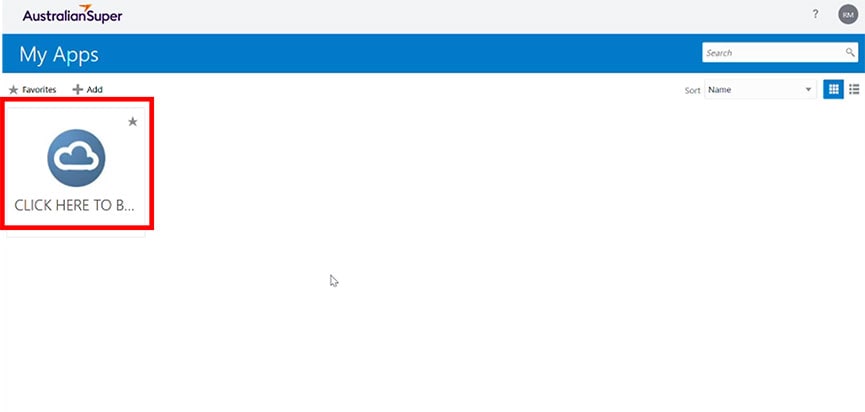
Once you are logged into the system, click on the cloud icon (Figure 5 below) and then click on the Journeys icon.
Your pre- onboarding Journey will be waiting for you (see Figure 6).
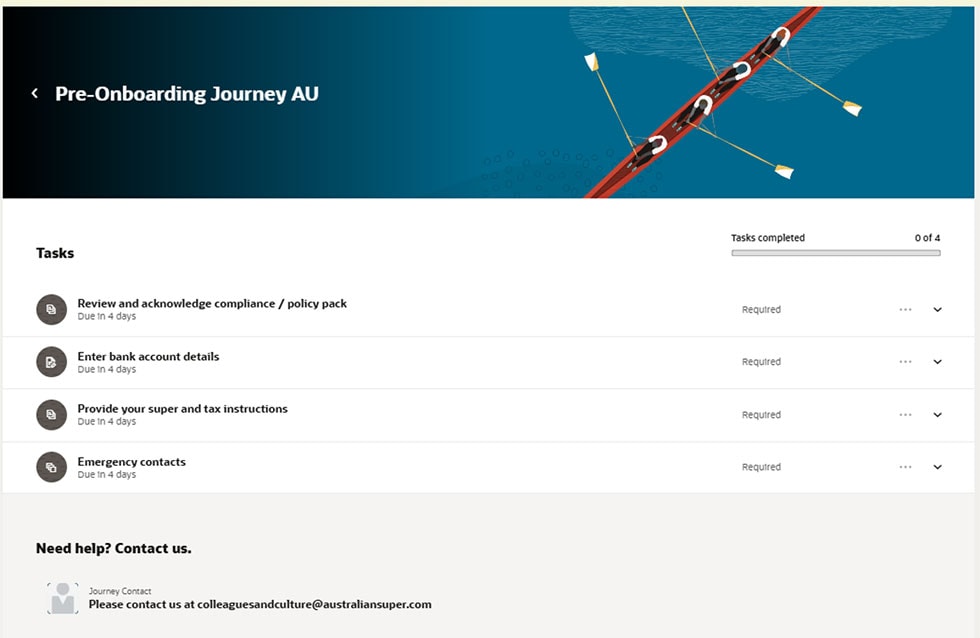
After you complete each task in your journey, please ensure you click Done. Once you’ve clicked Done the relevant task will close and you will not be able to re-open it.
If you are having any issues with this task, please refer to the FAQs section.
Documents and forms
AustralianSuper employee policies and guides (global)
Personal Trading and Switching Policy - pdf, 332 KB
Conflicts Management Policy - pdf, 499 KB
Declaration of Outside Interests Policy - pdf, 195 KB
Star Compliance User Guide - pdf, 326 KB
AustralianSuper documents for Australian colleagues only
AustralianSuper Product Disclosure Statement
AustralianSuper Privacy Policy
Income Protection Guide - pdf, 115 KB
Completing the ATO New Employment Form: Quick Reference Guide - pdf, 490 KB
Super and tax documents for Australian colleagues who cannot use the ATO New Employment Form
Superannuation standard choice form - pdf, 578 KB
How to complete the paper TFN declaration form – payee | Australian Taxation Office
ATO TFN Declaration - pdf, 416 KB
Frequently asked questions
Task 1: Providing more information
-
Should I trust emails coming from an email address similar to ‘ejjl.fa.sender@workflow.email.ap-sydney-1.ocs.oraclecloud.com’?
Yes, this is our system email address. If have any concerns about an email you have arrived, please email Colleagues and Culture at colleaguesandculture@australiansuper.com.
-
Why haven’t I received my request for more information email?
If you’ve accepted the letter of offer in the system, you should have received an email asking you to provide more information within minutes of that. If you haven’t, please check your junk or spam folder. If it’s not there, please email Colleagues and Culture at colleaguesandculture@australiansuper.com. -
What do I do if I don’t yet have my national identifier?
You must have a national identifier to be employed by AustralianSuper.
If you have applied for one but are still waiting for it, you can enter a substitute National Identifier in order to be able to submit the online form.
Please use the following substitute National Identifiers:
- For Australia, enter 111 111 111 as your Tax File Number.
- For the UK, use XX + your date of birth + X. So if I were born on 21 March 1980, I would enter XX210380X.
- For the US, enter 000-00-9999 as your Social Security Number.
-
Do I have to provide the issue date, expiration date and place of issue of my National Identifier?
No, please ignore these fields.
-
Can I select more than one ethnicity?
Apologies, but present, the system cannot accommodate this in Australia and the UK.
-
I can’t select a category for disability
This field is not in use. If you require an accommodation related to a disability please do provide that where indicated.
Task 2: Setting up multi-factor authentication
-
Do I need phone or internet coverage to use the MFA app?
You will need an internet connection to download and set up the app. After that, you can use the app offline – it generates a one-time passcode for authentication even when not online.
-
I can’t seem to configure the app by scanning the QR code. What am I doing wrong?
Please ensure you are scanning the QR code from inside the app.
-
How do I use my mobile device to scan a QR code that’s on my mobile device?
The method varies slightly depending on whether it’s an Android or Apple device but you will need to start by taking a screenshot of the QR code. Detailed instructions are provided in this third-party article.
-
Can I use the Microsoft Authenticator app instead of the Oracle Authenticator app?
Yes, you can. Please:
- Scan the QR code.
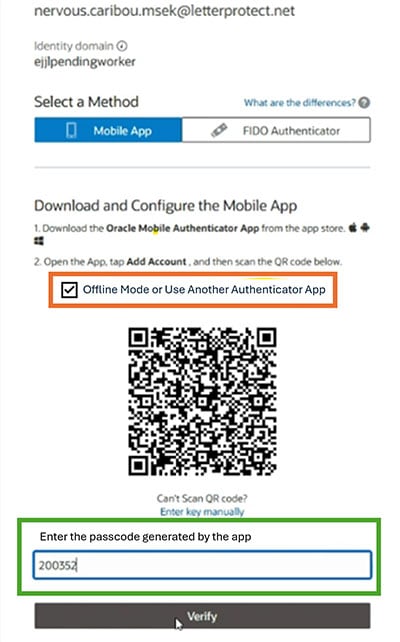
- Tick the box ‘Offline Mode or Use Another Authenticator App’ as shown in the image below (orange box).
- Download the Microsoft Mobile Authenticator App if you don’t already have it.
- Enter the passcode shown in your Microsoft Mobile Authenticator App (green box).
Task 3: Completing your pre-onboarding Journey
-
How do I log into the system once I’ve logged out?
If you want to complete your pre-onboarding journey tasks over multiple sessions, you can log into the employee system using this link. Your User Name is your personal email address.
-
I can’t seem to log in – what should I do?
If you log into the site multiple times, you may encounter issues logging in. We suggest you clear your cookies (in your browsing history) and try again. If that doesn’t work, please contact colleaguesandculture@australiansuper.com.
-
I’ve forgotten my password – what should I do?
If you forget your password, you can request a reset. The system email you will receive looks like the one below.
If you attempt to log in with the wrong password too many times you will be temporarily locked out of the system.
-
Is there a file size limit on uploads?
Yes, please make sure the PDFs you upload are no larger than 1 MB.
-
Why is the system not letting me mark a particular task ‘Done’?
If the task instructions include a link, you must click on the link before you can mark the task ‘Done’.
-
How can I re-open a task I have marked ‘Done’?
You cannot access a task once it’s marked ‘Done’. Please contact colleaguesandculture@australiansuper.com who can do it for you.
-
What is the Employer ABN for the Trustee for AustralianSuper (Australian colleagues only)?
It is 6571 439 4898. If you are completing the ATO New Employment Form, please refer to this Quick Reference Guide which contains all the information you need.
-
What is the USI for AustralianSuper (Australian colleagues only)?
The USI is STA0100AU. If you are completing the ATO New Employment Form, please refer to this Quick Reference Guide which contains all the information you need.
-
I can’t log into myGov to complete my super and tax task (Australian colleagues only). What should I do?
Please submit both these forms via the relevant task:
-
Do I have to declare any outside interests now?
No, you do this once you start at AustralianSuper.
-
Do I have to register my portfolio holdings and seek pre-clearance for any trading before I start (pursuant to the Personal Trading and Switching Policy)?
No, you do this once you start at AustralianSuper.