Welcome to Adviser Resources — your hub for the latest news, FAQs, documents, product information and important updates, tailored to registered financial advisers and support staff.
Back
Next
News
FAQs
All documents
Products
Portal updates
Latest news
Important document updates for Advisers from 1 July 2026
We’re releasing updated PDSs, IBRs1 and guides effective 1 July 2026. As distributors of our products, it’s important that you dispose of all previous versions to ensure your clients receive the most current versions, some of which include join forms. Please begin using the updated documents and join forms from 1 July 2026.
Documents being updated
From 1 July 2026, the following updated documents will be available:
We’ll also be updating all Accumulation PDSs from 1 July 2026. Members will be informed of the changes via a web update factsheet, available at australiansuper.com/pds from 1 July 2026.
1 Incorporation by reference
This article is accurate as at the date of publishing: 25 June 2026.
Improved phone service from 27 April 2026
Our Adviser Services team (AST) is dedicated to helping you with your administrative, product and process queries. To make it easier for advisers and support staff to get the support they need, the AST is now using an upgraded phone service.
New options
When you call the AST, you’ll hear two options:
For advisers and support staff
For members and non-registered advisers.
If you select option 1, you’ll hear our privacy message and a general advice statement, to ensure we meet our compliance obligations. Your call will then be directed to an Adviser Services Manager. For quality assurance and training purposes, both inbound and outbound calls will be recorded – let us know if you don’t want your call to be recorded.
Don’t wait on the line
The AST can receive up to 300 calls per day, so you may not always be able to get through to a manager right away. If you prefer not to wait on the line, you can select our convenient callback service, or you can email us at any time at adviserservices@australiansuper.com
A new number for international callers
There’s no change for Australian callers; however there is a new number for international callers.
Australian callers: 1300 362 453 weekdays from 9am – 5pm AEST/AEDT
We’re confident that our upgraded phone service will deliver a faster, more efficient and consistent service to you. We know your time is valuable, so we want you to spend more of it providing advice and support to your clients who are AustralianSuper members.
This article is accurate as at the date of publishing: 24 April 2026.
EOFY cut off dates for FY26
We’d like to remind you of the end of financial year (EOFY) cut-off dates for processing paperwork and online submissions.
Anything received after these dates may not be included in the FY26 financial year accounting period. AustralianSuper needs to have the funds in its bank account to be considered as received.
Member contributions
Cut-off date for these transfer methods is 25 June 2026
Contribution splits - to be applied to spouse account.
BPAY - Contribution to be submitted by this cut-off date.
Cheque - to be received by this cut-off date. Note that cheques will usually be banked one day after receipt.
Direct debit (online and paper-based requests.) Direct debit requests to be received by this cut-off date.
Employer contributions
Cut-off date for these transfer methods is 25 June 2026
Clearing house payments - Contribution to be submitted by this date. We recommend that employers check with their clearing house provider first to ensure that payments are received by AustralianSuper prior to 30 June.
EFT Payments - Payment to be submitted with employers’ bank by this date. Transfer times need to be factored into any submission.
Applications
Applications should be made by the following dates to ensure they are received and processed - particularly for pension applications that require payments to commence within June. These dates apply to clean applications, i.e. applications that don’t require clarification or follow up.
For applications with outstanding requirements, these must be resolved before the below cut-off dates to ensure they are processed before 30 June.
For pension joins, AustralianSuper must have funds in our bank account to process by the requested payment dates.
Application type
Cut-off date
Accumulation join
25 June 2026
Employer join
25 June 2026
Pension joins
Monthly or yearly pension payment required 26 June, and
Funds transferred from an AustralianSuper accumulation account to create the pension account.
23 June 2026
Monthly or yearly pension payment required 26 June, and
Funds transferred from an external fund to create the pension account.
23 June 2026
Fortnightly pension payment required 25
June, and
Funds transferred from an AustralianSuper accumulation account to create the pension account.
22 June 2026
Fortnightly pension payment required 25 June, and
Funds transferred from an external fund to create the pension account.
22 June 2026
Withdrawals
Withdrawals should be made by the following date to ensure they’re processed before 30 June. This date applies to clean applications, i.e. applications that don’t require clarification or follow up.
For withdrawals with outstanding requirements, these must be resolved before the below cut-off date to ensure they are processed before 30 June.
Cut-off date for these transfer methods is 25 June 2026
Unrestricted cash
Financial hardship
Compassionate grounds
Departing Australia Superannuation Payments (DASP)
Retirement
Transfers out
Transfers out of AustralianSuper should be made before the below cut-off date to ensure the transaction is processed before 30 June. This date applies to clean applications, i.e. applications that don’t require clarification or follow up.
Cut-off date for these transfer methods is 25 June 2026
KiwiSaver
SMSF
eRollover
Paper rollover application
Other transactions
Transactions should be made by the following date to ensure they are processed before 30 June. This date applies to clean applications, i.e. applications that do not require clarification or follow up.
For transactions with outstanding requirements, these must be resolved before the below cut-off date to ensure they are processed in time.
Cut-off date for these requests is 25 June 2026
Member detail updates.
Member Investment Choice switches - Paper based request to be received by this cut-off date.
Notice of intent to claim a tax deduction.
This article is accurate as at the date of publishing: 1 May 2026.
Trusted Device is coming to the Adviser Portal
Following the successful implementation of multi-factor authentication to the Adviser Portal, we’re pleased to announce the introduction of Trusted Device. This enhancement tells us that you’re using a recognised, secure device when logging into the portal. Here are some FAQs to explain this change.
What are the benefits of Trusted Device?
No need to verify your login multiple times per day
Peace of mind knowing that only your trusted devices can access the portal
Receive notifications when you add or remove devices, or when someone logs in from a non-trusted device
Easy to review and remove your trusted devices within the portal
You can have up to three (3) trusted devices per user.
How do I add a Trusted Device?
Adding a Trusted Device is easy. Once it’s available, you’ll log in as normal, enter a six-digit verification code, then be given the option to ‘Trust Device’. After that, you’ll be able to skip the code on that device.
Is Trusted Device secure?
If you select ‘Trust Device’ during login, you won’t need to enter a code every time you sign in from that device. This option is just as secure and helps streamline your login experience. You’ll receive a confirmation email regardless of whether you choose to trust the device or not.
Why do I have to ‘trust a device’ multiple times?
Even if you’ve selected ‘Trust Device’ you might be asked to do it again. This can happen for a few reasons:
If your browser cookies are deleted either manually, through browser settings, or by using private/incognito mode, your device may no longer be recognised
Changing devices, or browsers, or even moving between time zones (yes, even within Australia) can affect trusted device settings
If your internet connection changes frequently, like when using different mobile networks or VPNs it can trigger the trusted device questions again
After 1 year of not logging in to your account, it will automatically reset trusted device settings, or if they detect unusual login activity
Updates to your operating system, browser, or security software can remove the data used to remember your device.
How many trusted devices can I have?
You can register up to three trusted devices per account. This limit helps maintain strong security while allowing flexibility for users who access their account from multiple locations or devices.
What if I reach the maximum number of trusted devices?
If you try to register a fourth device, you’ll be prompted to remove one of your existing trusted devices before proceeding. This ensures your account remains secure and manageable.
Can I manage trusted devices for support staff?
No, for added security only the account holder can manage their own Trusted Devices. However, Advisers can create or link to new support staff. They can also suspend access, remove a link or disable support staff access.
Is trusting a device mandatory?
No, trusting a device is optional. For example, you might be using a different laptop for a day or two, so you may not want to trust that device. So if you prefer, you can continue to receive a code each time you log in to a particular device.
How do I view and remove my trusted devices?
In the Adviser Portal, you’ll have the ability to view and remove your trusted devices at any time.
Log into the portal
Click on your account name in the top right corner
This article is accurate as at the date of publishing: 10 April 2026.
We've mandated multi-factor authentication to the Adviser Portal
To help keep your clients’ accounts secure, AustralianSuper has implemented multi-factor authentication (MFA) to the Adviser Portal as a mandatory security measure.
You’ll now need to enter a one-time code sent to your mobile phone when you log in.
If you're an adviser, Licensee, or support staff who hasn't yet added a mobile number, and now find your Adviser Portal access locked, please follow the instructions below to add a mobile number to your profile.
Our commitment to security
The introduction of MFA is an important step in enhancing the security of our members’ personal information. As a member-owned super fund, protecting our members is a top priority. We’re also aware that MFA can result in users having to verify their login multiple times per day. So we’re working on a new feature to improve the log on experience. Stay tuned for further updates.
How advisers can add a mobile number
To add a mobile number to your Adviser Portal profile, you’ll need to call us on 1300 362 453 weekdays from 9am-5pm (AEST). For privacy and security reasons, we'll need to verify your identity before changing any details.
Please note that we cannot accept email as a method of adding or updating a mobile number.
How to add a mobile number for support staff
Mobile numbers can be added to a support staff account in two ways:
Advisers can add it in the Adviser Portal:
Navigate to 'My account details' and click on the 'Manage Practice' tab. Here you’ll find a list of your support staff and their contact details.
Click 'view' to see your support staff’s profile, then click 'add mobile'.
Add your support staff’s mobile number.
Support staff can call us on 1300 362 453 weekdays from 9am-5pm (AEST). For privacy and security reasons, we'll need to verify their identity before changing any details.
Please note that we cannot accept email as a method of adding or updating a mobile number.
Update a mobile number for support staff
If your support staff need to update their mobile number recorded in the Adviser Portal, there are two options available:
You can call the Adviser Services team and update the mobile number on their behalf. We’ll need to verify your identity before changing any details.
Alternatively, your support staff can call to speak to the Adviser Services team to update their mobile number. For privacy and security reasons, each user must call to update their own mobile number so we can verify their identity.
Our Adviser Services team are available on 1300 362 453 or +61 2 8348 1417 for international callers, weekdays from 9am-5pm (AEST).
Please note that we cannot accept email as a method of updating a mobile number.
Check your recorded mobile number
Log in to the Adviser Portal to check your mobile number.
You can do this by:
Navigating to the top right corner of the Adviser Portal home screen and clicking on the drop-down arrow next to your name.
Select 'My account details' to view your recorded mobile phone number under Contact details.
If your mobile number is correct, you don’t need to do anything.
Update your existing mobile number
If your mobile number is incorrect, please call us on 1300 362 453 weekdays from 9am-5pm (AEST). For privacy and security reasons, we'll need to verify your identity before changing any details.
Please note that we cannot accept email as a method of updating a mobile number.
This article is accurate as at the date of publishing: 26 March 2026.
Important document updates for Advisers from 30 May 2026
We’re releasing updated PDSs, IBRs1 and guides effective 30 May 2026. As distributors of our products, it’s important that you dispose of all previous versions to ensure your clients receive the most current versions, some of which include join forms. Please begin using the updated documents and join forms from 30 May 2026.
Documents being updated
From 30 May 2026, the following updated documents will be available:
A choice member is someone who actively chooses AustralianSuper as their
default fund
A deemed member is someone who joins AustralianSuper by default through their employer
This article is accurate as at the date of publishing: 29 April 2026.
Clearer advice fee labels across member and adviser reporting
From 1 July 2026, we’re improving how advice fees are described across our digital and paper reporting to make it clearer for members and easier for advisers to reconcile and explain.
What is changing
The current catch-all transaction label “Advice fee” will be replaced with three specific transaction labels that match the existing Paying an advice fee form:
One-off advice fee,
Fixed-term advice fee, and
Ongoing advice fee.
These labels will display in the Member App, Member Portal, and the Adviser Portal. They’ll also show in exit and annual statements1 – as well as other ad hoc transaction reporting.
1. If the advice fees are being deducted from your client’s Member Direct Cash account, the three specific advice fee labels will appear in the Member Direct Portal. However, in their exit and annual statements, the three specific advice fees will continue to be shown collectively under “Advice fees”.
Benefits of the change
For advisers and support staff, the change provides clearer transaction visibility, faster matching to the correct fee authority, and simpler client conversations.
For your clients who are AustralianSuper members, the improved descriptions help them better understand the nature and frequency of any deductions from their super, reducing confusion and supporting transparency.
To set up Adviser Portal access, scroll to the top of this page and select the dropdown option from the ‘Login’ button.
And remember, if your client needs support during the application process (e.g. they didn’t receive a one-time-password for verification) we’ll communicate with both you and your client, to make it easy for you to provide them with assistance.
This article is accurate as at the date of publishing: 29 January 2026
We’re updating the Member Direct investment menu - effective 1 April 2026
AustralianSuper reviews the Member Direct investment menu annually to ensure we offer a range of suitable investments. As a result of a recent review, we’re adding 6 new ETFs, re-opening 2 ETFs that are currently closed, and closing 1 LIC. These updates will be effective from 1 April 2026.
These new ETFs are being added to the menu
ASX Code
ETF Name
Category/Channel
Investment Limit
AQLT
Betashares Australian Quality ETF
Australian Shares
No Limit
DACE
Dimensional Australian Core Equity Trust - Active ETF
Australian Shares
50%
DHHF
Betashares Diversified All Growth ETF
Diversified
No Limit
FSML
Firetrail Australian Small Companies Fund – Active ETF
Australian Shares
50%
PGA1
Plato Global Alpha Fund Complex ETF
International Shares - Developed Markets (Global)
50%
URNM
Betashares Global Uranium ETF
International Shares - Developed Markets (Region/Sector)
25%
These closed ETFs are re-opening and will be added to the menu
ASX Code
ETF Name
Category/Channel
Investment Limit
DJRE
SPDR Dow Jones Global Real Estate ESG Tilted ETF
Property & Infrastructure
50%
IOO
iShares Global 100 ETF
International Shares - Developed Markets (Region/Sector)
This article is accurate as at the date of publishing: 18 March 2026.
Important updates to the Member Direct investment option
From 28 March 2026, there will be several important updates to the Member Direct (MD) investment option.
If your clients have this option, they’ll be informed that we’re
changing the research provider from UBS Securities Australia Limited (‘UBS’) to Morningstar Australasia Pty Ltd (‘Morningstar’) to expand research coverage of ASX listed securities
reducing Portfolio administration fees for ‘Term Deposits’ and ‘Shares, ETFs & LICs’ levels of access
reducing Brokerage fees when buying and selling shares, ETFs or LICs
enhancing the cash transfer process to allow members, and their advisers, to specify dollar amounts to be transferred into or out of AustralianSuper’s other investment options when actioning a cash transfer from or to the MD Cash account
specifying the order in which we’ll action the early redemption of Term Deposits when we dispose of or rebalance their MD investments
updating the Terms and Conditions for using the AustralianSuper Member Direct online platform.
What this means for your clients with MD
MD online platform
You or your clients won’t be able to access the MD online platform between 11pm AEDT on Friday 27 March 2026 and 1pm AEDT on Saturday 28 March 2026 while we update the system.
We encourage members to log in once the system is back online to familiarise themselves with the changes, including reading all explanatory notes and disclaimers.
Re-submission of orders
To help us manage the change, any remaining open orders as at 11pm AEDT on Friday 27 March 2026 will be cancelled. This includes open or unfilled 30-day limit orders, and open part-filled at market orders.
Accordingly, members will be advised not to set up any limit orders after market close (4pm AEDT) on Friday 27 March 2026 as these will be automatically cancelled at 11pm AEDT. If required, they can set up new limit order requests once the platform is back online on Saturday 28 March 2026.
Fee changes
If members have selected the Cash Account level of access their fees won’t change. In all other cases, their Portfolio administration fee and any Brokerage fees will reduce from Saturday 28 March 2026.
What advisers need to do
When you first access the MD online platform from 28 March 2026, you’ll need to read and accept the updated Terms and Conditions for using the AustralianSuper Member Direct online platform available on our Member Direct page.
MD investment menu on, or around 1 April 2026 with additions and deletions as part of the annual review,
TTR Income PDS, as the associated join form is being refreshed and the Binding death nomination form is being updated.
As distributors of our products, it’s important that you:
dispose of all previous versions of the documents mentioned above (including any join forms) to ensure your clients receive the most current versions, and
use the updated documents (including any join forms) from 28 March 2026.
What your clients with MD need to do
When your clients first access the MD online platform from 28 March 2026, they’ll need to read and accept the updated Terms and Conditions for using the AustralianSuper Member Direct online platform, available on our Member Direct page.
If they wish to change their level of access to take advantage of the reduced fees, they can log into MD and make the change in their account settings once the platform is back online on Saturday 28 March 2026.
If your client is not comfortable with the changes and they wish to cancel their MD account, they can log into MD and make the change in their account settings before 4pm AEDT on Friday 27 March 2026.
This article is accurate as at the date of publishing: 16 February 2026.
Changes to insurance costs from 30 May 2026
On 30 May 2026, the cost of insurance cover1 is increasing2 for AustralianSuper members in the AustralianSuper plan, Super Options and the Personal Plan. This means that some of your clients may be impacted.
Why is the cost of insurance increasing
Every year we review the insurance we offer and what it costs. As part of the review, the cost of members’ insurance cover may change - increase or decrease3. This year the increases are due to a rise in Death, Total & Permanent Disablement (TPD) and Income Protection claims paid over the past year.
AustralianSuper is a profit-for-member super fund, so members only pay for what it costs to provide their insurance.
What are the average increases to weekly insurance costs
Cover
Average % increase
Death
20%
TPD
40%
Income Protection with a 60-day or a 30-day waiting period
Benefit payment period up to two years
38%
Benefit payment period up to five years
9%
Benefit payment period up to age 65
No change
You’ll also find a summary of the new costs on pages 2 to 4 of the Significant Event Notice (SEN) titled Important changes to insurance costs that we’re sending to members.
What if my client doesn’t have insurance cover
If they don’t currently have cover4, they don’t pay for it. But we still need to tell them about the new costs. That’s because their basic cover may start in the future (if they become eligible), or they could be thinking about applying for cover or transferring cover from another super fund or insurer.
How can my client check their insurance cover
Before they make any decisions about their insurance or super, they can check their cover by using the AustralianSuper app or logging into their account and going to Insurance, then Manage insurance.
How can my client calculate their costs
To calculate their new weekly costs, your client can use our Insurance calculator. It compares the cost of cover before, and from 30 May 2026. They can also calculate them manually at australiansuper.com/InsuranceCosts
Where do I get more information
Please refer to the SEN which includes a summary of the new costs for Death, TPD and Income Protection cover.
There is also information about work rating and a link to the work rating tool.
Your client can refer to page 6 of the SEN for help and access to advice about insurance including links to forms, calculators, guides and contact details
Disclaimers
AustralianSuper insurance is provided by TAL Life Limited (the Insurer) ABN 70 050 109 450, AFSL 237848.
The cost of cover is increasing for all cover types except Income Protection with a benefit payment period up to age 65 (which isn’t changing).
From 27 May 2022 to 29 May 2026, overall insurance costs decreased between 17% to 37% for eligible AustralianSuper plan and Super Options members who received basic age-based cover. Eligible AustralianSuper plan and Super Options members receive basic age-based Death and TPD cover. Eligible AustralianSuper plan members also receive basic Income Protection with a benefit payment period up to two years and a 60-day waiting period.
If your client doesn’t know whether they have cover or not, they can use the AustralianSuper app or log into their account to find out.
This article is accurate as at the date of publishing: 24 March 2026
Earnings tax increase for super balances over $3m
From 1 July 2026, a significant change to the taxation of large superannuation balances will come into effect with the introduction of Division 296 – Better Targeted Super Concessions. Transitional arrangements will apply for the 2026-27 financial year.
Who is affected?
The measure is designed to reduce tax concessions on very large super balances, while leaving the existing framework unchanged for the vast majority of Australians. This change will affect around 80,000 to 90,000 Australians, or roughly 1 in 200 people with super1.
Under Division 296, individuals with a total superannuation balance above $3 million will be subject to additional tax on the realised investment earnings attributable to the portion of their balance above that threshold.
For the portion of their balance greater than $3 million and up to $10 million, an additional 15% tax will apply to the attributable earnings.
For the portion of the balance above $10 million, a further 10% may apply to the attributable earnings.
Importantly, the tax is applied to the individual, not within the super fund and is assessed annually by the ATO. While the tax is personal, AustralianSuper members can elect to release funds from their AustralianSuper accounts to pay the liability.
Considerations for advisers
For financial advisers, Division 296 introduces new considerations when supporting high balance clients, including monitoring total super balances across multiple funds, managing the timing of realised earnings, and reviewing long term contribution and retirement strategies.
Advisers working with AustralianSuper members may also see increased demand for guidance on balance aggregation, developing and implementing transition year strategies, cash flow impacts and retirement planning decisions, as affected clients adjust to the new rules.
As 1 July 2026 approaches, early awareness and proactive conversations will be key to helping impacted members navigate the change with confidence.
This article is accurate as at the date of publishing: 15 April 2026.
Important changes for Advisers from 23 October 2025
We’re releasing new Choice Income and Transition to Retirement (TTR) Income Product Disclosure Statements (PDSs), join forms, Target Market Determinations (TMDs) and Investment Guide effective 23 October 2025.
Updated PDS documents, join forms and TMDs
As distributors of our products, it’s important that you:
dispose of all previous versions of our Choice Income and TTR Income PDSs (including the join forms) and our TMDs to ensure your clients receive the most current versions,
use the updated PDS documents (including the join forms) and the updated TMDs from 23 October 2025.
In July 2025, the SuperRatings benchmarks used in the investment objectives of some PreMixed investment options, to compare performance to other funds, were changed. The change removed the number of providers in each benchmark, e.g. ‘50’ was removed from the SR50 Balanced (60-76) Index.
Investment option
Super and TTR
From
To
Stable
SR50 Capital Stable (20–40) Index
SR Capital Stable (20–40) Index
Conservative Balanced
SR25 Conservative Balanced (41–59) Index
SR Conservative Balanced (41–59) Index
Balanced
SR50 Balanced (60-76) Index
SR Balanced (60-76) Index
High Growth
SR50 Growth (77–90) Index
SR Growth (77–90) Index
Choice Income
From
To
Stable
SRP50 Capital Stable (20–40) Index
SRP Capital Stable (20–40) Index
Conservative Balanced
SRP25 Conservative Balanced (41–59) Index
SRP Conservative Balanced (41–59) Index
Balanced
SRP50 Balanced (60-76) Index
SRP Balanced (60-76) Index
High Growth
SRP50 Growth (77–90) Index
SRP Growth (77–90) Index
This article is accurate as at the date of publishing: 23 October 2025
Support staff can now create super accounts online
Previously, we announced that advisers and public trustee officers (PTOs) can open super (accumulation) accounts for their clients directly in the Adviser Portal.
To make things even easier for advisers, we’ve enhanced the portal to allow adviser support staff to pre-fill new account applications using their own login details.
More information
Main benefits
Saves time for advisers who delegate this task to their support staff.
More secure than sharing login details with others.
Will help to open super accounts faster for clients.
How does it work?
When creating an application, the support staff will select the adviser/PTO who will review and approve (or reject) the application.
On the last page of the application, the option to ‘submit’ is replaced with ‘send for review’. The application will be sent to the selected adviser/PTO to review and approve (or reject).
Help and support
To learn more about the Adviser Portal and support staff access, please read the FAQs on our Adviser Resources page. And if you need further help, please refer to the related article, “Open super accounts online” or contact us.
Important notice about Annual Statements
AustralianSuper will send annual statements to members from September 2025. Advisers should be aware that while the closing balance shown on these statements is correct, it may not match the closing balance members see in the member portal and app.
This is due to a known issue, and AustralianSuper is actively working on a fix. We’re also adding messages to both the member portal and app to alert members about this discrepancy.
If you receive any enquiries from your clients, please explain the situation and reassure them that AustralianSuper is resolving the issue. Then direct them to refer to their annual statement to see the correct closing balance.
This article is accurate as at the date of publishing: 11 September 2025.
Important changes for Advisers effective 1 August 2025
We're releasing new Accumulation, Choice Income and Transition to Retirement (TTR) Product Disclosure Statements (PDS) effective 1 August 2025.
Updated PDS documents and join forms
As distributors of our products, it’s important that you dispose of all previous versions of our PDSs to ensure your clients receive the most current PDS and join form. Please begin using the updated join forms included in the new PDS.
Fees and costs
The confirmed fees and investment costs have been included in the August 1 Accumulation, TTR and Choice Income PDSs, and are also available on our website.
Changes to our Socially Aware option
AustralianSuper has recently reviewed the investment exclusions (or ‘screens’) that apply to the Socially Aware investment option to better meet member expectations, specifically in relation to the areas of concern subject to screening, and to ensure as far as practical that screens apply to all assets held by the option.
Effective from 1 August 2025, the review has resulted in changes to the strategic asset allocation, investment objectives, risk levels and screens that apply.
For full details of the Socially Aware investment option, including updated details on the implementation and monitoring of screens, refer to:
Notice of Intent (NOI) and rollover/withdrawal timing - Best practice
To support smooth processing and protect your client’s ability to claim a tax deduction, check the Adviser Portal to confirm the client’s NOI has been processed, before submitting any rollover or withdrawal requests.
This approach ensures contributions are eligible for deduction and avoids delays or unintended tax outcomes.
To find this information, go to your client’s ‘Transactions’ screen on the portal. By choosing the financial year, the description of the transaction will display as ‘Notice of Intention (NOI) tax deduction’ – see below for example:
Insurance enhancements through TAL Connect
As part of our ongoing commitment to improving member experience, we’ve introduced more efficient and user-friendly ways to lodge insurance claims and underwriting applications through our insurance provider TAL Life Limited.
Online claims
Members can now lodge claims for Total & Permanent Disablement (TPD), Income Protection or terminal illness through the AustralianSuper Member Portal, Member App, or by speaking with a TAL claims consultant via tele-claim.
These options provide numerous benefits, including:
Reduced waiting time for claim forms via mail
Intuitive forms based on member claim type and condition, and
Direct claim lodgement to the TAL claim team.
Members can also complete a greenID check in TAL Connect for Income Protection payments. For TPD and terminal illness, additional ID checks will be required.
Paper-based claims remain available and are required for Third Party Authorities (TPAs) and restricted members.
Start your basic cover - new
New members can now apply online to start their basic cover before they turn 25 and their super balance reaches $6,000 (age limits and eligibility conditions apply). Members can continue to submit paper Start your basic cover application forms included in their Welcome pack.
Life events
Eligible members can apply for new or additional cover following certain life events, if their insurance needs have changed. Members now have 120 days to apply. A child starting primary school and a child starting secondary school have been added as life events.
Salary increase
Eligible members now have 90 days to apply for an increase to their Income Protection cover amount following a salary increase. Evidence requirements have also been simplified.
Transfer of cover
Eligible members can transfer their existing insurance cover from another super fund to AustralianSuper - up to $2m for Death and TPD, and $20,000 a month for Income Protection (subject to maximum cover limits). We can now also match long-term Income Protection benefit payment periods (certain occupations can’t have a long-term benefit payment period).
For more information about any of these insurance changes, download the Insurance in your super guide.
AustralianSuper insurance is provided by TAL Life Limited (the Insurer) ABN 70 050 109 450, AFSL 237848.
Uploading forms in the Adviser Portal
You can now upload all your forms directly through the Adviser Portal. If you haven’t already, we encourage you to start using the 'Upload forms' page in the portal for all form and client request submissions. It’s a quicker and more efficient way to get things processed.
Open super accounts online
Advisers and public trustee officers can now open super accounts for their clients directly in the Adviser Portal.
Simply select ‘Create a new account > Superannuation’ from the main dashboard page and follow the on-screen prompts.
Once submitted online, the account will automatically be set up. There are no identity verification requirements for super accounts, so this doesn’t apply for the online process like it does for our Choice Income or Transition to Retirement products.
Please note, the process requires downloading a prefilled application form. This doesn’t need to be submitted to AustralianSuper however you’ll need to obtain the client’s signature and keep the signed form on file. Like our other application forms, you may be asked to produce this in future and are expected to do so within five business days.
We’re planning to extend this enhancement to authorised support staff in the future.
Choice Income online join via Adviser Portal
There are a few ways to submit a Choice Income application to Adviser Services. The fastest way to open an account is online via the Adviser Portal.
Online forms will only proceed with all the required information, reducing the need for unnecessary re-work.
Applications are received quicker, so they’re processed promptly by our admin team.
Any issues with Electronic ID are identified at lodgement stage and if certified ID is required, this can be sent directly with the application to Adviser Services to avoid delay.
If you need help with lodging an online application, please contact our Adviser Services team.
Submitting third party authorities
To ensure a smooth process when submitting your own third-party authority form to AustralianSuper, please follow these guidelines:
Adviser’s email: include email address of the adviser requesting authorisation.
Support staff authorisation: if you’d like your team to assist with client matters, please include a line on your form authorising ‘all support staff’.
Once completed, we’ll be in touch with next steps.
Please note: Currently, only advisers licensed by a licensee who are registered with AustralianSuper are eligible to register and deduct advice fees. If your licensee is not yet registered, please see our Super for financial advisers page for further information or get in touch with us at adviserenquiries@australiansuper.com
Who do I contact if I have any questions about becoming a registered adviser?
Our team will review your completed registration form and get in touch with the next steps.
Please note: if you’re transferring to a non-registered licensee, you’ll still be able to access your client details via the Adviser Portal (if they haven’t opted out) but you’ll no longer be able to deduct advice fees from AustralianSuper.
Working with us
Starting out
How do I get in touch if I have questions about AustralianSuper?
Registered advisers with AustralianSuper can email or call our dedicated Adviser Services team:
Our Adviser Distribution team are Fund and Product experts, dedicated to developing and maintaining strong, long-term relationships with external licensees and financial advisers. The team make regular visits to licensees throughout the year and will work with you to ensure you have the right information, tools and support.
How do I get listed on the AustralianSuper ‘Find an Adviser’ web page and start receiving advice referrals?
AustralianSuper have a limited number of registered financial advisers who may be eligible to receive referrals. Your Adviser Partnership Manager will contact you to discuss this further when there is adequate demand in your region and you have met the eligibility criteria.
Superannuation Product Identification Number
(SPIN): STA0002AU
Do I need to provide original documentation?
The only time we require original documentation is when you’re submitting:
Guardianship order; or other Certified documents.
All other AustralianSuper forms can be scanned and emailed to us. You can find a full list of forms accepted by email on our Guide to submitting forms page.
Yes. We accept digital signatures on most of our forms. There are a few exceptions; binding death nominations, guardianship, power of attorney and certified documents. You can find further information on our Guide to submitting forms page.
When do I need to provide certified ID? What are the certification requirements?
Take a look at our Guide to providing proof of your identity fact sheet for information on when certified ID is needed, and what other certification requirements are needed.
If you’re certifying the ID in your role as financial adviser, the certification must:
Be easy to read
Include the adviser’s full name and occupation e.g. financial adviser
Include the adviser’s ASIC Authorised Representative or AFSL number
Be signed by the adviser
Show the date of certification which must be within the last 6 months.
What are the expected time frames for processing paperwork?
All correctly completed forms are generally processed within 7 -10 business days from receiving your email.
For Advice Fee requests, please refer to the Advice Fee Payment Schedule in our FAQs for timeframes.
If we’re operating outside of this time frame due to high volumes, we’ll notify you via auto-reply emails and other methods of communication if needed.
The easiest way to check for the completion of your requests is by logging into the Adviser Portal.
Client account
How can I set up an account for my client?
You can open an Accumulation, Choice Income or TTR Income account on behalf of your client using online join form in the Adviser Portal, or by completing the join form included in our Product Disclosure Statements (PDSs).
The online join form for accumulation accounts is intended for members who don’t currently have an AustralianSuper accumulation account. If your client already has one, you’ll need to fill out two forms on their behalf:
Please scan these completed forms and upload them to the Adviser Portal, ensuring the file size does not exceed 3MB per file.
Why does my client have two numbers, and which one do I use?
You may be aware that our members have two unique numbers used to identify them:
A member number
An account number. The account number should always be used on all forms.
How do I access my client’s AustralianSuper account information?
Your client can sign a form to Give access to their financial adviser or you can use your own third-party authority form, if it clearly identifies both the member and adviser. Please note it is mandatory to include the Licensee AFSL number if you’re using your own form. You then submit either form to us via email and within 5 business days, you’ll have access to your client’s account information.
The easiest way to access member account details is by logging in to the Adviser Portal. If you haven’t yet registered for the Adviser Portal, please register or get in touch at adviserenquiries@australiansuper.com.
Does my authority and Adviser Portal access to my client’s account details expire?
All third-party authorities are valid for a maximum of 10 years from commencement. You can always submit a new authority to access information signed by your client at any time.
How does my client register for online access to their account?
Once their AustralianSuper account is active, members can register for online access to their account by visiting australiansuper.com/register All they need is their AustralianSuper member number (Customer reference number (CRN) for Choice and TTR Income account members) and email address.
Members will be able to check their account balance and withdrawals, manage their investments and insurance cover (if applicable), and make and/or change beneficiary nomination(s).
Registering is easy and should only take a few minutes.
Downloading the AustralianSuper app
Once a member has set up their account online, they can download the AustralianSuper app; a free and easy way to access and manage their account on mobile or tablet device.
Members will be able to use the same login as the one created for their AustralianSuper account online the first time they access the app. They can then create a four-digit pin for all future logins to the app.
If there’s a valid binding nomination on the account (for the deceased’s spouse), do I still need a No intent to apply for a death payment form from the adult children of the deceased?
If a client passes away, and their spouse has submitted a death claim, the Trustee (AustralianSuper) is obliged to assess the Binding Death Benefit Nomination (BDBN) form submitted by the member to determine whether the BDBN is valid as at the date the member passed away.
This includes any issues of the member’s capacity to make the BDBN and a determination as to whether the person nominated is a ‘dependant’ under the law. Therefore, we’re required to conduct enquiries about the member and their circumstances.
A No intent to apply for a death payment form doesn’t need to be completed by the deceased member’s adult children, but if the completed form is provided to us, it will assist with our enquiries.
Also, we still have duties (as a Trustee) to notify all potential claimants of our intention to distribute a benefit in a certain way. A 28-day letter, with the opportunity to object to us, and then onto an external dispute resolution body (AFCA) is required under the Corporations Act s1056.
If we don’t do this, and the fund pays a benefit to a beneficiary (under a binding nomination) that’s proven to be invalid, AustralianSuper may have to pay the benefit twice.
How should Power of Attorney (POA) documents be prepared and submitted?
To ensure timely processing, please be advised that POA documents should:
be in writing and be made by a person aged 18 years or over who can understand the nature of a POA
be scanned certified copies.
be certified on the first and last pages and initialled on all other pages, at a minimum. Note: If all POA pages are certified, this is also acceptable.
include the original certified identification for the nominated POA. AML/CTF legislation prevents us from acting on any instruction from an attorney until this is received. Acceptable forms of photo ID are driver’s licence or a passport.
include at least 3 client identification points such as client’s full name, date of birth, member number and address, for security reasons. Alternatively, a cover letter accompanying the POA document dated and signed by the nominated attorney, adviser (with third party authority) or the client containing 3 points of member identification is acceptable.
be emailed to adviserservices@australiansuper.com. Remember to also attach a copy of the documents (including the cover letter, if used) for our reference.
Are amendments allowed to an already completed Binding nomination form?
No, if any changes, amendments or corrections need to be made to a form, then a new form is required. The member cannot initial changes on an existing form, and the same form cannot be submitted.
Contributions
How does my client contribute to their AustralianSuper account?
Personal contributions can be made to your client’s AustralianSuper account via BPAY, Cheque, Direct Debit or EFT.
BPAY1 – is the fastest way for a personal contribution to be made to AustralianSuper. BPAY payment details are unique to each member and can be found on their member profile on the Adviser Portal, the member’s online AustralianSuper account, or can be requested via the Adviser Services team.
Cheque – A cheque made payable to AustralianSuper can be mailed to us.
BSB: 083-355 Account: 674065855 Bank: National Australia Bank Reference: Account Number Account name: Pacific Custodians P/L ATF AustralianSuper
EFT must only be made once a member’s account is open. Once payment has been made, the Adviser Services team must be advised by email at adviserservices@australiansuper.com to have the payment allocated. If the Adviser Services team is not advised, the payment may not be allocated and could be refunded back to the member.
1. ® Registered to BPAY Pty Ltd ABN 69 079 137 518
How does my client make a Downsizer contribution?
Acceptable forms of payment for a Downsizer contribution are:
EFT payment to:
BSB number: 083-355 Account number: 674065855 Account name: Pacific Custodians P/L ATF AustralianSuper Bank: National Australia Bank Reference: Your AustralianSuper Member Number_First Name_Last Name
EFT must only be made once a member’s account is open. Once payment has been made, the Adviser Services team must be advised by email at adviserservices@australiansuper.com to have the payment allocated. If the Adviser Services team is not advised, the payment may not be allocated and could be refunded back to the member.
Cheque – made payable to AustralianSuper can be mailed to us.
When the Downsizer contribution is received via EFT or cheque, a completed ATO Downsizer contribution into superannuation form must also be received for the Downsizer contribution to be allocated. The signed and dated ATO form must be received by the fund either before, or at the same time, the fund receives the contribution.
If you make multiple contributions to the fund, you must provide a Downsizer contribution into superannuation form for each contribution, remembering the total of your contributions must not exceed $300,000.
Please visit ato.gov.au to download a copy of the ATO Downsizer contribution into superannuation form.
How does my client make a Capital Gains Tax (CGT) Election Payment?
Acceptable forms of payment for a CGT contribution are:
Cheque – made payable to AustralianSuper can be mailed to us.
EFT payment to:
Account name: Pacific Custodians P/L ATF AustralianSuper BSB: 083-355 Account number: 674065855 Bank: National Australia Bank Reference: Account Number
Email the Adviser Services team with the attached form to have the payment allocated.
Please note we must receive the signed and dated ATO form before, or at the same time, that we receive the contribution.
If the above steps are not completed, the payment may not be allocated and could be refunded.
How do I complete a recontribution strategy for my client at AustralianSuper?
A recontribution strategy can be completed by withdrawing a lump sum from any combination of AustralianSuper accumulation, TTR Income or Choice Income account(s). Your client will need an AustralianSuper accumulation account to receive the contribution.
Follow the steps below to complete a recontribution strategy.
Your client has an accumulation account: Recontribution can be made to the existing account.
Your client does NOT have an accumulation account OR Your client has an accumulation account but wants to keep the tax-free component segregated: Your client will need to open a new/additional Personal Plan accumulation account.
Read the PDS before applying for a new AustralianSuper Choice Income account. Your client can then request to transfer whole or partial balance of the accumulation account to the Choice Income account.
SMSF
How does my client roll in to AustralianSuper from their Self-Managed Super Fund (SMSF)?
To rollover their SMSF super balance into their AustralianSuper account, clients can complete the Combine your super form at australiansuper.com/forms
They will need to provide us with the following details for AustralianSuper to request the transfer of super:
SMSF name and ABN
Active SMSF Electronic Service Address (ESA)
Obtaining an Electronic Service Address (ESA)
If the client needs an ESA, they can obtain this from:
their SMSF Administrator, tax agent, accountant or bank; or
a dedicated SMSF messaging provider – go to ato.gov.au/esa for registered providers.
How does my client roll out from AustralianSuper to their Self-Managed Super Fund (SMSF)?
To rollover their AustralianSuper account balance to their SMSF, clients can complete the Apply for a Payment form at australiansuper.com/adviserresources
They will need to provide us with the following details:
SMSF name, ABN and bank account details
Active SMSF Electronic Service Address (ESA)
Certified copy of a SMSF bank document that clearly displays the SMSF account name, BSB and account number (current document issued within last 12 months)
Obtaining an Electronic Service Address (ESA)
If the client needs an ESA, they can obtain this from:
their SMSF Administrator, tax agent, accountant or bank; or
a dedicated SMSF messaging provider – go to ato.gov.au/esa for registered providers.
Our products
General info
Where can I find AustralianSuper’s product TMDs and learn more about adviser Design and Distribution Obligations (DDO) responsibilities?
A Target Market Determination (TMD) describes the target market for a financial product and relevant conditions in relation to the distribution of the product to consumers. It also includes the events or circumstances where we may need to review our products and the TMD. You can view AustralianSuper’s TMDs here.
TMDs are a requirement of the Treasury Laws Amendment (Design and Distribution Obligations and Product Intervention Powers) Act 2019. Read the FAQs to learn about superannuation product design and distribution obligations (DDO) for financial advisers.
What’s the difference between Personal, Industry and other accumulation product divisions at AustralianSuper?
If you’re setting up a new member to join AustralianSuper, we have a range of accumulation divisions tailored for different individuals, employers and employment arrangements. Below provides a brief description of the main divisions:
Personal
Plan (no default insurance) – this division is for members who do not
require default insurance, or are self-employed as sole traders, or as a
partner in a partnership, or who aren’t currently in paid employment, or who
are retired or who won’t be receiving regular Super Guarantee (SG)
contributions.
AustralianSuper plan (Industry division with default insurance) – this is our largest
division and is open to members in full-time, part-time or casual
employment within any industry, who receive regular SG contributions, and
require default insurance (insurance is activated by and dependant on
receiving SG contributions).
For further details on our accumulation product divisions, download the relevant PDS under the All documents tab on this site.
Note: If you join up a member to the Industry division (AustralianSuper plan), default insurance is provided automatically once they’re eligible. They’re eligible once they’re 25 or older; and have a super balance of $6,000; and receive an employer super contribution after they meet both age and balance requirements (other conditions apply). They will also need to ensure they have enough money in their super account to cover the cost of insurance. If your client does NOT want default insurance, you should consider the Personal Plan. Please read the PDS for further details on each division.
How do crediting rates and investment returns work?
We calculate the investment performance of your clients’ investment options every business day. We do this through crediting rates, published on our public site.
Crediting rates change based on movements in investment markets and can increase your client’s account balance if positive, or reduce if negative. Their balance is likely to change most days based on these movements and any transactions on your account.
Crediting rates are net of fees and tax, so they’re shown after all fees and taxes related to managing the investment portfolio have been taken out.
To learn more on how these rates are published, when they’re applied and how they’re calculated, you can view on our crediting rates page.
What is your insurance cover design?
The default insurance cover design depends on the division your client joins. Please note that default insurance is not available in the Personal Plan. Default insurance cover available in AustralianSuper Select may differ due to tailored employer-sponsored insurance arrangements.
Eligible members receive a basic level of age-based cover without having to provide any health information. They’re eligible once they’re 25 or older; and they have a super balance of $6,000; and they’re receiving employer super contributions (age limits and other conditions apply). If your client is younger than 25, they’ll have to apply for cover.
Income Protection is available from age 15 to age 69, and your client can choose between age-based or fixed cover. Default Income Protection isn't available in Super Options, but your client can apply for it anytime.
Death cover is available from age 15 to age 69, and Total & Permanent Disablement (TPD) from age 15 to 64. For Death and TPD cover, your client can choose between age-based, age-based plus extra (fixed) cover or just fixed cover. If your client has Death or TPD cover with AustralianSuper they may be able to claim a benefit for terminal illness.
Generally, the cost of cover increases as the member gets older. Insurance premiums are quoted on a weekly rate and are deducted monthly from the member’s super account. For further details on our insurance, please read the relevant PDS and Insurance Guide available under the All documents tab on this site.
How do I access term deposits for my client?
Term deposits are available only via Member Direct. If you require term deposits for your client, they’ll need to register for a Member Direct account. Please see the steps above to register for a Member Direct account and refer to the Member Direct Guide for further details.
Does AustralianSuper publish its PreMixed option asset allocation by weight?
Yes, we publish the asset allocation for each Premixed investment option every quarter1. This also includes:
1 Data is published approximately 45 days after the end of each quarter. This ensures the protection of members’ interests by avoiding the disclosure of our investment strategy in a manner that could negatively impact members’ returns.
Retirement
What are your retirement income products at AustralianSuper?
If you’re setting up a client to join AustralianSuper, and who’s transitioning to either part or full retirement, they have two choices for an income stream:
Choice Income account – for clients retiring and wanting to draw an income from their savings in a tax-effective environment.
Transition to Retirement (TTR) Income account – for clients not yet retired and looking to supplement their income by drawing on their super savings.
Note: Generally, your client will need a $10,000 minimum balance for a Choice Income account and $10,000 minimum for a TTR account. However, where their advice strategy requires a lower starting balance, we may be able to arrange an exception for you. If this is the case, please get in touch to discuss.
For further details on our retirement product divisions, download the relevant PDS under the All documents tab on this site.
How do I roll a pension over from another fund to AustralianSuper? Do I need to open a super account first or can the pension be rolled over directly to an AustralianSuper Choice Income account?
Unless your client is adding money from outside super (for example, making a non-concessional contribution), then you can roll their external pension directly to a new AustralianSuper Choice Income account. Join the new member using an application form for the relevant retirement account via the PDS or online. On the application form, there’s space to roll in one external fund. If there’s more than one external fund rolling in to the new account, also complete a Combine your super into AustralianSuper form.
It’s a good idea when rolling a pension over from another fund, to check if the pension is a Death Benefit Pension, as these monies must remain separate in terms of legislation and cannot be sent via SuperStream. It’ll be necessary for the outgoing fund to process your request manually and provide us with a Death Benefit RBS.
What happens when a TTR Income account transfers to a Choice Income account?
When a member meets a condition of release, their TTR Income account is converted to a Choice Income account. All details including account number stay the same, but the name of the product changes. When this occurs, a Balance Booster amount will be credited to the account on the day the account changes over. This will happen automatically when the member turns 65 years. Additionally, if the member had an AustralianSuper accumulation super account before moving to a TTR Income account, their whole account history is taken into account when Balance Booster is calculated.
Member Direct
What is Member Direct?
The Member Direct investment option offers members more control and choice of their super or retirement income investments. They can invest in shares, Exchange Traded Funds (ETFs), Listed Investment Companies (LICs), term deposits and cash – all from an easy-to-use online platform.
There’s a separate AustralianSuper Member Direct portal where you can access your client’s Member Direct investment details and make transactions on their behalf (subject to having submitted a valid client authority form.
How does my client set up Member Direct?
Before commencing a Member Direct account, we recommend that both you and your client read the Member Direct Investment Guide and the Member Direct Menu located under the All documents tab on this site.
Step 1: Your client first needs to have an AustralianSuper accumulation or pension account, and register for member online access to the Member Portal.
Step 2: Once the funds are available in their AustralianSuper account, the member can then register for a Member Direct account. They can do this by logging in to their online account and locating the ‘Member Direct’ tile via the Investments tab.
Step 3: To register for Member Direct, they’ll need to make a cash transfer from their existing AustralianSuper account. Please note they cannot transfer their whole balance into Member Direct. A minimum of $5,000 needs to remain in their PreMixed and/or DIY Mix options. It takes two days before the cash is available to invest on Member Direct. You may prefer to assist the member with this process; however access is only available via the member’s online account.
Step 5: To access your client’s Member Direct accounts, simply login to the Member Direct portal. The link is also under the Member Direct tab on this site. Once logged into the Member Direct portal, you can make transactions in Member Direct on behalf of your client via the UBS share trading facility. You’ll need to have ‘read and transact’ access in order to do this.
Step 6: If you’re charging for an advice fee to be debited from the client’s Member Direct account, use the Request to Pay Advice fee - Member Direct form
Handy hints:
Members in a Transition to Retirement (TTR) Income account can only register for Member Direct using their Accumulation account, not their TTR Income account.
Special rules apply to Member Direct. There are minimum account balance requirements and investment limits that apply to ETFs, LICs, and shares. Also, once you open a Member Direct account, you must keep a minimum ongoing balance in your other AustralianSuper investment options at all times. For all the information you need to help your client set up and maintain their Member Direct account, visit australiansuper.com/MemberDirectGuide.
Member Direct investing uses a separate system to regular AustralianSuper accumulation and retirement products.
Using the regular AustralianSuper Adviser Portal, you’ll only be able to view the high level amounts in you client’s Member Direct option. To view the full details of their investments or transact on their account (subject to your authorisation level), you’ll need to log in via the Member Direct portal.
How do I transact on Member Direct for my clients?
You’re then sent the login details to access the Member Direct portal.
I’ve received my username and password, how do I log in?
Once you’ve received your username and temporary password, you can log in to Member Direct.
Please note: your temporary password expires 11:59 pm on the same day you receive it, so if it’s no longer working, please email us and we’ll create a new password for you. This process can take 2-3 business days.
How do I view my clients in Member Direct?
After you log in, you’ll see the list of your Member Direct clients for which you have read and/or transact access. Under the Administration tab, you’ll be able to select those clients for which accounts you want to administer.
Once you’re in client’s account and wish to swap over to another client, go to the human icon and click on ‘Administration’. This will take you back to the list of your Member Direct clients.
You can now use the ‘Invest’ page to invest in S&P/ASX300 shares, select ETFs and LICs, term deposits, or cash depending on the option they’re in.
How do I transfer cash?
You can transfer cash between the Member Direct Cash account and your clients’ other AustralianSuper investment options once per business day. To make a cash transfer, please follow the steps below:
Select the ‘Invest’ tab
Select the ‘Transfer Cash’ button (under the ‘I WANT TO’ button)
Select the ‘Move money from’ button to switch which account you are transferring from
Enter the transfer amount. Note: You can nominate a specific amount or choose from the available presets ($10K, $20K, $50K and $100K). Click ‘Review and submit’.
Click ‘Edit’ to customise transfer amounts from the default amounts shown on the screen. Click ‘Continue’ once complete.
Click the ‘Submit’ button to submit the transfer
How do I submit an investment switch?
You can submit an investment switch for your clients’ investment options once per business day.
Note: you can’t submit an investment switch and a cash transfer at the same time.
To make an investment switch, please follow the steps below:
Select the ‘Invest’ tab
Select ‘Manage My Investment Options’ (under the ‘I WANT TO’ button)
You’ll see your clients’ current investment mix and weightings under the ‘Current value (%)’ tab. To perform a switch, you’ll need to enter the new weighting in the ‘Change to (%)’ tab. The amount needs to be a whole value, decimals aren’t accepted.
For super accounts, you’ll also need to update the future contribution weightings to allocate where your clients’ contributions are deposited into the future. You can do this by inserting a whole number in the ‘Change to (%)’ tab. Decimals aren’t accepted.
For pension accounts, you can also choose to change your clients’ drawdown strategy and where they receive their pension payments from. You can do this by inserting a whole number in the ‘New strategy’ tab. Decimals aren’t accepted.
How do I invest in Term Deposits?
You can request to invest in Term Deposits once a week. If we receive your request before 11.59pm AEST/AEDT (Melbourne time) on a Thursday your investment in the Term Deposit will take effect on the Friday (or the next business day if it is a public holiday). If your request is received after this time, it will take effect from the following Friday (or the next business day if it is a public holiday).
To invest in a Term Deposit, please follow the steps below:
Select the ‘Invest’ tab
Select ‘Buy Term Deposits’ (under the ‘I WANT TO’ button)
Select the available Term Deposit by clicking on the interest rate.
Enter the investment amount. Note: the minimum investment is $2,000.
To set term deposit options, select the ‘Options’ button to choose your auto-reinvestment preference. Click ‘Save’ to proceed.
Select the ‘Review and submit’ button to review your selections before submitting.
Select the 'Submit’' button to finalise.
How do I buy and sell shares, ETFs and LICs?
You can submit an order request to buy or sell shares, ETFs and LICs at the market price (‘at market order’) or set a price limit (‘limit order’).
To submit an order, please follow the steps below:
Enter the Limit Price, Number of Shares or Order Value
Review and click ‘Submit’ to finalise.
For more information, please refer to pages 10-11 in the Member Direct guide.
How do I change the dividend reinvestment plan (DRP) preference for my clients?
The default setting for DRP is cash however you also have the option to reinvest dividends instead.
To update your clients’ DRP preference, please follow the steps below:
Hover over the human icon and click on ‘Member details’
Default option – Cash for all dividends, click Edit
You can pick and choose for each listed security held
Click Save to complete.
How do I generate reports?
You can generate reports that allow you to track your clients’ investments in Member Direct and other fees and expenses incurred on their account. To get started:
Select the ‘Invest’ tab
Select ‘View Portfolio Activity’ (under the ‘I WANT TO’ button)
Scroll down to Reports – select the report you’re after
Choose a date range and click ‘Generate’
Once the report is generated, you’ll be able to download this as an Excel file or PDF.
Balance Booster
What’s Balance Booster?
Balance
Booster is a tax saving. If the member meets the eligibility requirements,
we’ll pass this tax saving on to them. When the member has a super account or
TTR Income account, AustralianSuper sets money aside to pay for future capital
gains tax when investment assets are sold.
When
the member moves from a super or TTR Income account to a Choice Income account
(account based pension), their balance is transferred to a tax free
environment. Assets sold in retirement phase are not taxed, so the amount set
aside in the member’s super or TTR Income to cover a future capital gains tax
liability can be passed to them as a credit – their Balance Booster payment.
Does Balance Booster count towards the $2.1m transfer cap?
Yes, it does. Members need to make sure that the amount they transfer from their super or TTR Income account, plus their Balance Booster and any other money they hold in other retirement income accounts, does not exceed this cap. If the Balance Booster triggers an excess transfer balance, the member will need to reduce the excess amount from their account and pay the excess transfer balance tax. The ATO has further information on what to do for excess transfer balances.
What can affect the value of a Balance Booster payment?
One of the factors that may influence the value of a potential Balance Booster payment is the amount of time the member has been invested in the option in a super or TTR income account, as this may impact the capital gains made, and also the money set aside for applicable capital gains tax.
If the member changes investment
options prior to moving to a Choice Income account, their accrued Balance
Booster amount may be reduced to zero. This is because some of the money that
was set aside is now used to pay the applicable capital gains tax for the
assets sold during the switch. The same result can also apply when undertaking
a cash out and a re-contribution strategy.
How can I get a Balance Booster estimate for my client?
Simply contact the Adviser Services team. Please note that the estimate will be based on the balance the day it’s calculated and not based on the date the Choice Income account application is processed. Therefore, there’s likely to be a difference between the estimate and final amount, since the daily crediting rates change.
Advice fees
Advice fee payment
How are advice fees paid?
For payment to be made, a completed fee request form - either
a Paying an advice fee form
or a Paying an advice fee – Member Direct form -
must be sent to Adviser Services at adviserservices@australiansuper.com, along with the member’s
certified copy of identification (e.g. driver’s licence, passport, birth
certificate etc.) attached.
The fee request will then be assessed, and if approved, deducted
from the member’s account and sent to your licensee within six to eight weeks
for distribution. See our advice fee payment schedule for our fee processing
dates.
Advice fee payment schedule
Where completed fee deduction requests are received between the start and end dates of a payment cycle, assuming that all necessary information has been provided and the fee meets the requirements for approval, this calendar shows the expected date of deduction from a member’s account, and the date of expected payment to your licensee. For Member Direct fees, the expected date of payment to the Licensee is the second Tuesday of each month.
For External Reference
Fee Run Reference No.
Start date
End date (COB)
Expected date of deduction from member account
Expected date of payment to licensee
AF160
30/05/2026
12/06/2026
Friday, 19 June 2026
Tuesday, 30 June 2026
AF161
13/06/2026
03/07/2026
Wednesday, 15 July 2026
Tuesday, 21 July 2026
AF162
04/07/2026
17/07/2026
Friday, 24 July 2026
Tuesday, 4 August 2026
AF163
18/07/2026
31/07/2026
Friday, 7 August 2026
Tuesday, 18 August 2026
AF164
01/08/2026
14/08/2026
Friday, 21 August 2026
Tuesday, 1 September 2026
AF165
15/08/2026
28/08/2026
Friday, 4 September 2026
Tuesday, 15 September 2026
AF166
29/08/2026
11/09/2026
Friday, 18 September 2026
Tuesday, 29 September 2026
AF167
12/09/2026
24/09/2026
Friday, 2 October 2026
Tuesday, 13 October 2026
AF168
25/09/2026
9/10/2026
Friday, 16 October 2026
Tuesday, 27 October 2026
AF169
10/10/2026
23/10/2026
Friday, 30 October 2026
Tuesday, 10 November 2026
AF170
24/10/2026
06/11/2026
Monday, 9 November 2026
Tuesday, 17 November 2026
AF171
07/11/2026
20/11/2026
Friday, 27 November 2026
Tuesday, 8 December 2026
AF172
21/11/2026
11/12/2026
Friday, 18 December 2026
Tuesday, 29 December 2026
AF173
12/12/2026
23/12/2026
Monday, 4 January 2027
Tuesday, 12 January 2027
AF174
24/12/2026
15/01/2027
Friday, 22 January 2027
Tuesday, 2 February 2027
AF175
16/01/2027
29/01/2027
Friday, 5 February 2027
Tuesday, 16 February 2027
AF176
30/01/2027
12/02/2027
Friday, 19 February 2027
Tuesday, 2 March 2027
AF177
13/02/2027
26/02/2027
Friday, 5 March 2027
Tuesday, 16 March 2027
AF178
27/02/2027
12/03/2027
Friday, 19 March 2027
Tuesday, 30 March 2027
AF179
13/03/2027
25/03/2027
Friday, 2 April 2027
Tuesday, 13 April 2027
AF180
26/03/2027
09/04/2027
Friday, 16 April 2027
Tuesday, 27 April 2027
AF181
10/04/2027
23/04/2027
Friday, 30 April 2027
Tuesday, 11 May 2027
AF182
24/04/2027
07/05/2027
Friday, 14 May 2027
Tuesday, 25 May 2027
AF183
08/05/2027
21/05/2027
Friday, 28 May 2027
Tuesday, 8 June 2027
AF184
22/05/2027
04/06/2027
Friday, 11 June 2027
Tuesday, 22 June 2027
AF185
05/06/2027
18/06/2027
Friday, 25 June 2027
Tuesday, 6 July 2027
AF186
19/06/2027
02/07/2027
Friday, 9 July 2027
Tuesday, 20 July 2027
Can I submit a Paying an advice fee form for one-off, fixed term or ongoing advice fees using the same form?
Yes, provided it meets the fee requirements and AustralianSuper’s standard advice fee cap.
What types of one-off advice can and cannot be paid from an AustralianSuper account?
For one-off advice
services, any advice provided in a Statement of Advice or Record of Advice that
relates to the member’s AustralianSuper account, can be paid from their AustralianSuper
account, such as:
Super advice (e.g.
accumulation, investment choice, contributions, withdrawals)
Pre-retirement
pension advice (e.g. transition to retirement)
Insurance and claims
advice (e.g. death, TPD, income protection)
Estate planning
advice (e.g. binding death benefit and reversionary beneficiary nominations)
Including incidental
advice such as simple cash flow analysis, retirement projections and applying
for social security which supports the provision of advice relating to an
AustralianSuper product
Implementation of the
above.
Any one-off advice
services that do not relate to the member’s AustralianSuper account,
cannot be paid form their AustralianSuper account, such as:
Super advice (e.g.
investment choice, contributions, withdrawals, accumulation accounts, defined
benefit account, self-managed super fund)
Insurance advice and
claims (e.g. death, TPD, income protection, trauma)
Estate planning
advice
Debt, lending and
credit facilities
Implementation of the
above.
What types of fixed term or ongoing advice services can and cannot be paid from an AustralianSuper account?
For fixed term or ongoing advice
services, any advice services provided during the agreed service period
that relates to the member’s AustralianSuper account, can be paid
from their AustralianSuper account, such as:
Personal advice
(Statement of Advice or Record of Advice)
Review meeting(s)
Administrative
support and implementation services
Investment portfolio
updates.
Any fixed term or ongoing advice
services provided during the agreed service period, that do not relate
to the member’s AustralianSuper account, cannot be paid from their
AustralianSuper account, such as:
Personal advice
relating to the member’s property holdings or other non AustralianSuper
investments.
Review meeting(s)
Administrative
support and implementation services
Investment portfolio
updates
Other services (e.g.
newsletters, invitations to events, access to the
adviser).
Can the member pay an advice fee from their AustralianSuper account if some of the services provided did not relate to their AustralianSuper account?
No, the member cannot pay advice fees from an AustralianSuper account for services that:
don’t relate to their AustralianSuper account (such as non-super investments, advice about loans); or
relate to someone else (such as their spouse or partner), even if the other person is an AustralianSuper member.
Only the portion of the one-off, the fixed term or ongoing advice fee that relates to their AustralianSuper account can be paid from their AustralianSuper account.
Can the member pay an advice fee from their AustralianSuper account if some of the services provided related to their partner?
No. The member cannot pay advice
fees from an AustralianSuper account for services that:
don’t relate to their
AustralianSuper account; or
relate to someone else (such as their spouse or partner), even if the other person is an AustralianSuper member.
Only the portion of the one-off,
the fixed term or ongoing advice fee that relates to their AustralianSuper
account can be paid from their AustralianSuper account.
I have an ongoing fee arrangement with my client where I provide them with ongoing financial services. Can the fee be paid from their AustralianSuper account?
Yes. An ongoing advice fee can be
deducted from the member’s AustralianSuper account for an ongoing fee arrangement
of more than 12 months.
However, for ongoing advice fees,
AustralianSuper:
will only allow up to 12 months of the advice fees for
this arrangement to be paid from a member’s account,
will require a new Paying an advice fee form each
time the ongoing fee arrangement is renewed, and
will not process the request if the member’s nominated
account is a Super (Accumulation) account and all or part of that account
is invested in AustralianSuper’s Balanced (MySuper) option.
Advice fee types
What types of fees can be deducted from an AustralianSuper account?
One-off, fixed term and ongoing advice fees
can be deducted from the member’s AustralianSuper account, with some important
exceptions.
Only the portion of the total advice fee that
relates directly to AustralianSuper account(s) can be deducted from the member’s
nominated account.
You cannot request a fee to be deducted from a
member’s AustralianSuper account(s) for advice, if it’s:
not related to member’s AustralianSuper account(s), or
related to another member or non-member, including a
spouse, or
related to an ongoing advice
fee where the member’s nominated account is a Super (Accumulation) account
and all or part of that account is invested in AustralianSuper’s Balanced
(MySuper) option, or
from an account where the advice fee will reduce the balance
of the member’s account below $15,000 at the time of the fee request.
What is a one-off advice fee?
It is an advice fee for a one-off
service where you have provided a Statement of Advice (or Record of Advice) to
the member.
What is a fixed term advice fee?
It is an advice fee for a non-ongoing
fee arrangement where you and the member have agreed to a service arrangement
for a period of 12 months or less.
What is an ongoing advice fee?
It’s an advice fee for an ongoing arrangement of more than 12 months.
AustralianSuper only allows up to 12 months of the advice fees for this arrangement to be paid from your client’s account and requires a new Paying an advice fee form each time an ongoing fee arrangement is renewed.
Where your client’s nominated account for the ongoing advice fee deduction is their AustralianSuper (Accumulation) account, and all or part of that account is invested in the Balanced (MySuper) option, AustralianSuper cannot process the request.
What is the service period ‘start date’ for an ongoing advice fee?
For a new ongoing fee arrangement:
The start date is the day the arrangement was entered into.
For a renewal of an ongoing fee arrangement:
The start date is:
if the arrangement was entered into before 10 January 2025, and
this renewal is before 10 January 2025 – the Anniversary day, or
this is the first renewal on or after 10 January 2025 – the Anniversary day,
for any other renewal – the reference date applicable to the ongoing fee arrangement consent that most recently ceased.
What is the ‘end date’ for an ongoing advice fee?
This is the day before the next reference date.
What is the next ‘reference date’ for an ongoing advice fee?
The next reference date can be any day after the service period start date, but no later than the anniversary of the service period start date.
Note: The next reference date is the date specified as such in the current ongoing fee arrangement consent that the member has given to you. If no next reference date has been specified in that consent, the next reference date will be the anniversary of the service period start date.
What is the ‘anniversary’ day for an ongoing fee arrangement?
It is the anniversary of the day on which the ongoing fee arrangement was entered into.
Advice fee form completion
How do I complete a Paying an advice fee form?
As part of the Delivering Better Financial Outcomes (DBFO) package, AustralianSuper has updated the Paying an advice fee forms and the process for completing them. The previous PDF forms are no longer available on the Adviser resources webpage. The Advice Fee form must now be completed online through the Adviser Portal, with step-by-step guidance to make it an easy process.
By completing the Advice Fee form online via the portal, your inputs will be validated for accuracy as you complete the form. This will reduce the potential for any errors, before you print the form for your client’s consent, so we can process the submission faster and you’ll receive your fee payment sooner.
Advisers can access the Advice Fee form via the Adviser Portal:
For new clients that do not already exist in the Adviser Portal, use the link at the top of the screen.
For existing clients that are in your client list, access the form through the client record.
Note: There is no change to how the form should be completed and submitted, including the requirement to provide your client’s certified ID and having the printed form signed by the client.
For more information, please refer to the Frequently Asked Questions (FAQs) in the Adviser Portal Support tab.
What are the requirements for certified ID when submitting with the Paying an advice fee form?
If you’re certifying the ID in your role as financial adviser,
the certification must:
Be easy to read
Include your full name and occupation e.g. financial adviser
Include your ASIC Authorised Representative or AFSL number
Be signed by you
Show the date of certification, which must be within the last 12
months.
Please note: electronic verification is not available for certified ID
submitted with the Paying an advice fee form.
Do I need to outline the services I provide in the one-off, fixed term and ongoing fee sections of the form?
Yes, you’ll need to select all the service(s)
provided. We need this information to ensure that we only deduct advice fees
that relate to the member’s AustralianSuper account. A member cannot pay fees to their financial
adviser from their AustralianSuper account for services that:
don’t relate to their
AustralianSuper account (such as non-super investments, advice about loans), or
relate to someone
else (such as their spouse or partner), even if they are an AustralianSuper
member.
If the advice services section is
not completed, the fee request will be rejected.
Do I need to complete all the sections in the fee form?
All relevant sections of the Paying an advice fee
form must be completed in full and correctly signed by both the member and
the adviser.
Why does AustralianSuper sometimes request further information or documentation about the advice fee before it is processed?
As a Trustee,
AustralianSuper has an obligation to always act in the member’s best interest.
This ensures advice fees deducted from a member’s account are both appropriate and,
in the member’s, best interests. The Trustee must also comply with the sole purpose
test (SIS Act) and take reasonable steps to ensure advice fees are only
deducted for advice that relates to the member’s interest in AustralianSuper.
Can I use digital signatures on the Paying an advice fee form?
Yes. However, please ensure:
You provide a digital signature certificate / audit report as verification that the member has signed the form. If a digital signature certificate / audit report is unable to be produced, our Adviser Services team will need to contact the member; and
You have used the email address nominated on the member’s account.
Can Paying an advice fee forms be accepted if either the adviser or member signs in the wrong signature field?
No. A new form will be required to be correctly signed to ensure
we have the proper consents and declarations from the member and the adviser.
When submitting the Paying an advice fee form, can an editable version be submitted?
No. The form must be submitted as a non-editable form.
What happens with the fee form if I change licensee?
We will pay the advice fees to the Licensee named on the fee form, until we become aware that the adviser has changed licensees. Once we are aware, we will liaise with the adviser to determine next steps depending on the advice fee type, the date of licensee change and the fee payment status.
Advice fee amount
What is the standard advice fee cap?
The total advice fee deduction requests allowed to be submitted within a rolling 12-month period for a member cannot exceed the lower of (GST inclusive):
$7,700; or
2.50% of the combined balances of the member’s AustralianSuper accounts at the time of the deduction.
In addition, if an advice fee request will cause the member’s account balance to fall below $15,000, the advice fee will not be processed.
Who does the standard advice fee cap apply to?
The standard advice fee cap applies to advice fees charged through AustralianSuper member accounts.
How do I work out how much of the advice fee is related to the member’s AustralianSuper account and how much it isn’t?
You should refer to your Licensee
Compliance team or Licensee Policies and Guidelines on the Sole Purpose test.
Is there a minimum balance the member must have in their superannuation account to deduct an advice fee?
Yes, the advice fee cannot be deducted from an account where the advice fee will reduce the balance of the member’s account to below $15,000 at the time of the fee request.
Why isn’t my client’s Member Direct monthly or quarterly fee adding up to exactly the annual amount on the signed fee payment request?
Member Direct monthly or quarterly fees are charged based on the
number of days in the specific monthly or quarterly deduction. Over the 12
months, the exact requested fee amount will have been deducted.
Example:
If your client has approved a $1,200 annual advice fee, the monthly amount
deducted from their account for January will be ($1,200/365) x 31 days in
January = $101.92.
For February, it would by ($1,200/365) x 28 = $92.05.
Advice fee consent
Can members withdraw their consent and, if so, how?
Members can withdraw their consent
to the deduction of advice fees at any time before the fee has been deducted
from their account. To withdraw consent, they need to contact AustralianSuper
on 1300 362 453 9am-5pm (AEST/AEDT)
weekdays, or email adviserservices@australiansuper.com
If the submitted form has both a one-off advice fee, a fixed term fee or an ongoing advice fee, can a member withdraw their consent on one fee and leave the others?
No. Any withdrawal of consent will apply to all
fees on the Paying an advice fee form. However, you and the member can agree
to submit another form later to reinstate the fee you want to be paid from
their AustralianSuper account.
Can the AustralianSuper Paying an advice fee form replace the consent that I need to have with my client?
No. Advisers should have their own agreement in place as the AustralianSuper Paying an advice fee form only relates to the deduction of advice fees from your client’s AustralianSuper account - fees and services that relate to your client’s AustralianSuper account.
Can you accept client consent or any changes to the advice fees by a confirmation email from the member?
No. We won’t accept a member
agreeing to the fees in an email. The Trustee needs to see evidence that the
member has signed the Paying an advice fee form by web, electronic or
digital signature via programs like DocuSign or Adobe.
Do I need to notify AustralianSuper if the member withdraws their consent?
Yes. You need to notify AustralianSuper if the member has withdrawn
their consent to the deduction of advice fees. For one-off or fixed term advice
fees, you must notify AustralianSuper at any time before the fee has been
deducted from the member’s account. For ongoing advice fees, you must notify
AustralianSuper within 10 business days of receiving the member’s written
notice to withdraw or vary their consent. For any changes to consent, you need
to contact AustralianSuper on 1300 362 453 9am-5pm (AEST/AEDT) weekdays,
or email adviserservices@australiansuper.com
Advice fee reviews
What are Advice Fee Reviews?
As part of our trustee obligations under the SIS Act, AustralianSuper is required to have appropriate oversight of advice fee deductions.
In particular, trustees are required to have appropriate controls to ensure that:
members are receiving the advice services for which they’ve paid the advice fee from their AustralianSuper account; and
the advice services provided aligns with the information provided on the Paying an Advice fee form and the advice fee is consistent with the Sole Purpose Test.
AustralianSuper on a random and risk basis may request an adviser to provide documents to validate the above.
On what basis is AustralianSuper making this request?
As part of our trustee obligations under the SIS Act, AustralianSuper is required to have appropriate oversight of advice fee deductions.
The request for you to provide this documentation is in line with the general obligation in your Licensee and Adviser Registration Agreement (LARA). The request is also aligned with the terms agreed to in the signed Paying an advice fee form.
When do the documents need to be provided by?
We request that you provide the relevant documents within 10 business days of the initial request.
How do I provide documents to AustralianSuper?
For data and security purposes, you must only provide the documents via the AustralianSuper Citrix platform ShareFile as this will ensure documents are provided securely to AustralianSuper.
Can documents be provided via email?
No. As the documents contain personal information, for data security purposes they must not be provided via email. Documents must only be provided via the AustralianSuper Citrix ShareFile platform.
What happens to the documents after the Advice Fee Review is completed?
After the review is completed, the documents will be deleted from AustralianSuper systems and we will have no way to access the documents again.
How are advice fees selected for review?
Advisers and/or advice fees are selected on a random and risk basis.
What advice services can be charged to a member’s AustralianSuper account(s)?
The guiding principle when assessing for compliance to the Sole Purpose Test is the advice fee can only be deducted from a member’s account for the portion of the advice services that are directly connected to the member’s interest in AustralianSuper.
The following areas of advice are examples considered to be directly connected to the member’s interest in AustralianSuper:
establishment of an AustralianSuper account (accumulation and pension);
investment strategy within an AustralianSuper account;
contributions to an AustralianSuper account;
withdrawals from an AustralianSuper account;
income payments from an AustralianSuper account;
account consolidation and rollovers to an AustralianSuper account (include product research to determine suitability of AustralianSuper);
retirement income planning where it relates to an AustralianSuper account;
insurance (Life, TPD, Terminal Illness and Income Protection) connected to an AustralianSuper account (include product research to determine the suitability);
death benefit nominations (binding, non-binding and reversionary beneficiary nominations) for an AustralianSuper accumulation or pension account;
advice implementation services associated with an AustralianSuper account; and
ongoing review and advice in relation to an AustralianSuper account for a 12-month period
Please note this is not an exhaustive list and should only be used as a guide.
What types of advice fees can’t be deducted from a members AustralianSuper account(s)?
The cost of any advice provided to a member which is outside the member’s interest in AustralianSuper cannot be paid from their AustralianSuper account and must be paid for by other means. For example, fees for advice in relation to managed funds, the establishment of an annuity or debt consolidation cannot be deducted from a member’s AustralianSuper account.
Where advice being provided to a member is in relation to both their AustralianSuper account and an external superannuation account, the advice fees must also be apportioned accordingly. Only the portion of the advice fee relating to the advice about the member’s interest in AustralianSuper can be deducted from their AustralianSuper account.
Where a financial adviser is providing implementation (or execution) only services to a member (i.e. no advice), the relevant fees cannot be deducted from the member’s AustralianSuper account.
When should advice fees be apportioned?
If an adviser provides advice services that aren’t directly connected to a client’s AustralianSuper interest, then this portion of the advice fee must be set aside as a stand-alone fee and paid from alternative means (e.g. from the client’s personal funds).
The advice fees should be apportioned when the advice relates to:
the client’s partner/spouse or another individual
a financial product that is not AustralianSuper
a strategy that is not connected to the client’s interest in AustralianSuper
Will I be informed of the review outcome?
Yes, you’ll be provided with the review outcome, which will either be:
Satisfactory with no further action required.
Not Satisfactory with commentary on the reason why and actions that AustralianSuper plans to undertake.
What information will I need to provide for Advice Fee Reviews?
AustralianSuper
will communicate directly with advisers when requesting documents to conduct
our Advice Fee Reviews. This communication will detail the advice fee payment
being reviewed, the information being requested, and how the information is to
be provided securely.
We are
respectful of members’ privacy and will only require the relevant sections from
documents to confirm the advice services have been provided and the advice fee
deduction complies with the sole purpose test.
These documents may include, but are not limited to:
Relevant sections of the Statement of Advice (SOA) or Record of Advice (ROA)
Cover page
Table of contents
Overview of the recommendations
Product and advice fee sections
Client Acknowledgement and Authority to Proceed
Service agreements for ongoing or fixed term advice fees
Fee Disclosure Statements (FDS) for ongoing fee arrangements
Confirmation of renewals for existing ongoing
fee arrangements
What if the documents contain information about the member’s partner?
We request that before advisers provide us with the requested documentation,
they de-identify the member’s partner by redacting their name, date of birth, signature, address, email address,
phone number and employer.
What if the documents contain sensitive information about my clients?
We request that before advisers provide us with the requested documentation,
they redact sensitive information about the
member and their partner.
Sensitive
information is defined as information or an opinion about an individual’s health,
genetics, racial or ethnic origin, political opinions, membership of a
political associations, religious or philosophical belief/affiliations,
membership of trade union or trade/professional associations, sexual
orientation or practices, criminal record and some aspects of biometric
information.
The adviser portal allows you to create new accumulation and account-based pension accounts (Choice Income or TTR Income) for your clients, plus view key information on your AustralianSuper clients’ accounts (both Accumulation & Choice Income) including:
Current account balance (including benefit & withdrawal estimates)
Contact details
Extracting member transactions and upload them on to the XPLAN platform
Concessional /Non-Concessional summary
Yearly concessional and non-concessional contribution totals are calculated and displayed under a client’s profile
Note: All client authorities are valid for a maximum of 10 years from authority commencement date (unless an earlier expiry date is stated on the authority or at the client’s request).
Your client’s account details will automatically be removed from the portal view when the expiry date is reached, or if revoked by the member in writing/over the phone or by the adviser in writing.
How do I remove a client from the Adviser Portal?
If your client wants to revoke your authority/access to their account details, you can get in touch with us at adviserservices@australiansuper.com to let us know. Alternatively, your client can ring the AustralianSuper contact centre directly on 1300 300 273.
Support staff access
What is support staff access?
Support staff access is particularly useful for financial advisers that work as part of a team with support staff. This functionality allows advisers to set up support staff access in the Adviser Portal to transact and manage clients on their behalf.
Why set up support staff access?
Support staff access allows advisers to delegate work more efficiently in their business. It’s also a more secure way for support staff to use the portal.
By using support staff access, advisers can:
Create and remove support staff in the portal.
Enable support staff to complete most tasks with their own login details.
Approve or reject applications that their support staff have started on their behalf.
What can support staff do in the Adviser Portal?
In the Adviser Portal, support staff can:
View and download client profiles on advisers’ behalf.
Create new Super (accumulation), Choice Income and TTR Income accounts and submit these for approval. This will trigger an email to the linked adviser to review the form. Advisers will have the option to reject or approve the application.
Complete, download and print Advice Fee forms with the linked adviser.
What can’t support staff do in the Adviser Portal?
Support staff can’t:
Complete whole applications from start to finish. These will need to be approved by linked advisers or selected Public Trustee officers.
Create, disable, suspend or remove access of another support staff.
Create/remove a direct relationship with a particular adviser/public trustee officer.
Approve or reject an application form.
Print support staff details into an Advice Fee Form. The details printed in the Advice Fee Form will be the details of the adviser/public trustee officer selected.
How do I create support staff in the Adviser Portal?
Setting up and managing support staff access in the portal is easy. You can do so in 3 simple steps.
Click your profile name in the portal and then ‘Manage practice’.
Click on the button ‘Create support staff’.
Fill in the details and click ‘Confirm’. Your support staff will receive email instructions on how to register.
Who are linked advisers?
Linked advisers are those advisers that have a direct relationship with support staff. When support staff log into the portal, they will be able to view clients for all linked advisers. They will also be able to submit applications and forms to linked advisers for their approval.
How do advisers link support staff to their profile?
Support staff are linked to advisers’ profiles once created in the Adviser Portal. Working as part of a multi-adviser practice, sometimes advisers may need to link other support staff from the office, for example, those created by another adviser. To do this:
Click your profile name in the portal and then ‘Manage practice’.
Click on the ‘Link support staff’ button.
Select from existing support staff from the drop-down menu and click ‘Confirm’.
I’ve created support staff in the portal, what are the next steps?
Once you’ve created support staff, they can expect to receive a welcome email after two hours. This email will contain information how they can log in.
How do I view forms that support staff have submitted?
To manage support staff submissions, please log into the Adviser Portal to review and either submit or reject applications. Follow the steps outlined below:
If you approve the application, it will be sent for processing, and you will receive an email confirmation with a new member number. If you reject the application, it will be returned to your support staff team member.
My support staff is leaving the business, how do I change their access in the Adviser Portal?
You can remove your support staff’s access either temporarily or permanently in the Adviser Portal by:
Navigating to your profile name and clicking ‘Manage practice’
You’ll be able to see all the support staff listed under your practice and click on ‘view’ to manage individual support staff access.
To temporarily remove your support staff’s access, click ‘Suspend access’.
When you want to switch this access on again, you can select ‘Resume link'. This will allow your support staff to submit applications and forms again.
To permanently remove your support staff’s access from the portal, for example if they’ve left your company, you can do this by clicking ‘Disable support staff’.
Can I set up support staff access in Member Direct?
Currently support staff access is only available in the Adviser Portal and not yet available in Member Direct. We’re always looking for ways to enhance our technology.
Upload forms
Can I upload forms to the Adviser Portal?
Yes, you can scan and upload all forms to the adviser portal except for advice fee forms and Member Direct third-party authorities. Ensure the file size does not exceed 3MB per file. To submit advice fee forms and Member Direct third-party authorities, or if you have any issues uploading your forms to the portal, please email us at adviserservices@australiansuper.com
Are there any online forms on the Adviser Portal?
Yes, Accumulation, Choice Income and Transition to Retirement (TTR) join forms are available on the Adviser Portal as online join applications, designed for a quicker and easier join experience.
Where do I find the forms?
You’ll find our latest forms, fact sheets, PDSs (with join forms), guides and reports under the ‘All documents’ tab at the top of this page.
What should I note before uploading a form to the Adviser Portal?
You’ll need to log in to the Adviser Portal and go to the ‘Upload forms’ tab. Please ensure the file size does not exceed 3MB per file. If certified ID is required with your form, you can include it with the same form upload.
You’ll receive a confirmation email for each successful upload.
Upload/email client forms one at a time, except for the forms listed below, which can be submitted together.
Submit one at a time
Submit with a Join AustralianSuper form
Submit with an Open a Choice Income account/ Open a TTR Income account form
1265.1 - Apply for a payment
1265.4 - Pension request - full withdrawal
75359 - ATO request for rollover NAT
1288.3 - Pension request - partial withdrawal
1270.6 - Apply for a payment (Family Law)
1264.7 - Apply for a payment (compassionate grounds)
1264.8 - Apply for a payment (financial hardship)
Investment Choice – Superannuation account
Binding death benefit nomination
Combine your super into AustralianSuper
Add to your super with after-tax contributions
Can you add to super? (Work Test & Work Test Exemption declaration)
Keep your AustralianSuper super accounts open
Binding death benefit nomination
Combine your super into AustralianSuper (retirement account)
Find our latest forms, fact sheets, PDSs (with join forms), guides, brochures and reports to download. Before submitting a form to AustralianSuper, refer to the guide below.
Before submitting a form to AustralianSuper, refer to our Guide to submitting forms webpage. This guide explains the requirements for submitting forms in the correct manner. This will ensure efficient processing and avoid any unnecessary delays.
Reports, SOA wording and Trust Deed
Reports (2)
Chant West Super Investment Rating report
- pdf, 592KB
AustralianSuper provides this SOA template to advisers to help ensure clarity, compliance and consistency in financial advice, to enhance client understanding and trust.
Advisers have easy access to our most recent and previous investment performance reports:
Download the most recent Super Investment Performance report from our new Super products page. This page also has Performance data (super and retirement) in Excel format.
Download the most recent Choice Income Investment Performance report from our new Retirement products page.
This DIY Mix option invests in a wide range of Australian and international bonds and loans by actively investing in the fixed interest, credit and cash asset classes.
To view and download our super forms, please visit our Guide to submitting forms page. This page also explains the requirements for submitting forms in the correct manner, to ensure efficient processing and avoid any unnecessary delays.
Retirement forms, fact sheets and disclosure documents
Forms
To view and download our retirement forms, please visit our Guide to submitting forms page. This page also explains the requirements for submitting forms in the correct manner, to ensure efficient processing and avoid any unnecessary delays.
Fact sheets (3)
Retirement income payment calendar 25/26
- pdf, 55KB
To view and download our Insurance forms, please visit our Guide to submitting forms page. This page also explains the requirements for submitting forms in the correct manner, to ensure efficient processing and avoid any unnecessary delays.
Fact sheets (6)
Applying for a Terminal Illness payment
- pdf, 114KB
To view and download our Member Direct forms, please visit our Guide to submitting forms page. This page also explains the requirements for submitting forms in the correct manner, to ensure efficient processing and avoid any unnecessary delays.
Guides (3)
Member Direct investment option guide
- pdf, 16.0MB
View our investment portfolio. We focus on investing in a mix of quality assets to help grow members’ savings over time, and balance this with an understanding of the risks we need to take to achieve this goal.
For more information about our product divisions, comparing our products, recent performance reports and crediting rates, visit our Super products page designed specifically for advisers.
Retirement
Is your client thinking about retirement? Get to know our retirement products.
Visit our super fund performance page to compare the performance of our investment options for Pension and TTR accounts, download performance data and fact sheets.
Our PreMixed investment options page details asset allocations, performance snapshots, investment objectives and risk levels for time invested.
For more information about retirement products, comparing products, documents and downloads and switching, visit our Retirement products page designed specifically for advisers.
Member Direct
Do you have clients who want to choose where to invest their super or retirement income? Visit our Member Direct page to see how our Member Direct investment option allows you to tailor your client’s portfolio.
Setting up an account
Before setting up a Member Direct account, your client will need to have an AustralianSuper accumulation or pension account, then register for online access to their account to the Member Portal. Both you and your client can then follow these steps to set up their Member Direct account.
Interest rates on Cash account and Term Deposits
View the current interest rates1 for the Cash account and Term Deposits in the Member Direct investment option.
For more information refer to the Member Direct guide and the Terms and Conditions which are available at australiansuper.com/MemberDirect.
Forms, fact sheets and guides
Before you talk to your client about the Member Direct investment option, take a look at our guides, forms and fact sheets.
Access Member Direct
If you have registered for the Member Direct adviser platform, you can log in here.
You can now upload all your forms directly through the Adviser Portal. If you haven’t already, we encourage you to start using the 'Upload forms' page in the portal for all form and client request submissions. It’s a quicker and more efficient way to get things processed.
Member correspondence now available
You’ve told us how important it is to see the correspondence we send to your clients. As a first step, we’ve made significant event notices and end of financial year statements (from time of account inception), available to view and download online. You can now find these under the ‘Clients’ tab. We’re also working to make additional member correspondence visible in future.
Support staff access now available
We’re pleased to launch support staff access – a new and secure way for your practice to use the Adviser Portal.
This new functionality allows you to:
Create and remove support staff in the portal.
Enable your support staff to complete most tasks with their own login details.
Approve or reject applications your support staff have started on your behalf.
We’ve improved this service to make downloading clients’ schedules easier. Thank you for your patience as we fixed this issue. Please let us know if there’s anything more we can improve via the feedback tab in the adviser portal.
Setting or resetting your password
We’ve improved the password setting screen to make it easier for you to log in – keeping your account secure.
Before
After
Enhanced visibility on third-party adviser authorities
You can now view third-party authorities in the portal, enabling you to update them with your clients well in advance of expiry dates or cancel them if they are no longer required. See the steps below for how to check authority details for your clients, including expiration dates.
Log in to the Adviser Portal.
Click on ‘Clients’ tab.
Search by name or client number in the search bar.
Click ‘View’.
You’ll see the authority details on the right side of the screen under ‘Contact details’.
This information has also been added to the CSV extract enabling you to view this status for all your clients in one place.
Improved contribution data display
You can now view up to six years of contribution data (current financial year plus five previous years) automatically. This means you can quickly check your clients’ concessional and non-concessional transactions totals without having to search.
Easy to find eligible service start date
Your clients’ eligible service date can now be found on the ‘Client details’ page, making it easier to help your clients with their insurances at claim time.
We value your feedback
We made these updates in response to your feedback. We value your insights and are always looking for new ways to improve. Let us know how we can make your Adviser Portal experience better by logging in and using the ‘Give Feedback’ button, located to the right of the screen.
Our Adviser Services team
Our Adviser Services team includes our Adviser Services Managers, a dedicated group of experienced financial services professionals. They can support you with administrative, product or process queries you may have while working with us.
Our Adviser Partnerships team are Fund and product experts, who are dedicated to developing and maintaining strong, long-term relationships with external licensees and financial advisers. They’ll work with you to ensure you have the right information, tools and support to grow your clients’ savings for a better future.
Meet our Adviser Partnerships team
Tim Berkman
Manager, Adviser Partnerships (QLD & NT)
Joining AustralianSuper in 2010, Tim previously spent eight years with BT and Rothschild. Tim’s role at the Fund involves building adviser and licensee relationships across Queensland and the Northern Territory. His focus is on growing the adviser channel and supporting licensees and advisers in their work with AustralianSuper.
Nikki joined AustralianSuper in 2017 after working for 18 years at a major dealer group as Practice and Recruitment Manager. Prior to this, she worked as a Certified Financial Planner and is a member of CPA Australia. She’s responsible for providing support on our products and services to our external advisers and licensees throughout Victoria and Western Australia.
Claire joined AustralianSuper in February 2020 and is the key contact for external advisers and licensees in the NSW North Shore, Far North Coast, Central Coast and Newcastle regions, providing support on our products and services.
Claire has worked in financial services for 15 years in Australia and overseas and spent the past nine years working with financial planners. Prior to joining the Fund, Claire held previous Business Development roles at a number of Australia’s largest financial institutions.
Ile Petroski
Adviser Partnerships Manager (NSW & ACT)
Ile joined AustralianSuper in 2018 and is a contact for external advisers and licensees, providing support on our products and services. He is the key contact within the Sydney CBD and metropolitan areas including East, West and South Sydney regions, as well as Central West, Southern Highlands, Riverina and ACT. He was previously at Vanguard Investments working in their Adviser Distribution team, and prior to that, at Colonial First State working across a number of adviser facing roles.
Ben has over 21 years of experience in the financial services sector, working across banking, financial advice and superannuation. He has been with AustralianSuper since 2016 working initially as a comprehensive financial planner, then Education Manager and now in his current role as an Adviser Partnerships Manager.
Peter Bekavac
Adviser Partnerships Manager (VIC, SA & TAS)
Peter has over 20 years’ experience in financial services. He has been with AustralianSuper since 2011 and was a foundation member of the Fund’s external advice channel. Prior to joining AustralianSuper he worked for one of Australia’s largest superannuation administrators, Link Group. With his broad skill set, Peter’s focus is to provide quality training and support on AustralianSuper’s products and services to advisers and support staff.

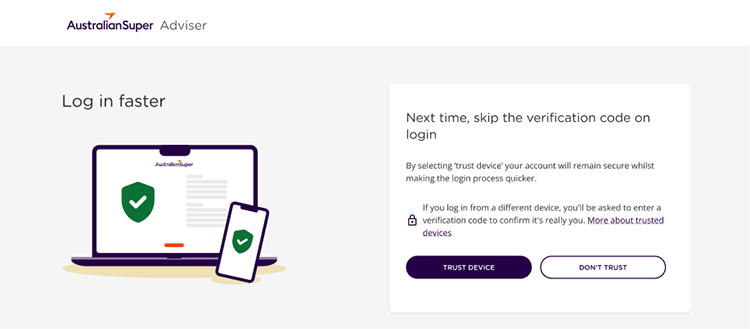
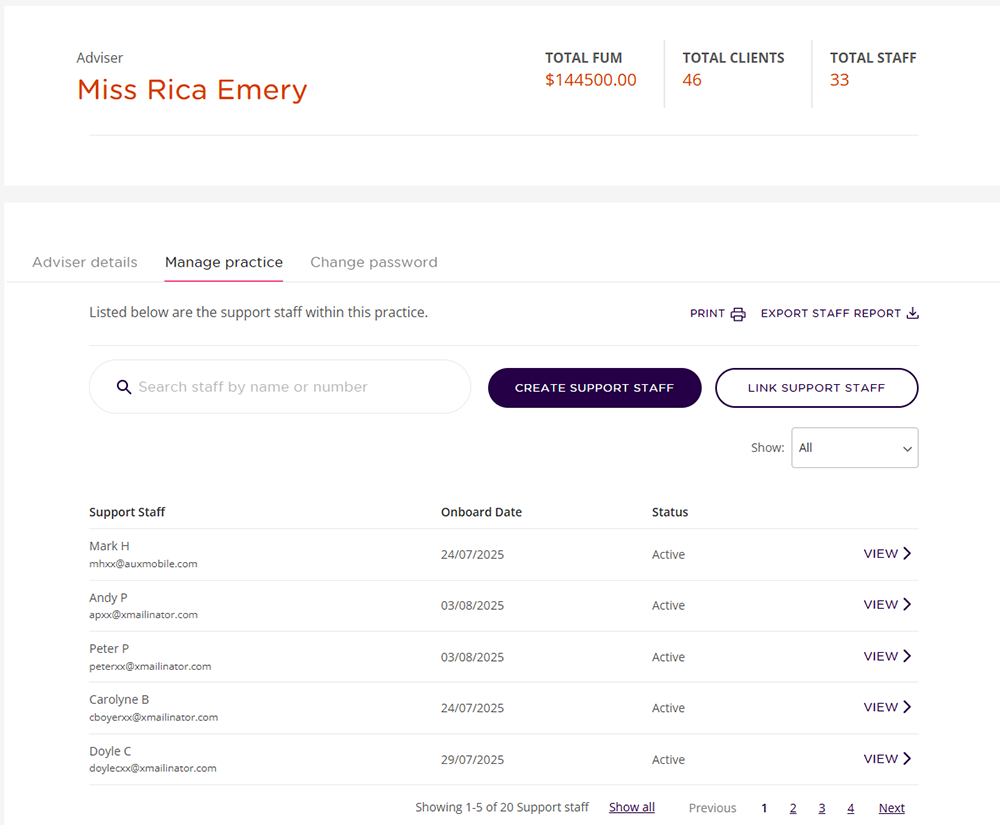
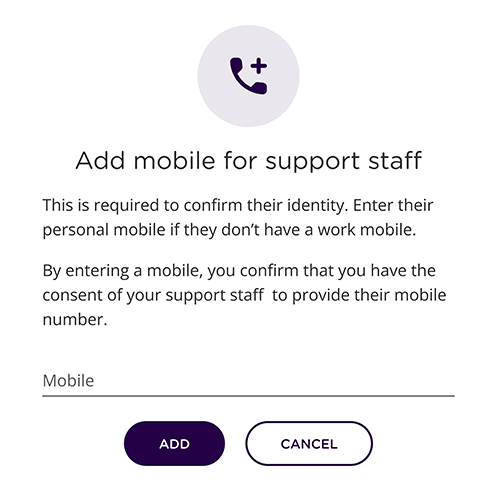
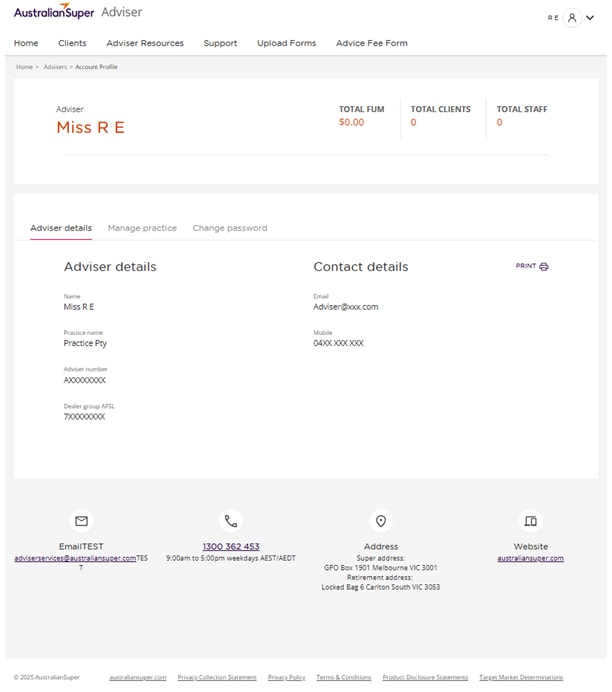











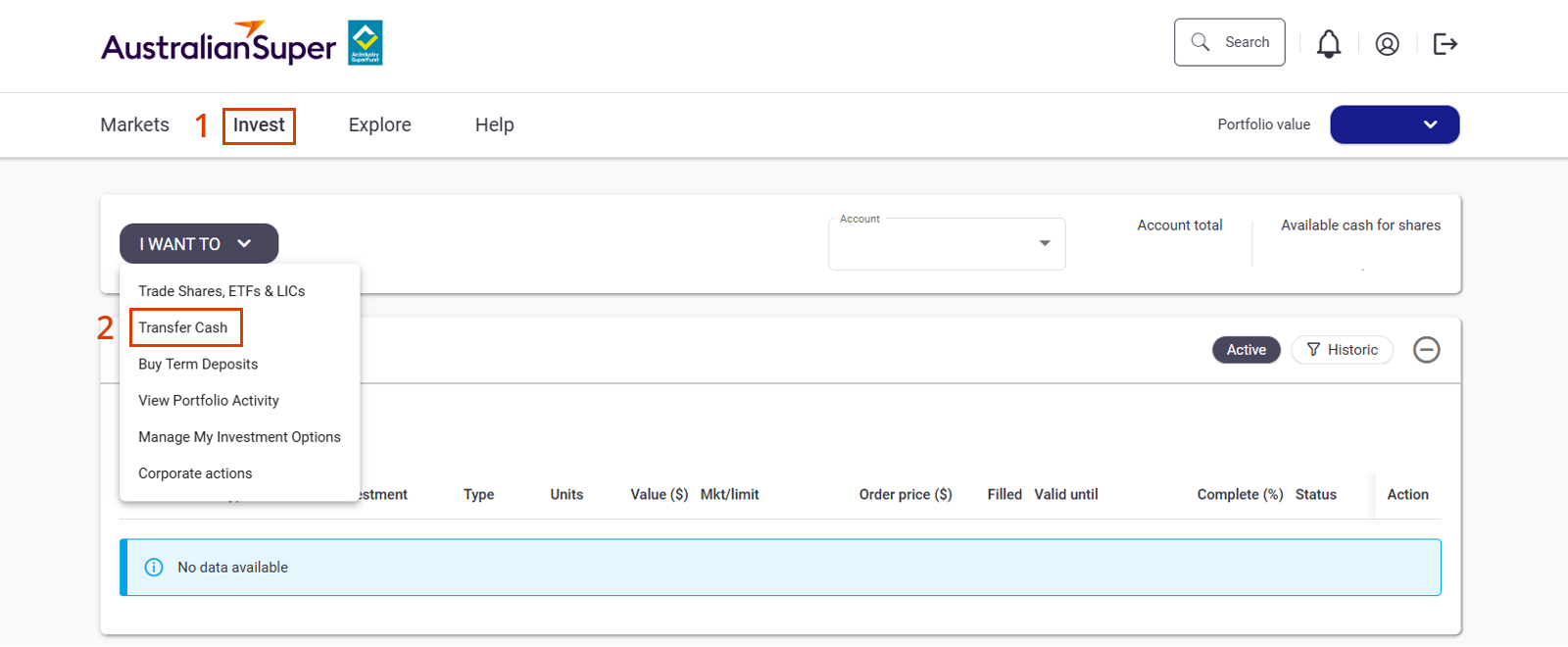
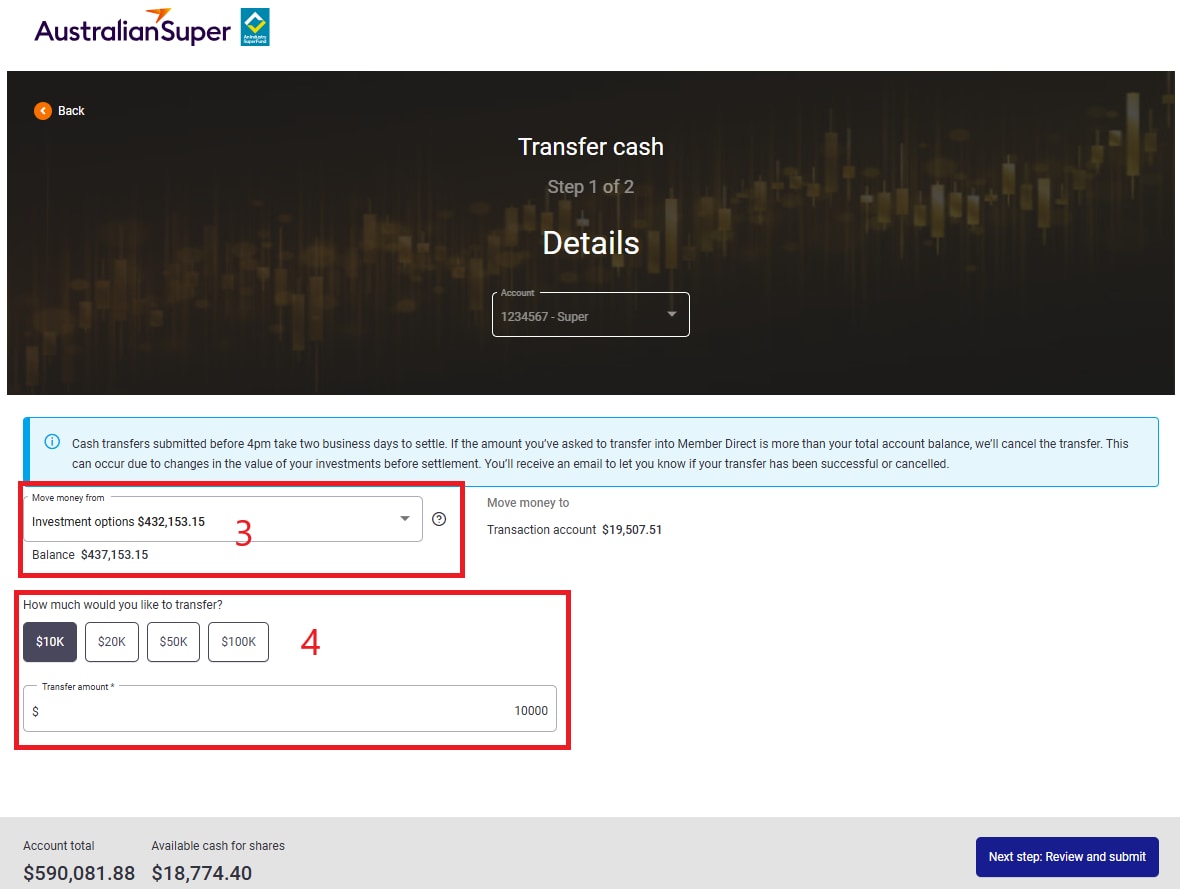
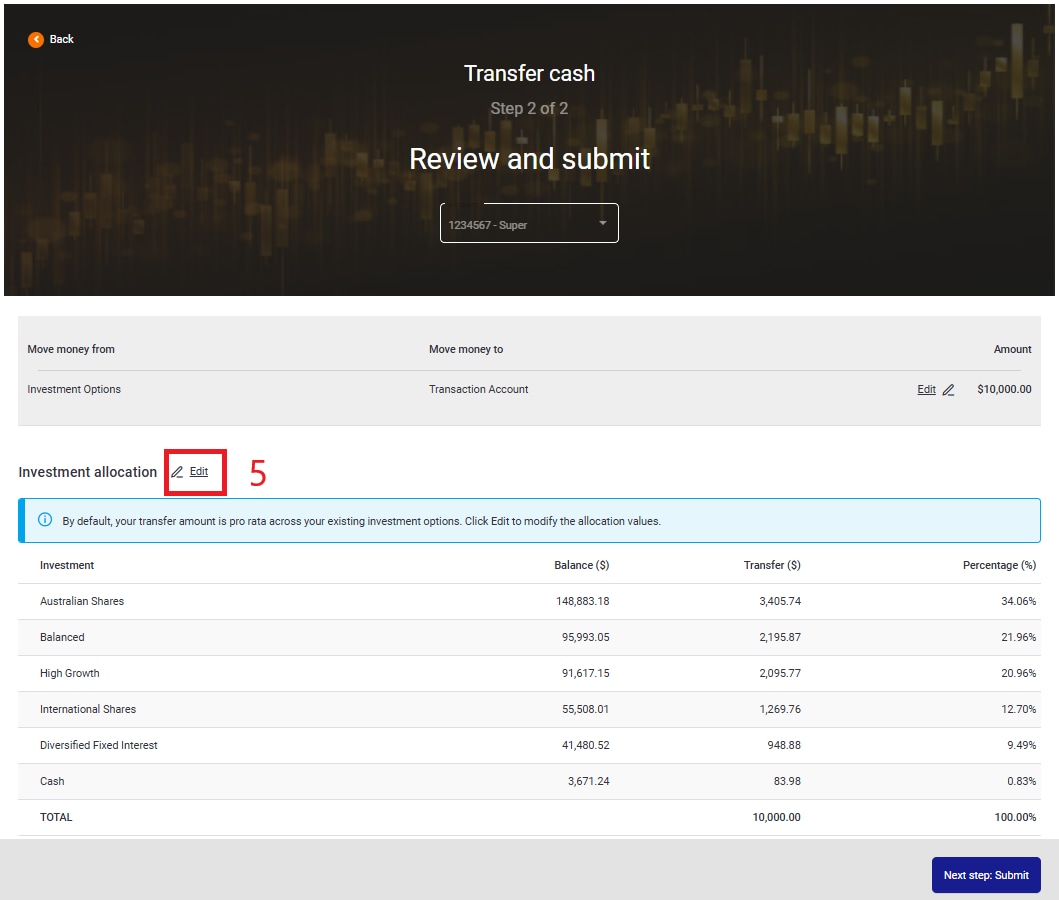
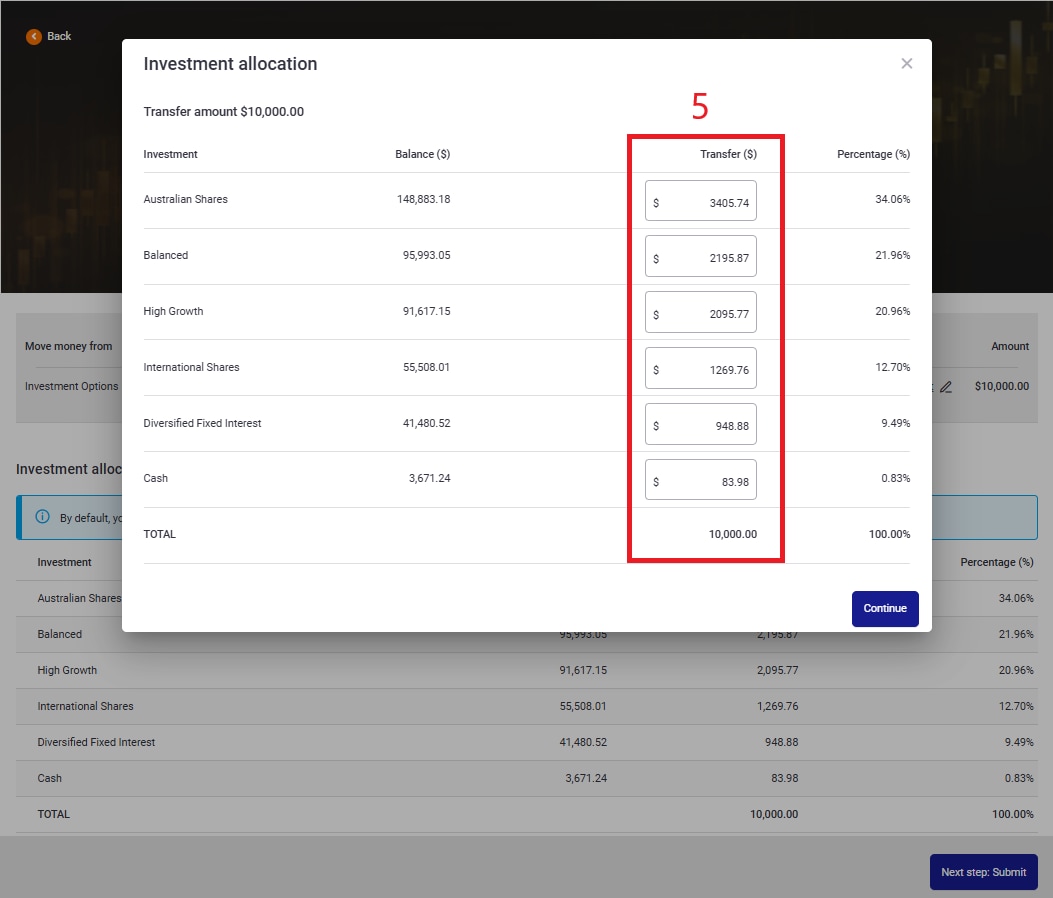
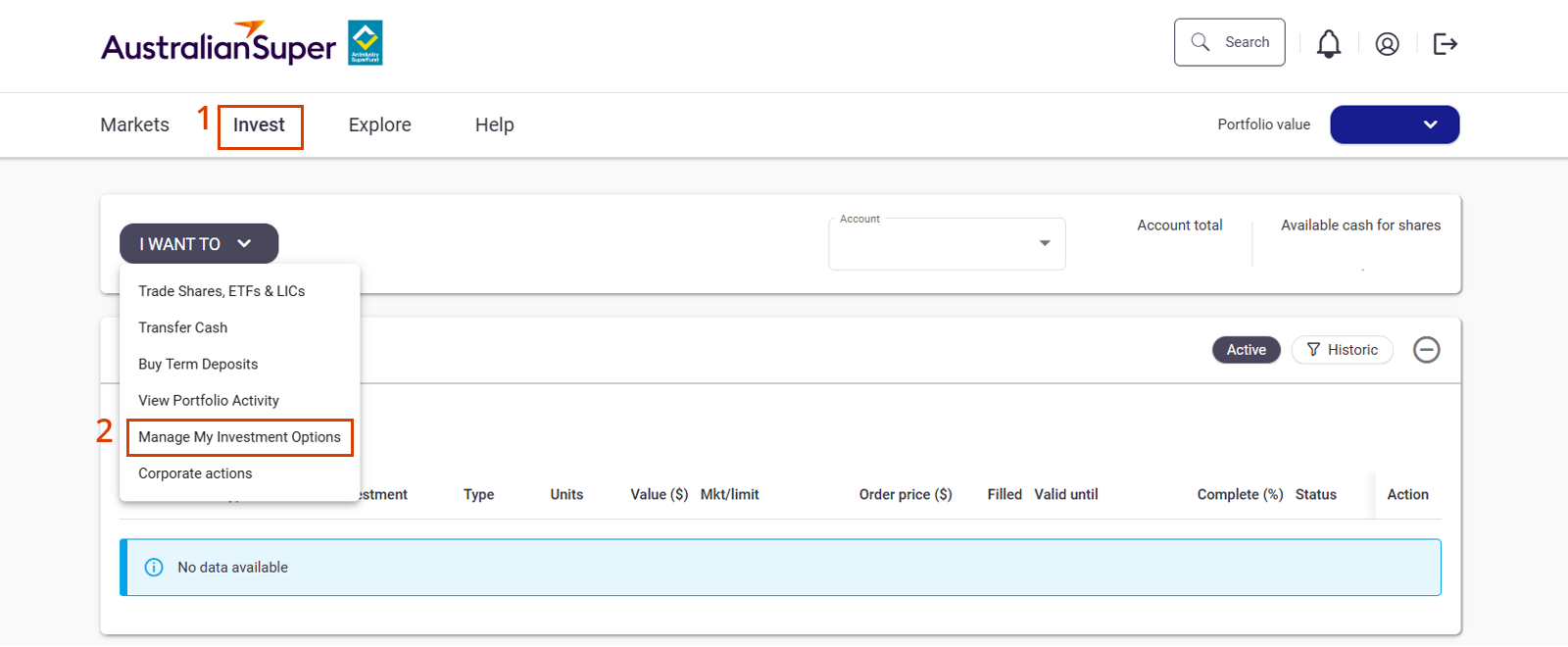
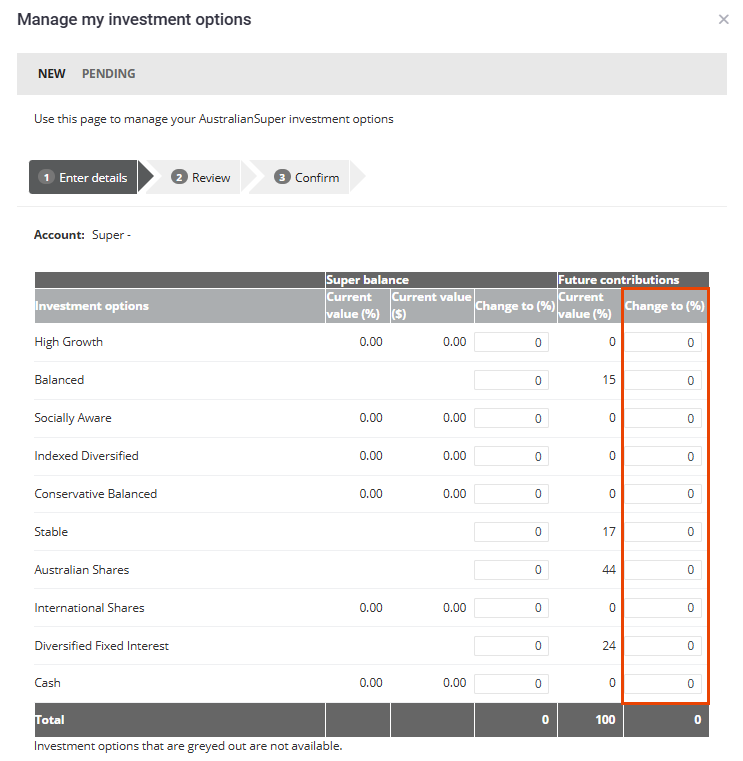
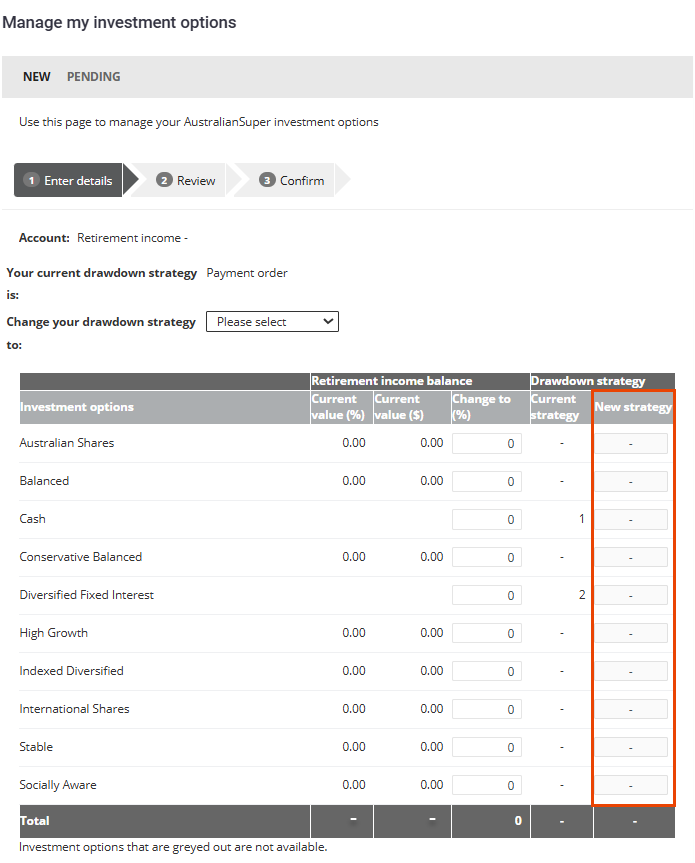
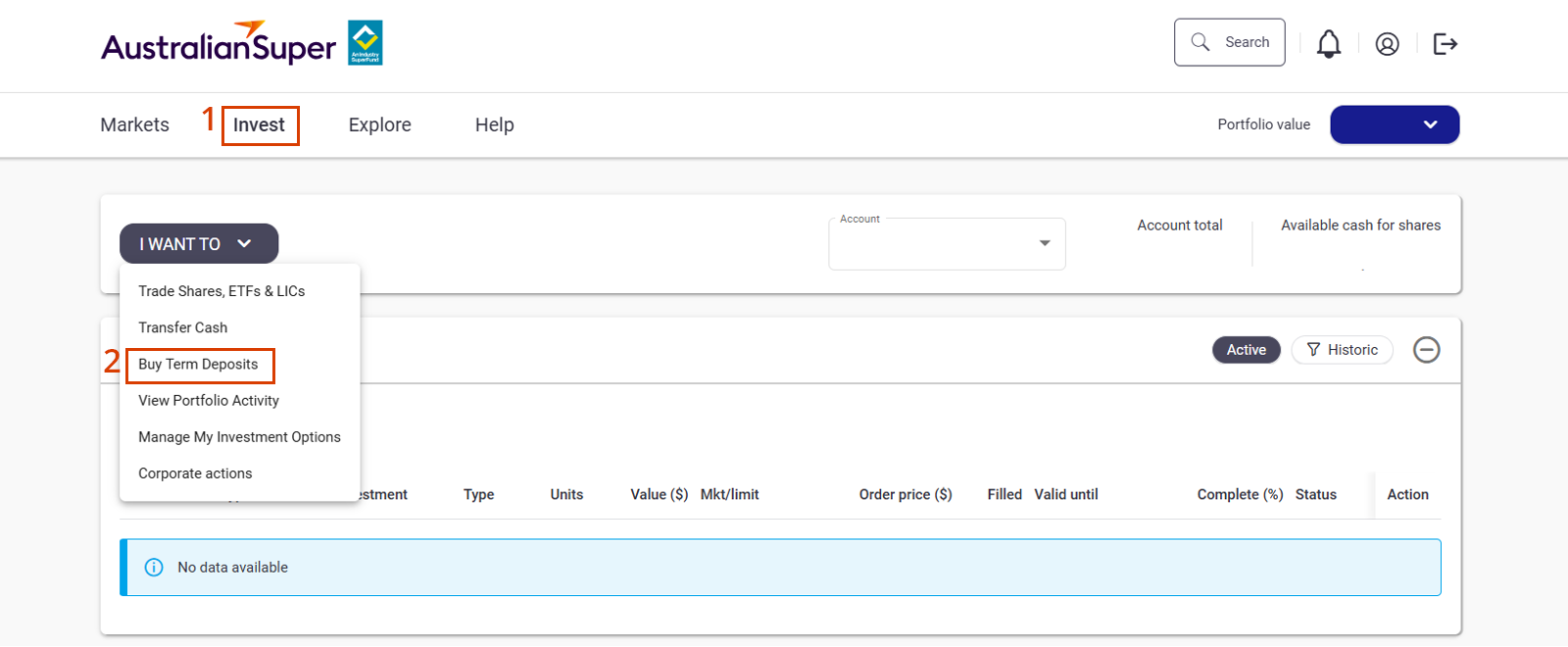
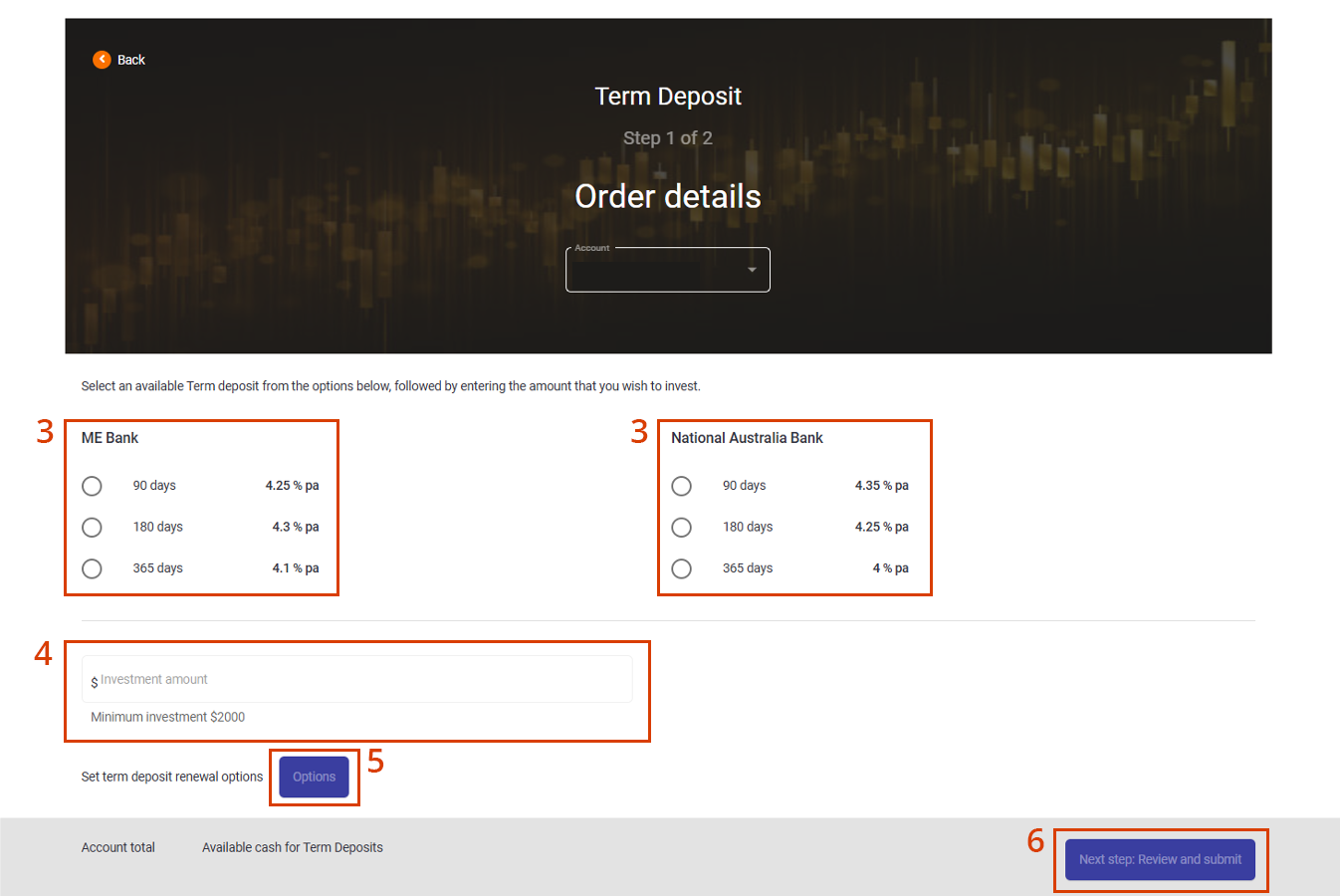
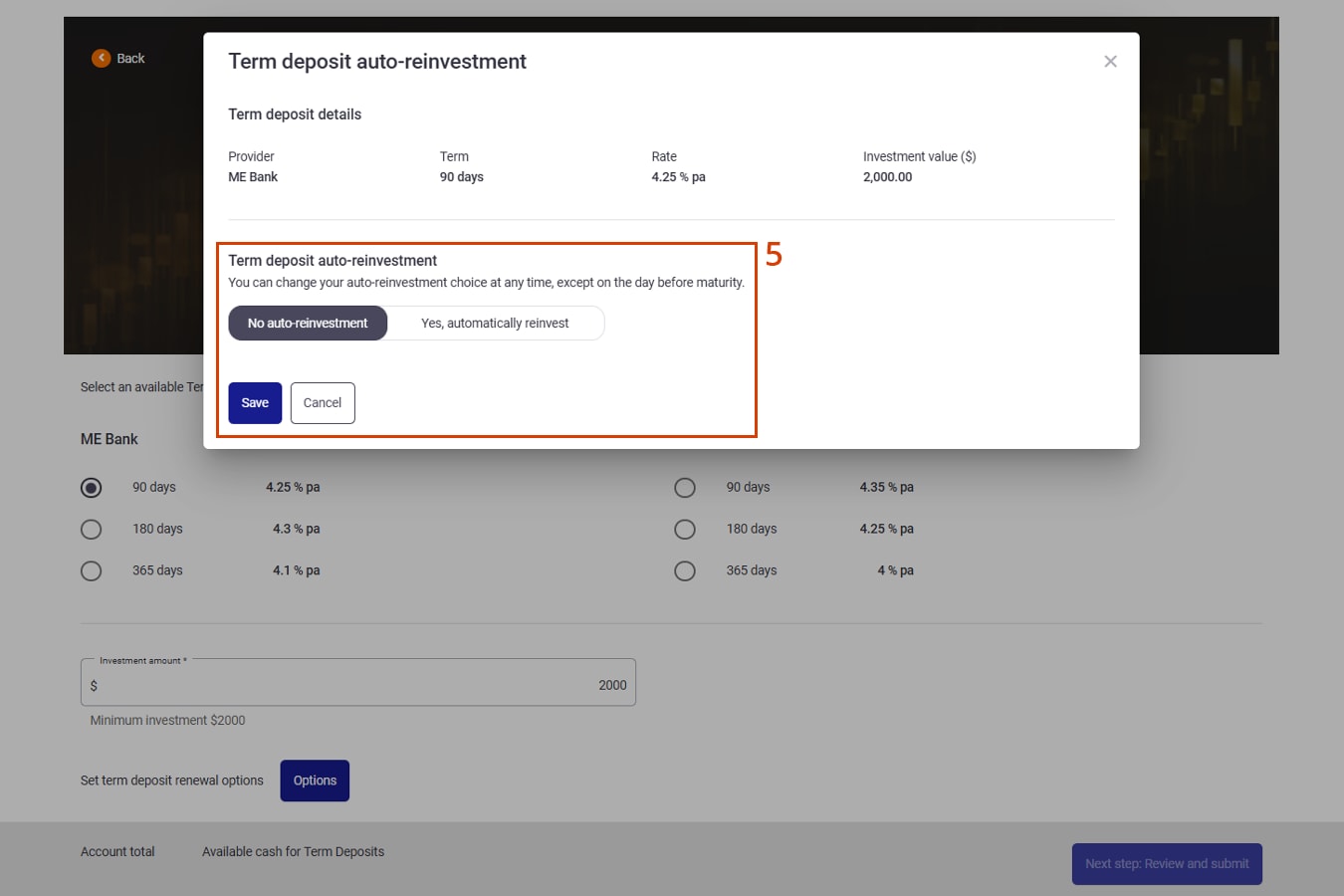
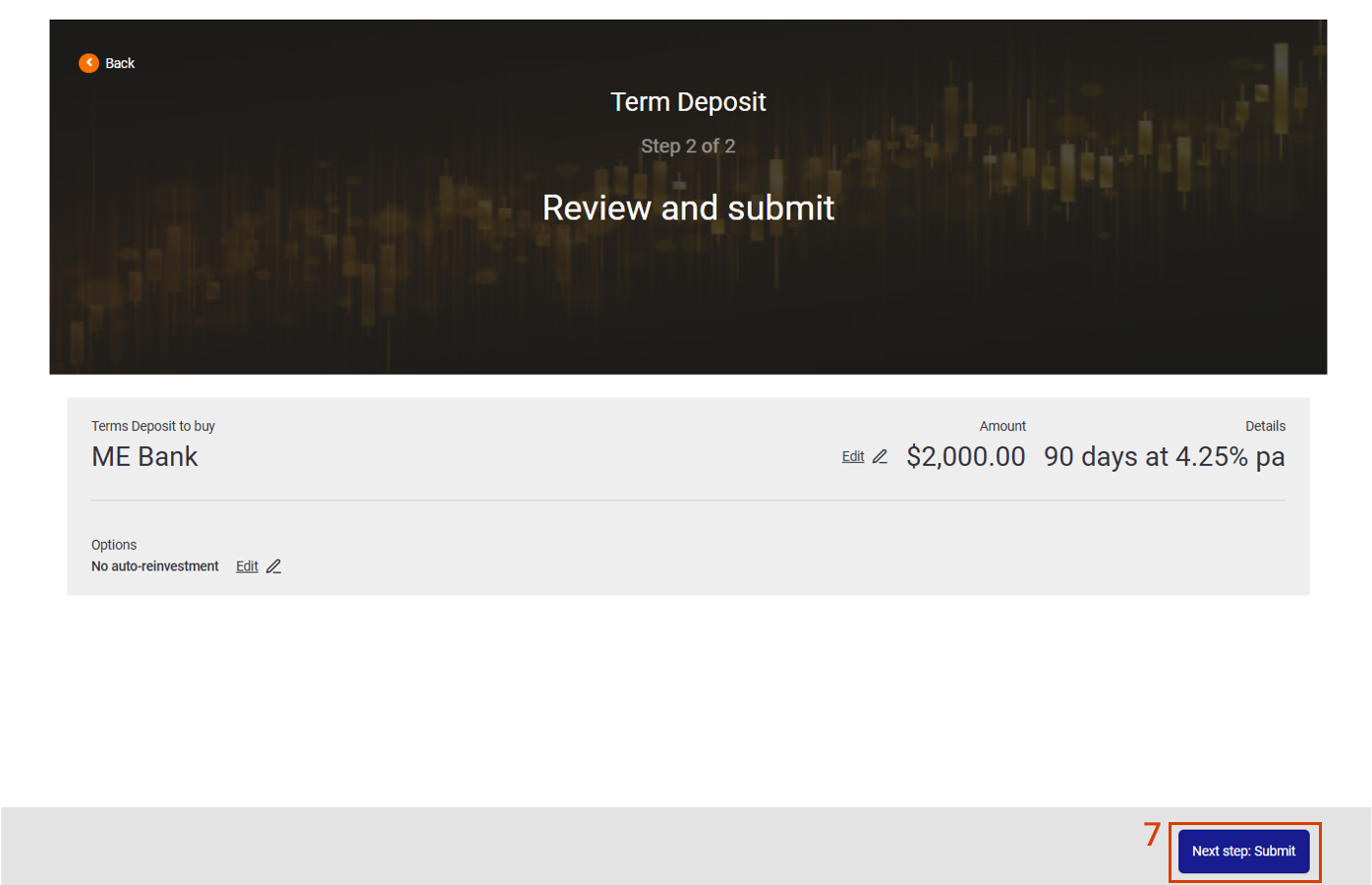
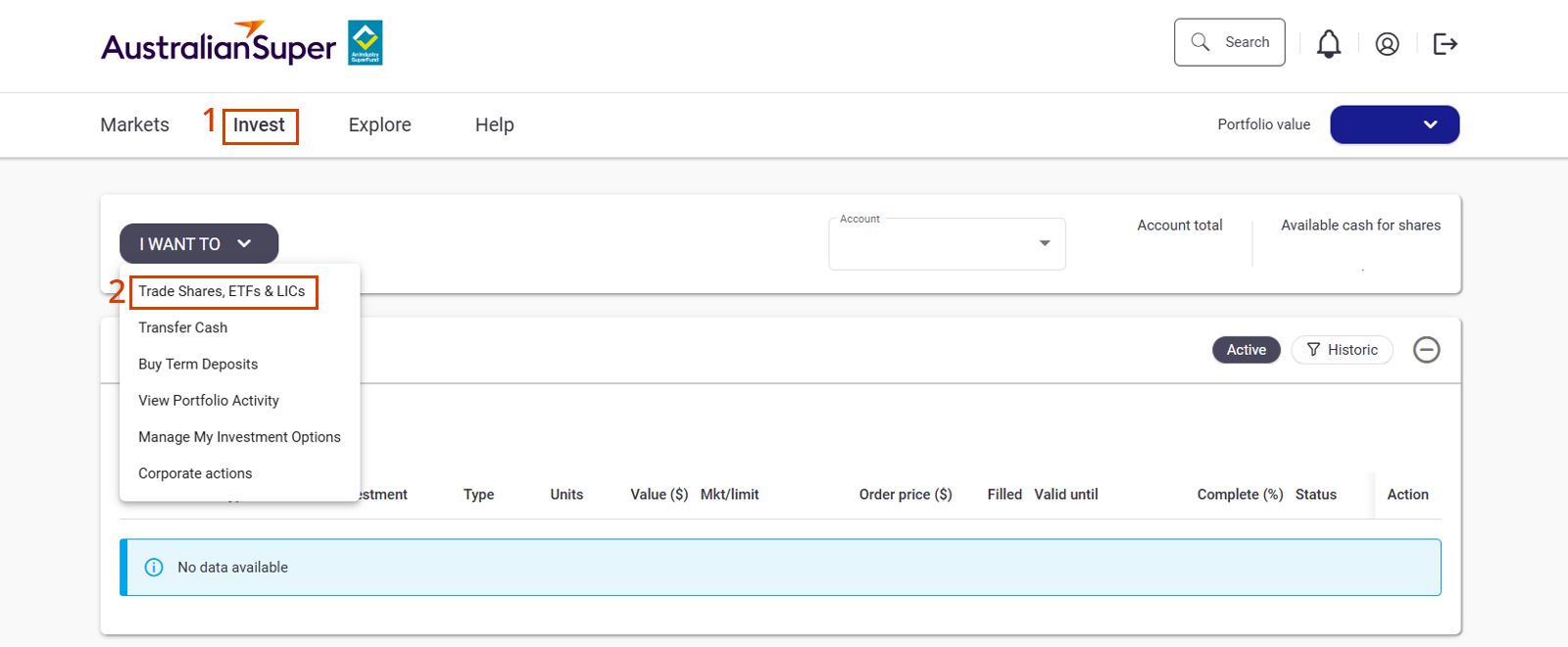
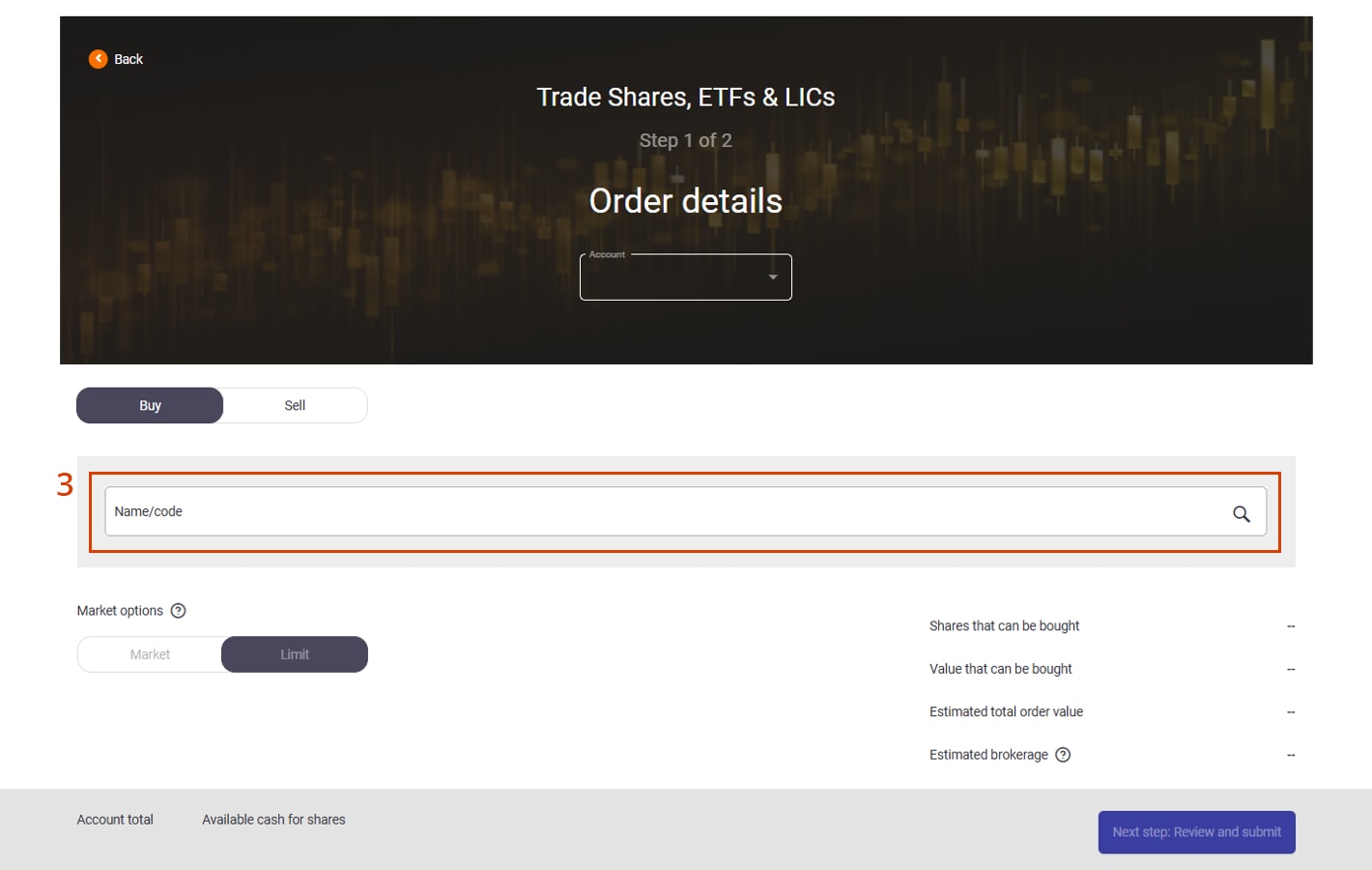
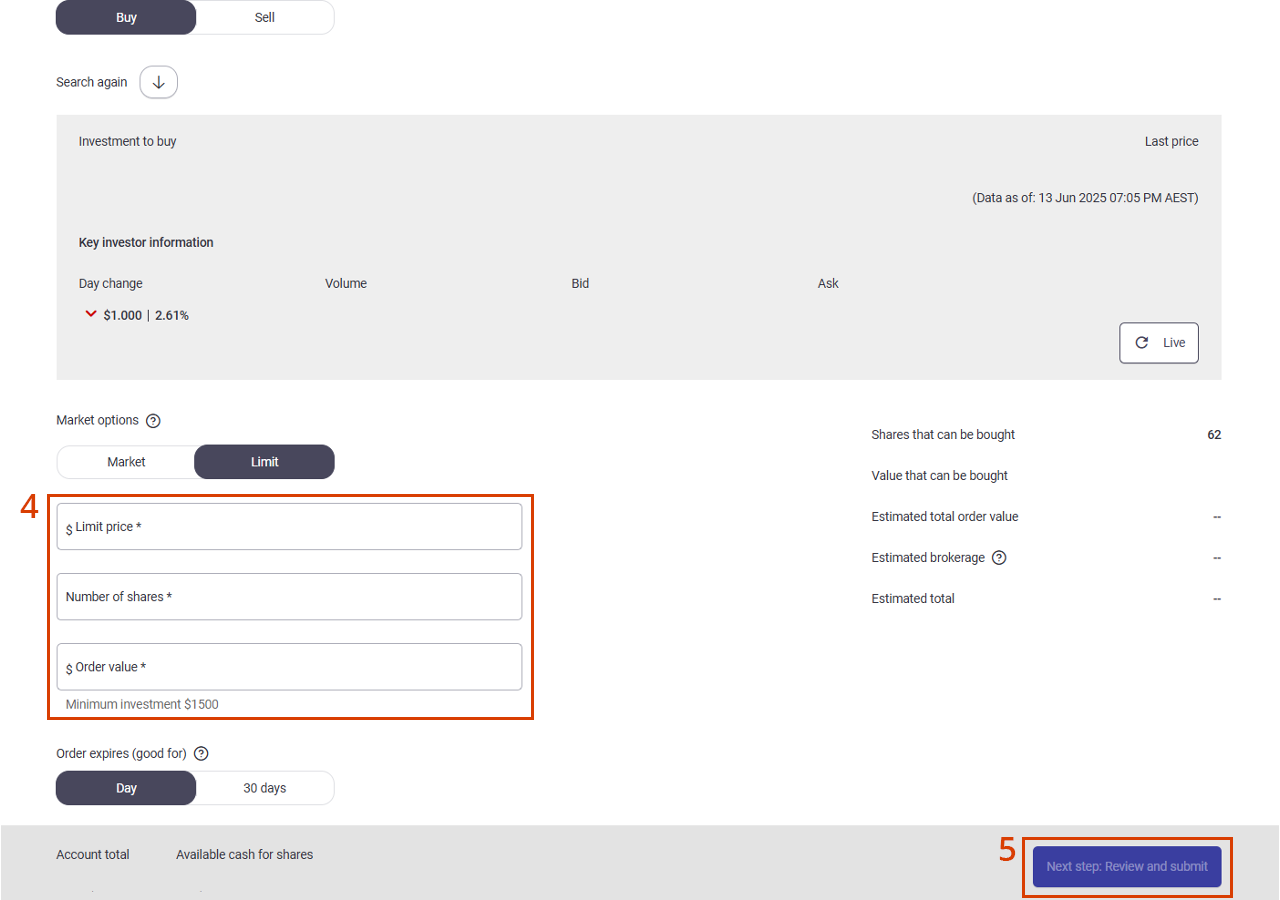
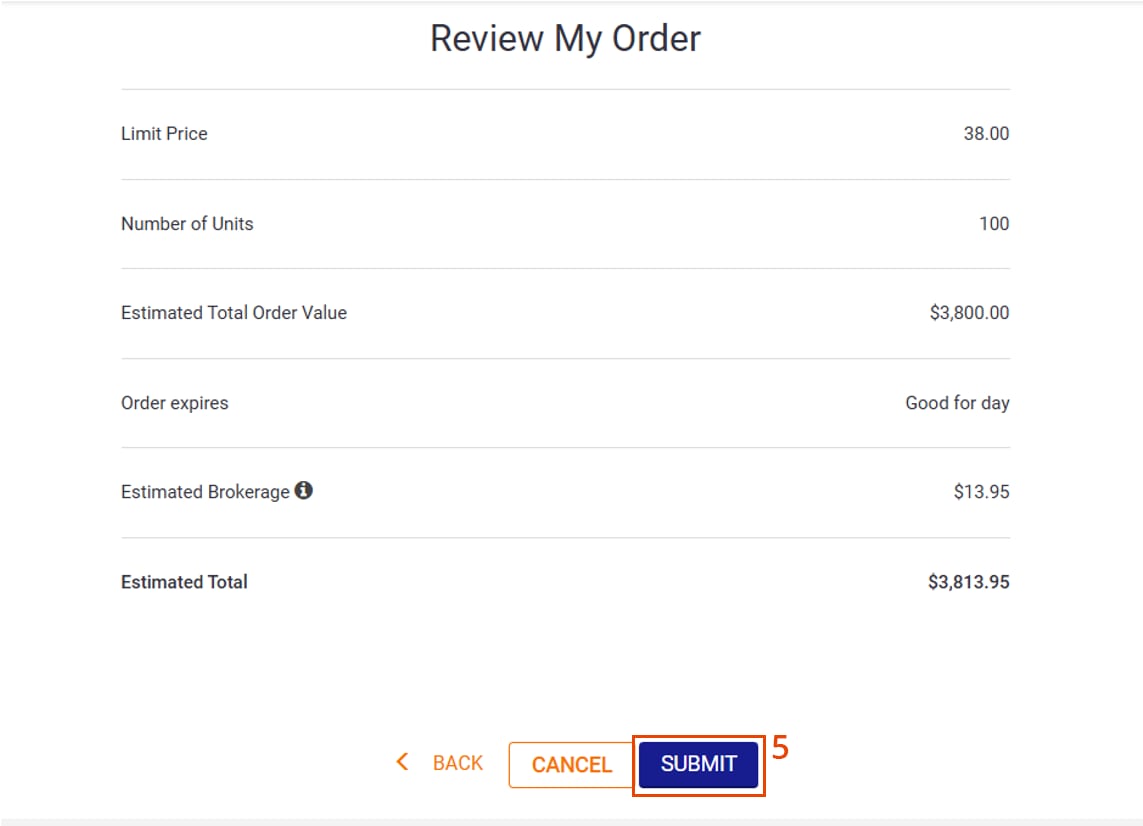

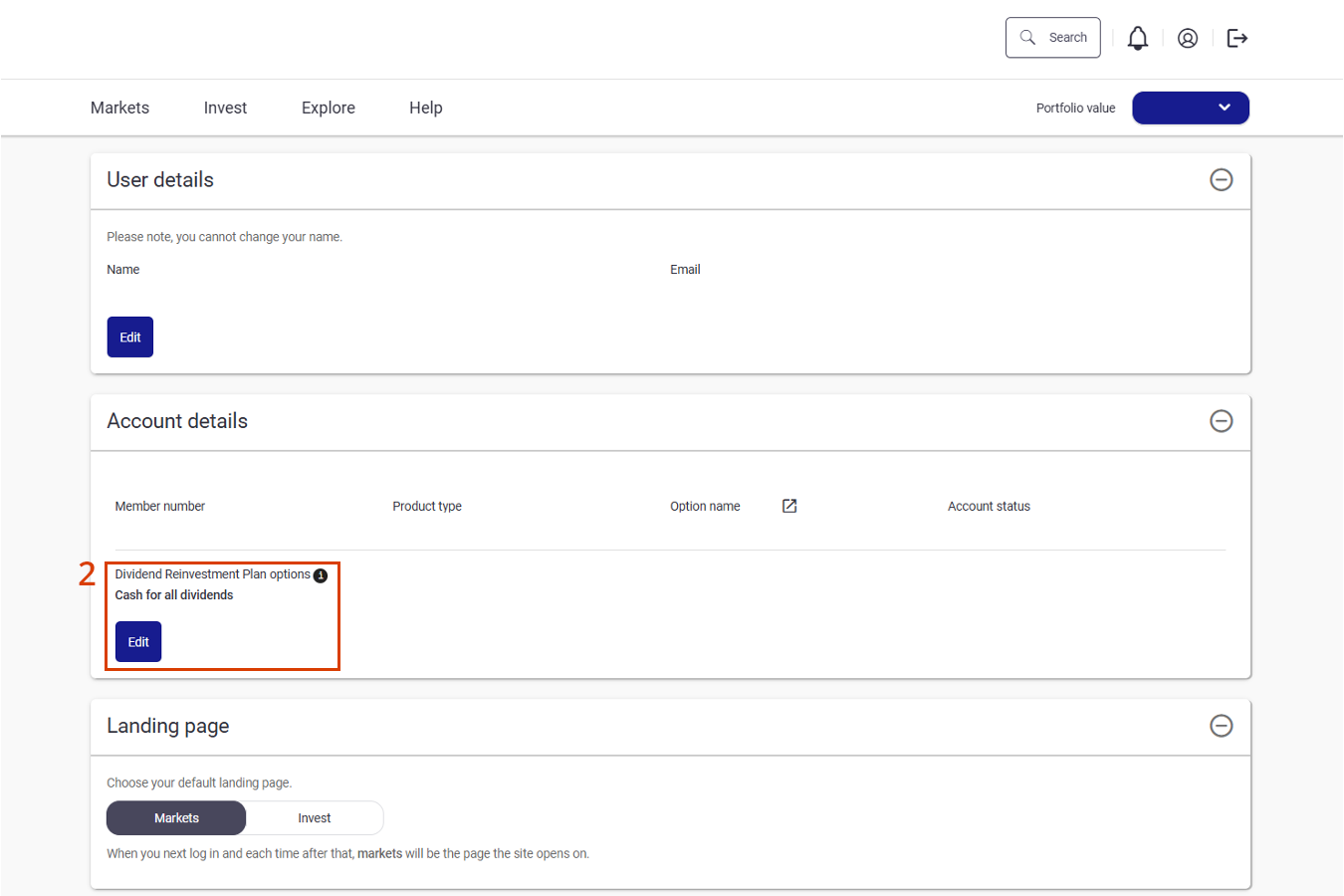
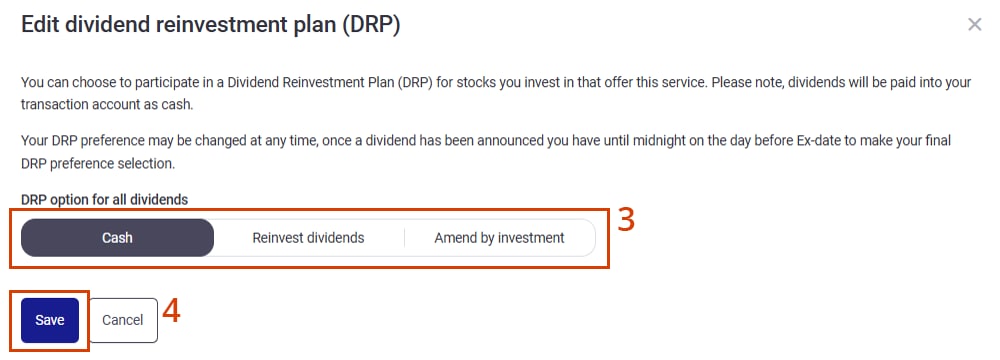
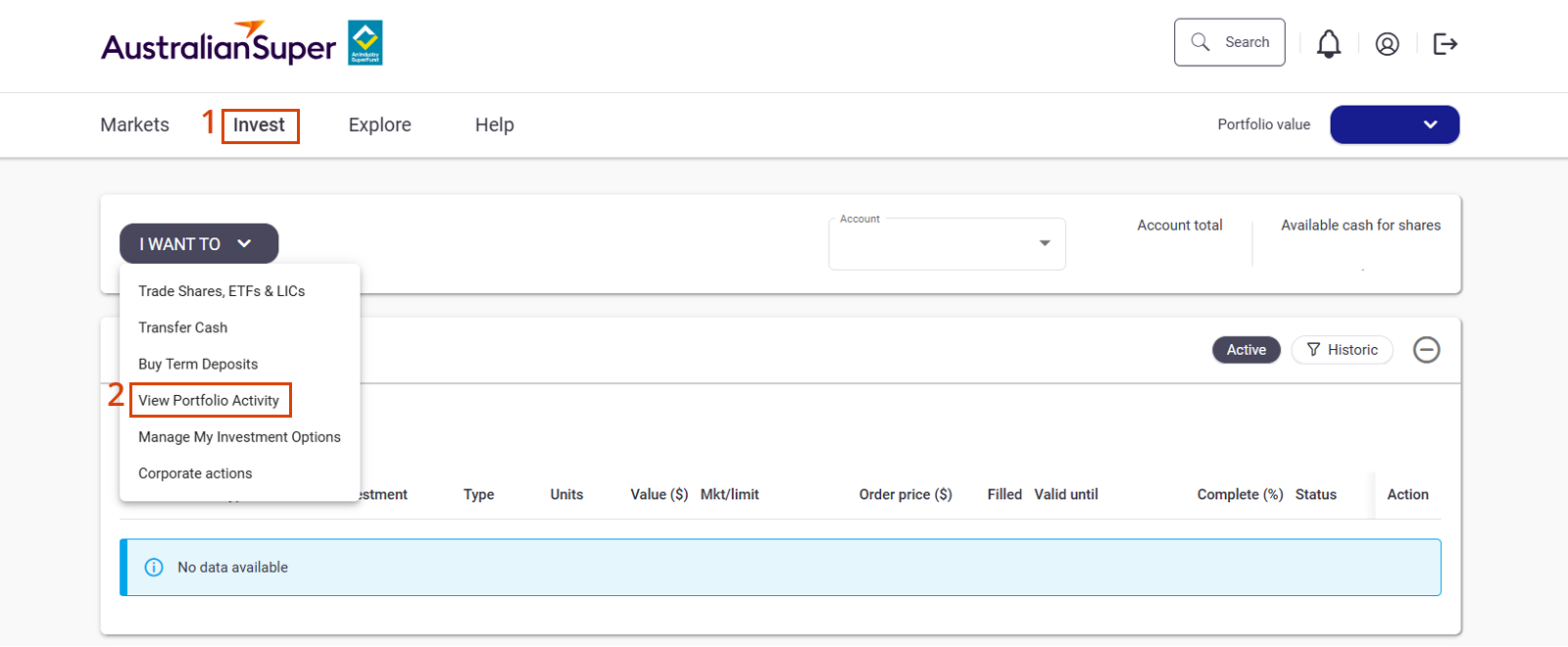
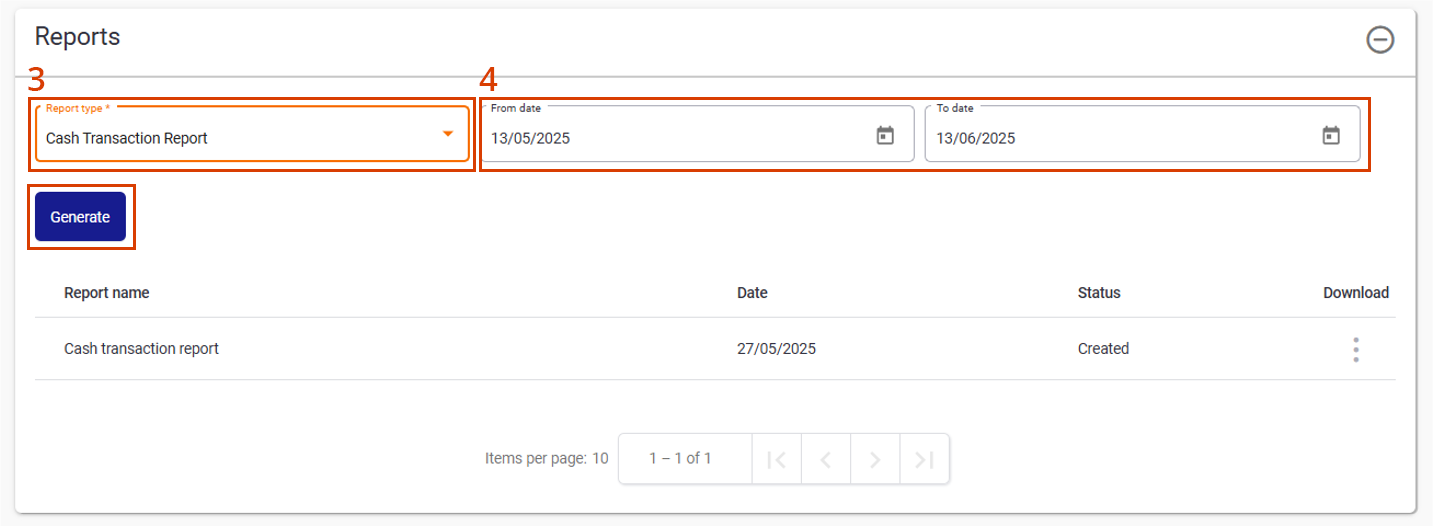
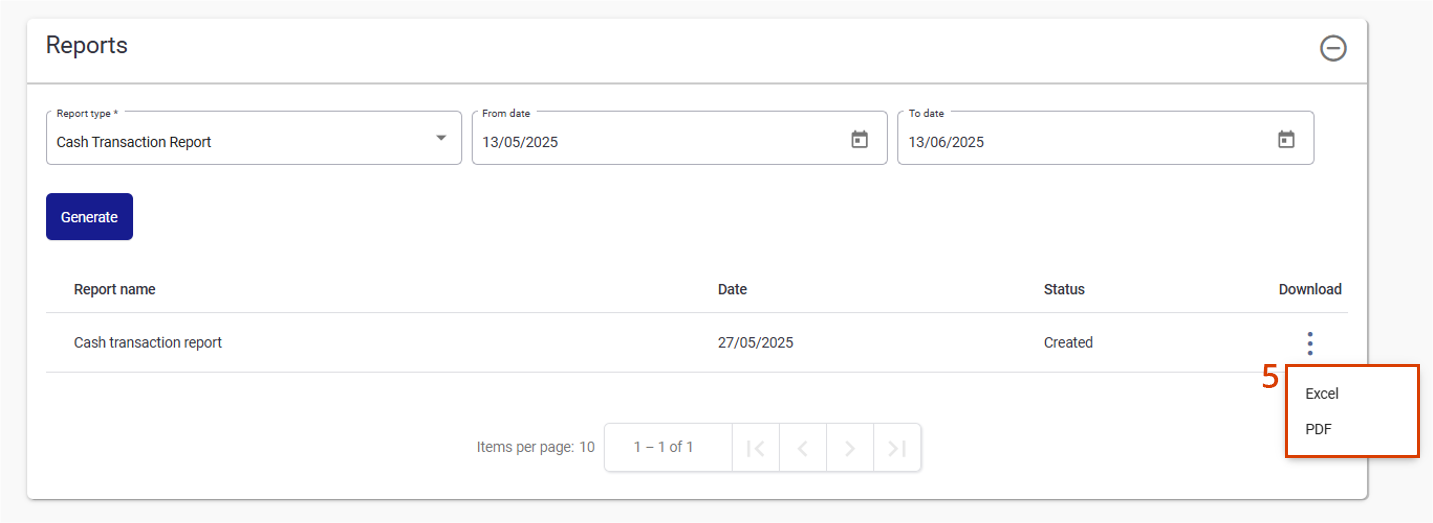
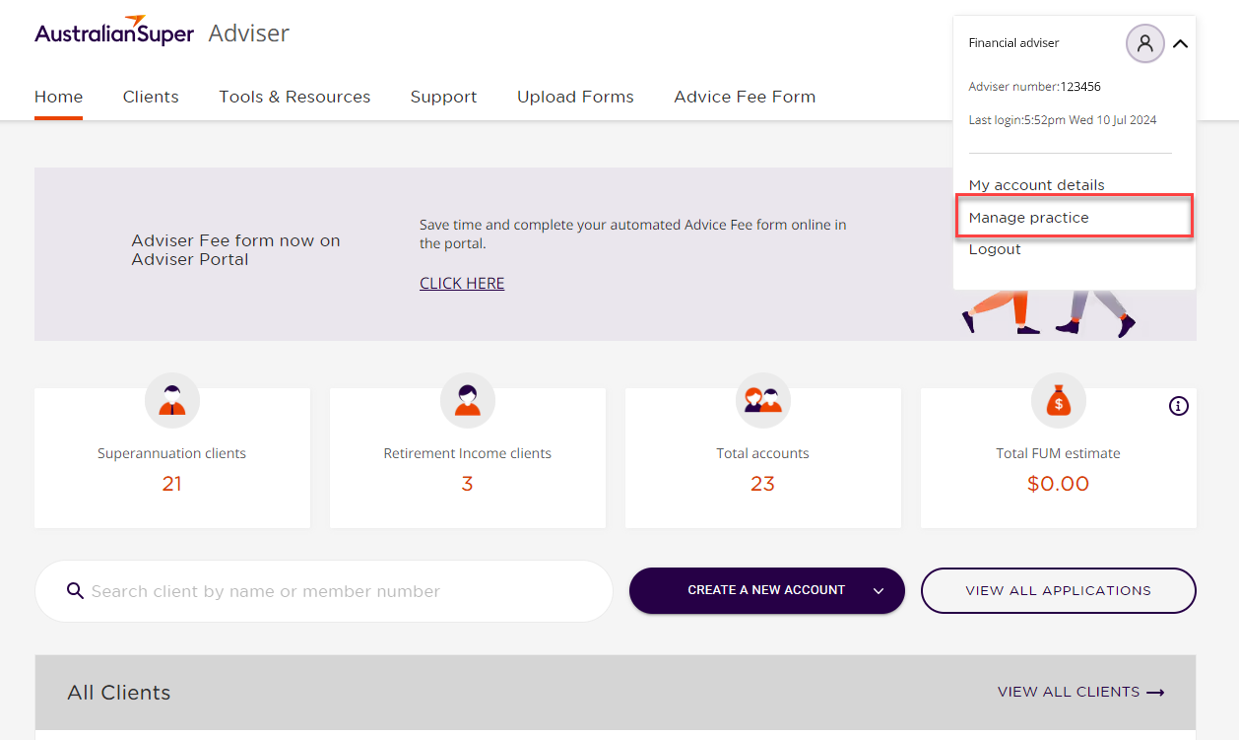
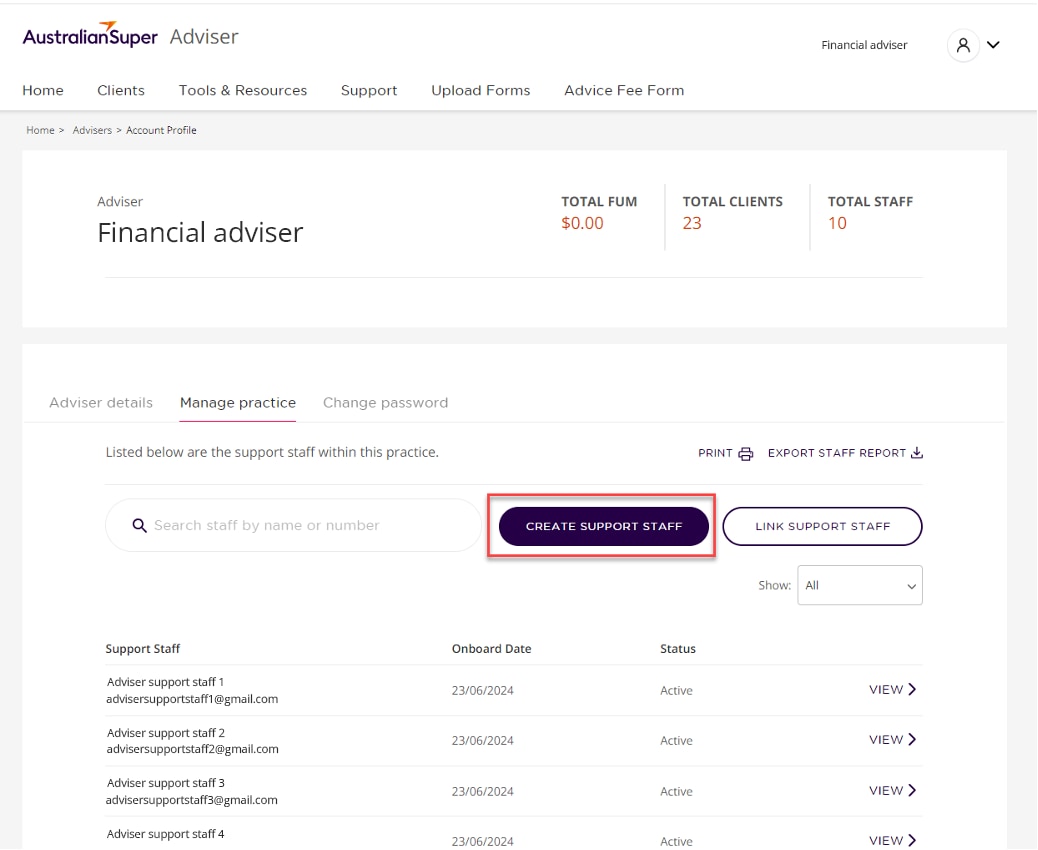
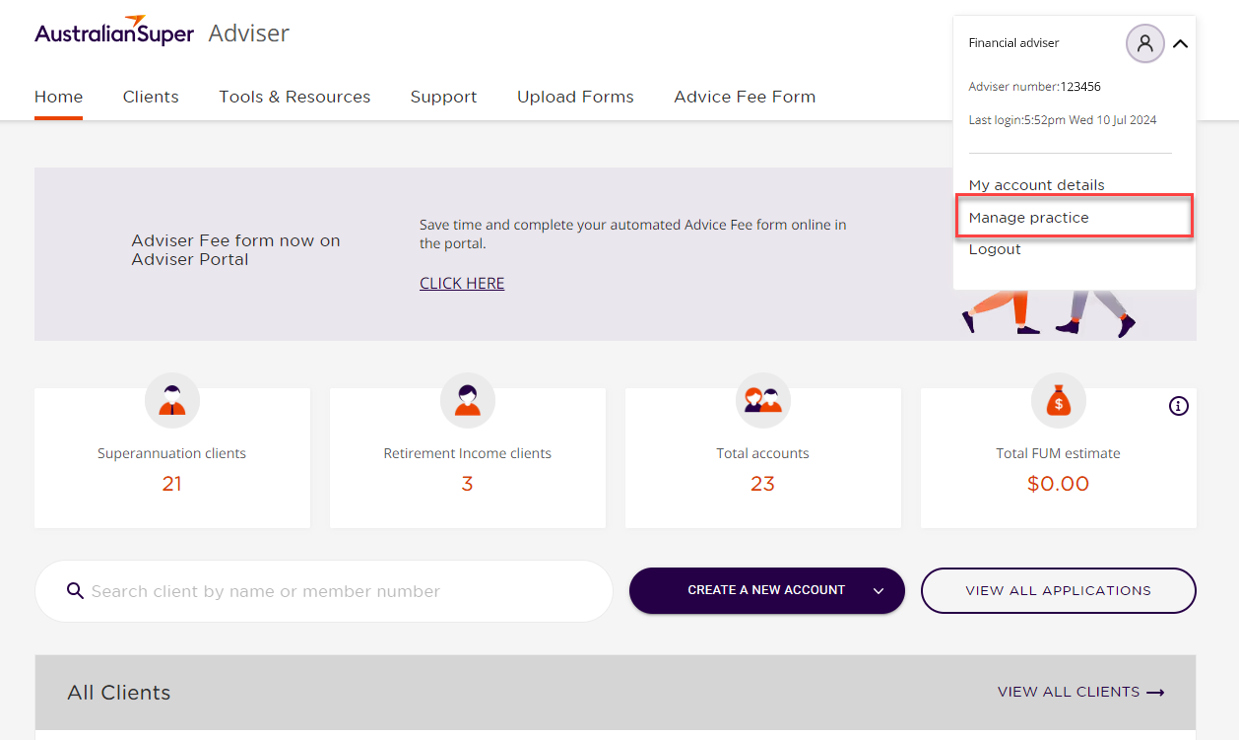
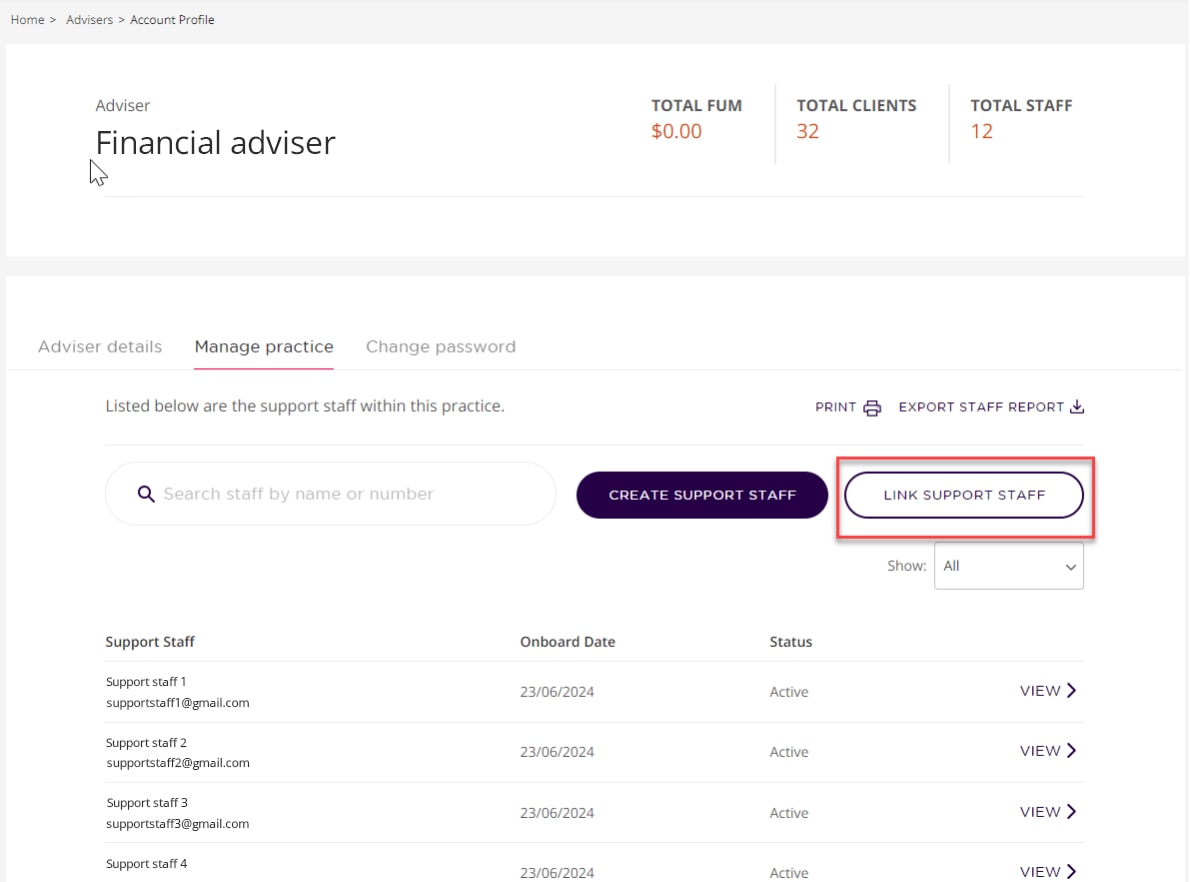
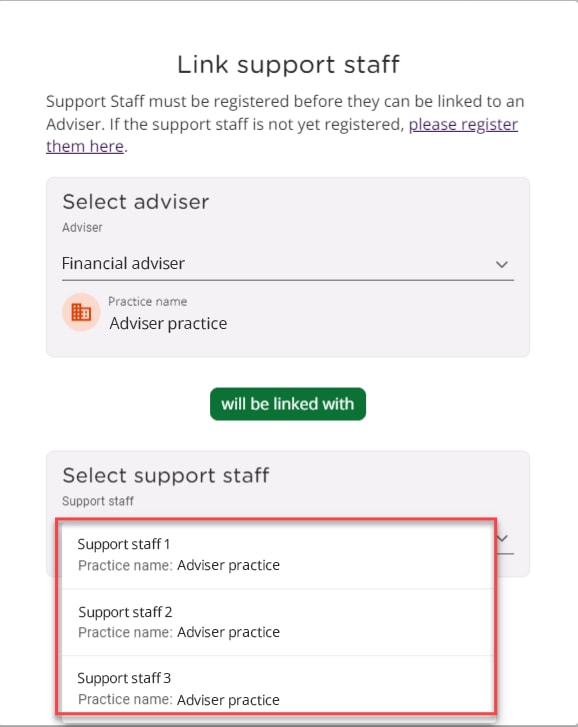
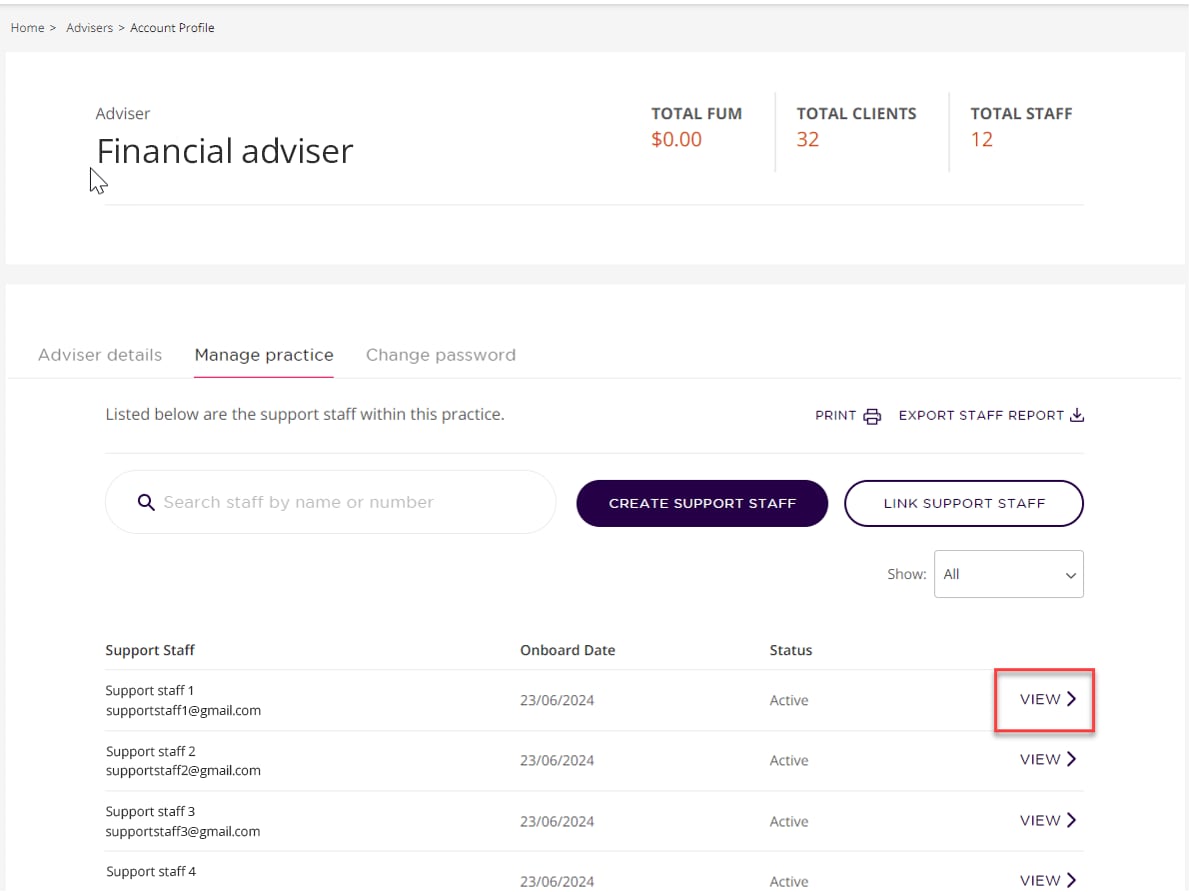
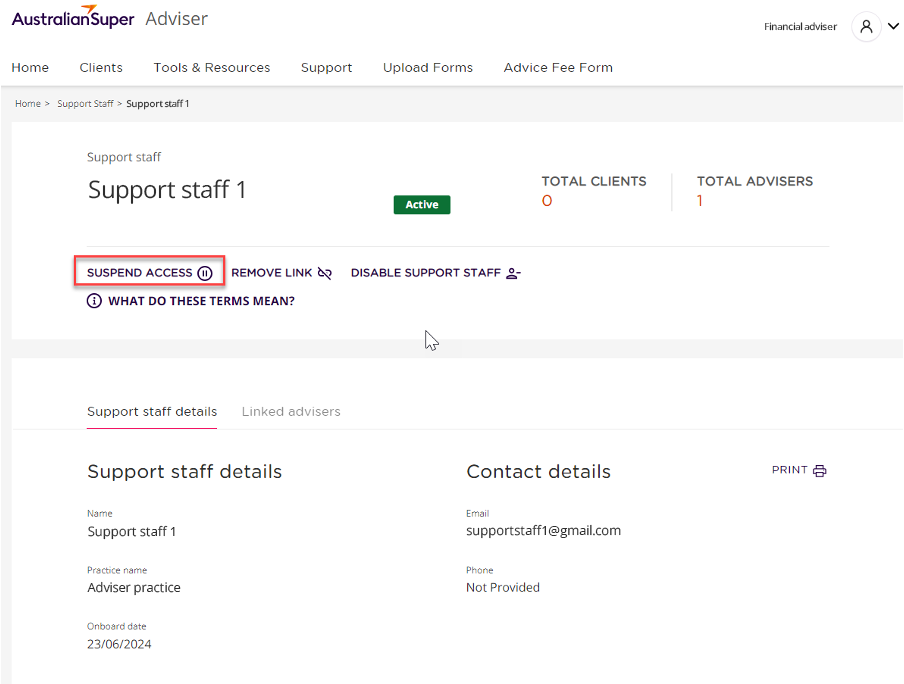
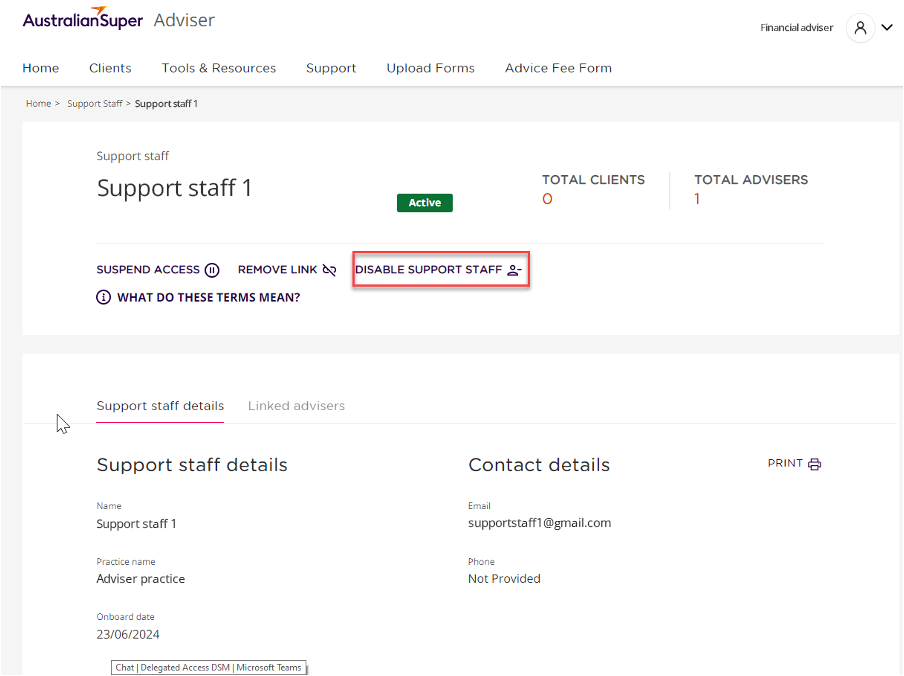





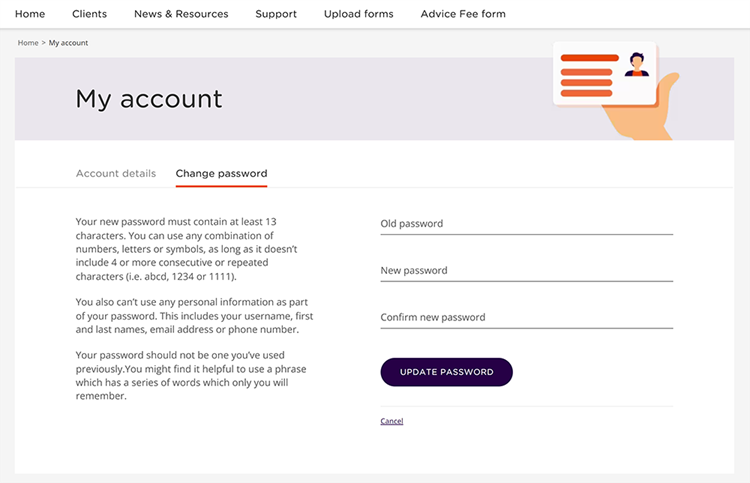
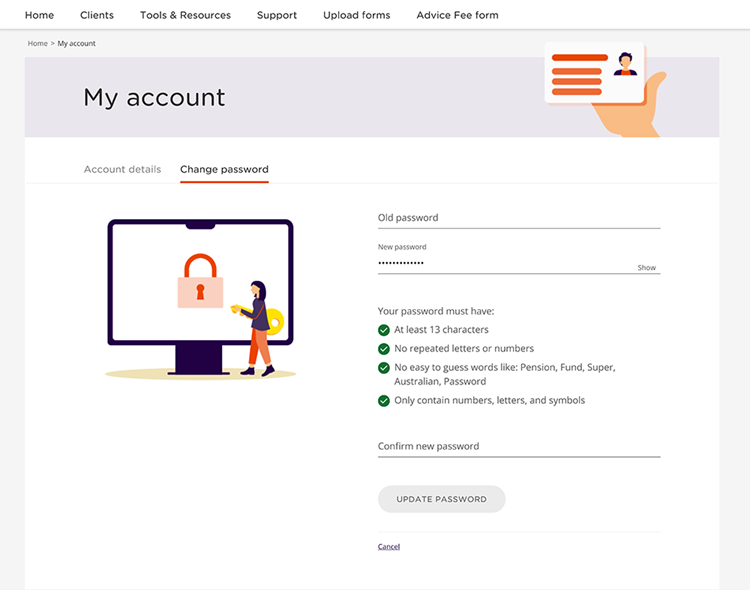
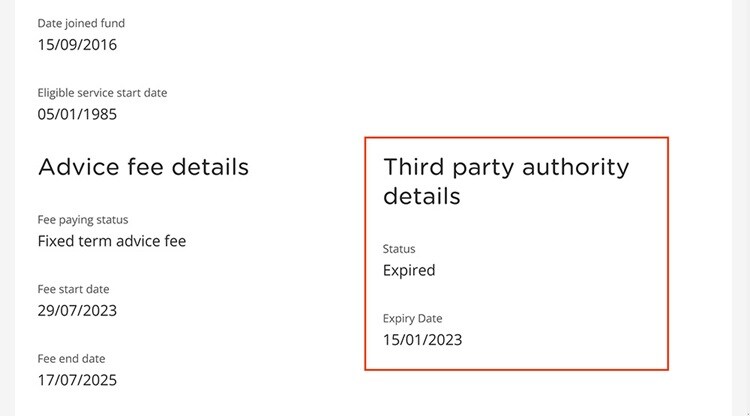
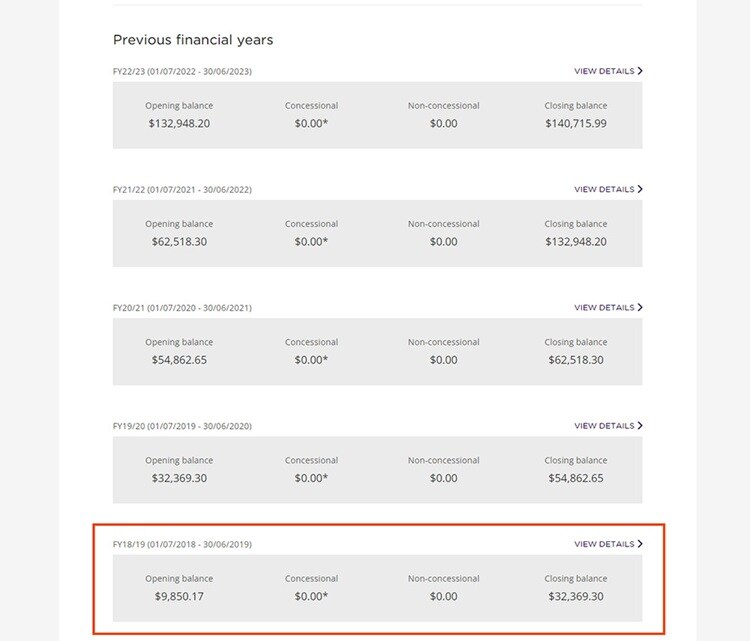
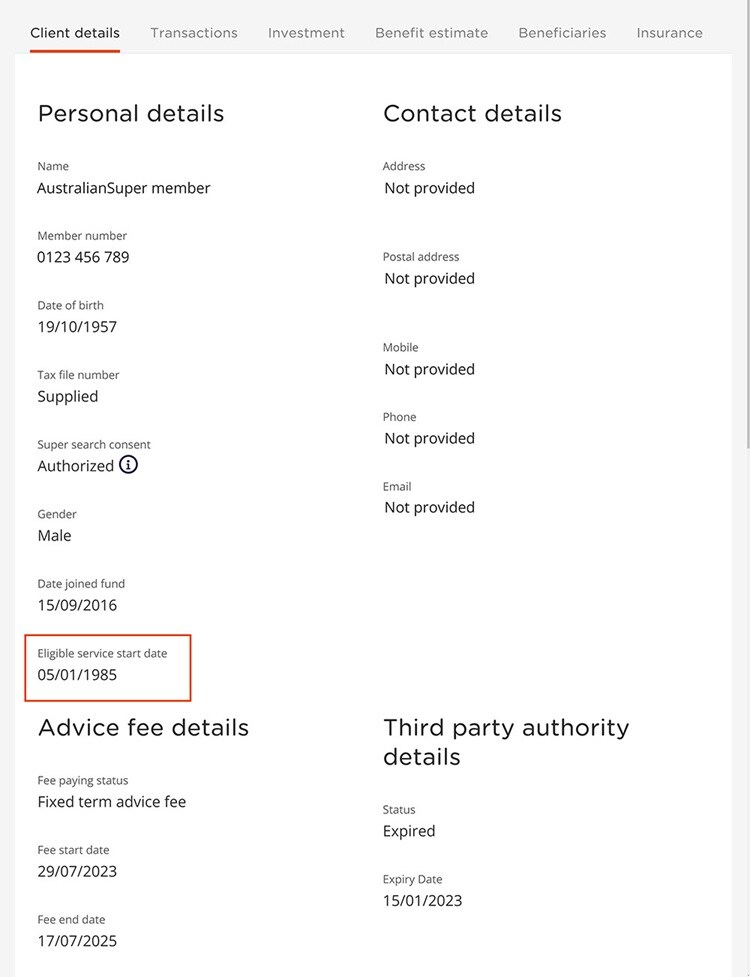
 Tim Berkman
 Nikki Spiers
 Claire Phillips
 Ile Petroski
 Ben Thompson
 Peter Bekavac