
- News
- FAQs
- All documents
- Products
- Portal updates
Latest news
Important document updates for Advisers from 1 July 2026
We’re releasing updated PDSs, IBRs1 and guides effective 1 July 2026. As distributors of our products, it’s important that you dispose of all previous versions to ensure your clients receive the most current versions, some of which include join forms. Please begin using the updated documents and join forms from 1 July 2026.
-
Documents being updated
From 1 July 2026, the following updated documents will be available:
- Choice Income PDS (including forms)
- TTR Income PDS (including forms)
- Fees and costs IBR
- Tax and super IBR
- Member Direct investment option guide
- Member Direct investment menu
We’ll also be updating all Accumulation PDSs from 1 July 2026. Members will be informed of the changes via a web update factsheet, available at australiansuper.com/pds from 1 July 2026.
1 Incorporation by reference
Improved phone service from 27 April 2026
Our Adviser Services team (AST) is dedicated to helping you with your administrative, product and process queries. To make it easier for advisers and support staff to get the support they need, the AST is now using an upgraded phone service.
-
New options
When you call the AST, you’ll hear two options:
- For advisers and support staff
- For members and non-registered advisers.
If you select option 1, you’ll hear our privacy message and a general advice statement, to ensure we meet our compliance obligations. Your call will then be directed to an Adviser Services Manager. For quality assurance and training purposes, both inbound and outbound calls will be recorded – let us know if you don’t want your call to be recorded.
-
Don’t wait on the line
The AST can receive up to 300 calls per day, so you may not always be able to get through to a manager right away. If you prefer not to wait on the line, you can select our convenient callback service, or you can email us at any time at adviserservices@australiansuper.com -
A new number for international callers
There’s no change for Australian callers; however there is a new number for international callers.
- Australian callers: 1300 362 453 weekdays from 9am – 5pm AEST/AEDT
- International callers: +61 2 8348 1417
-
Call smarter, not harder
We’re confident that our upgraded phone service will deliver a faster, more efficient and consistent service to you. We know your time is valuable, so we want you to spend more of it providing advice and support to your clients who are AustralianSuper members.
EOFY cut off dates for FY26
We’d like to remind you of the end of financial year (EOFY) cut-off dates for processing paperwork and online submissions.
Anything received after these dates may not be included in the FY26 financial year accounting period. AustralianSuper needs to have the funds in its bank account to be considered as received.
-
Member contributions
Cut-off date for these transfer methods is 25 June 2026 Contribution splits - to be applied to spouse account. BPAY - Contribution to be submitted by this cut-off date. Cheque - to be received by this cut-off date. Note that cheques will usually be banked one day after receipt. Direct debit (online and paper-based requests.) Direct debit requests to be received by this cut-off date. -
Employer contributions
Cut-off date for these transfer methods is 25 June 2026 Clearing house payments - Contribution to be submitted by this date. We recommend that employers check with their clearing house provider first to ensure that payments are received by AustralianSuper prior to 30 June. EFT Payments - Payment to be submitted with employers’ bank by this date. Transfer times need to be factored into any submission. -
Applications
Applications should be made by the following dates to ensure they are received and processed - particularly for pension applications that require payments to commence within June. These dates apply to clean applications, i.e. applications that don’t require clarification or follow up.
For applications with outstanding requirements, these must be resolved before the below cut-off dates to ensure they are processed before 30 June.
For pension joins, AustralianSuper must have funds in our bank account to process by the requested payment dates.
Application type Cut-off date Accumulation join 25 June 2026 Employer join 25 June 2026 Pension joins Monthly or yearly pension payment required 26 June, and
Funds transferred from an AustralianSuper accumulation account to create the pension account.23 June 2026 Monthly or yearly pension payment required 26 June, and
Funds transferred from an external fund to create the pension account.23 June 2026 Fortnightly pension payment required 25 June, and
Funds transferred from an AustralianSuper accumulation account to create the pension account.22 June 2026 Fortnightly pension payment required 25 June, and
Funds transferred from an external fund to create the pension account.22 June 2026 -
Withdrawals
Withdrawals should be made by the following date to ensure they’re processed before 30 June. This date applies to clean applications, i.e. applications that don’t require clarification or follow up.
For withdrawals with outstanding requirements, these must be resolved before the below cut-off date to ensure they are processed before 30 June.
Cut-off date for these transfer methods is 25 June 2026 Unrestricted cash Financial hardship
Compassionate grounds Departing Australia Superannuation Payments (DASP) Retirement -
Transfers out
Transfers out of AustralianSuper should be made before the below cut-off date to ensure the transaction is processed before 30 June. This date applies to clean applications, i.e. applications that don’t require clarification or follow up.
Cut-off date for these transfer methods is 25 June 2026 KiwiSaver SMSF eRollover Paper rollover application -
Other transactions
Transactions should be made by the following date to ensure they are processed before 30 June. This date applies to clean applications, i.e. applications that do not require clarification or follow up.
For transactions with outstanding requirements, these must be resolved before the below cut-off date to ensure they are processed in time.
Cut-off date for these requests is 25 June 2026 Member detail updates. Member Investment Choice switches - Paper based request to be received by this cut-off date. Notice of intent to claim a tax deduction.
Trusted Device is coming to the Adviser Portal
Following the successful implementation of multi-factor authentication to the Adviser Portal, we’re pleased to announce the introduction of Trusted Device. This enhancement tells us that you’re using a recognised, secure device when logging into the portal. Here are some FAQs to explain this change.
-
What are the benefits of Trusted Device?
- No need to verify your login multiple times per day
- Peace of mind knowing that only your trusted devices can access the portal
- Receive notifications when you add or remove devices, or when someone logs in from a non-trusted device
- Easy to review and remove your trusted devices within the portal
- You can have up to three (3) trusted devices per user.
-
How do I add a Trusted Device?
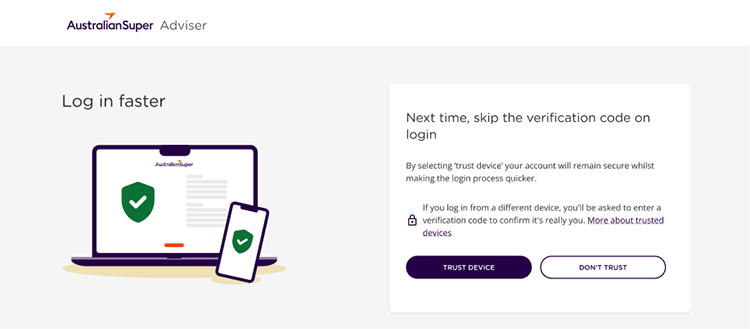
Adding a Trusted Device is easy. Once it’s available, you’ll log in as normal, enter a six-digit verification code, then be given the option to ‘Trust Device’. After that, you’ll be able to skip the code on that device.
-
Is Trusted Device secure?
If you select ‘Trust Device’ during login, you won’t need to enter a code every time you sign in from that device. This option is just as secure and helps streamline your login experience. You’ll receive a confirmation email regardless of whether you choose to trust the device or not. -
Why do I have to ‘trust a device’ multiple times?
Even if you’ve selected ‘Trust Device’ you might be asked to do it again. This can happen for a few reasons:
- If your browser cookies are deleted either manually, through browser settings, or by using private/incognito mode, your device may no longer be recognised
- Changing devices, or browsers, or even moving between time zones (yes, even within Australia) can affect trusted device settings
- If your internet connection changes frequently, like when using different mobile networks or VPNs it can trigger the trusted device questions again
- After 1 year of not logging in to your account, it will automatically reset trusted device settings, or if they detect unusual login activity
- Updates to your operating system, browser, or security software can remove the data used to remember your device.
-
How many trusted devices can I have?
You can register up to three trusted devices per account. This limit helps maintain strong security while allowing flexibility for users who access their account from multiple locations or devices. -
What if I reach the maximum number of trusted devices?
If you try to register a fourth device, you’ll be prompted to remove one of your existing trusted devices before proceeding. This ensures your account remains secure and manageable. -
Can I manage trusted devices for support staff?
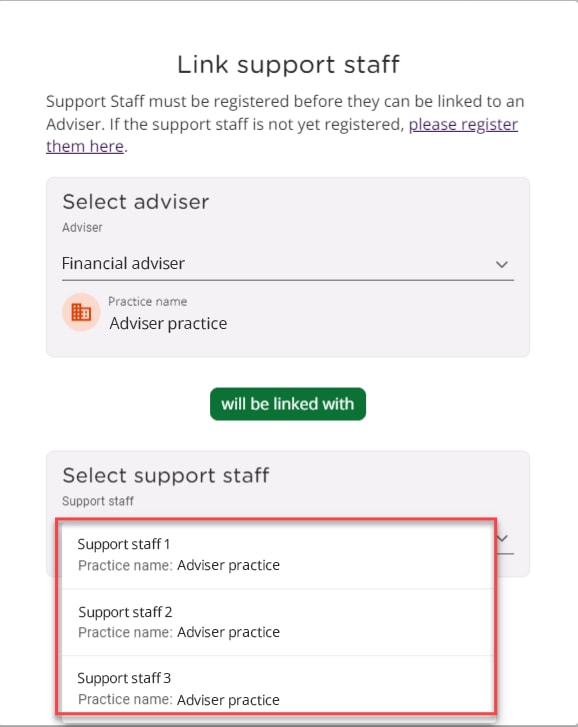
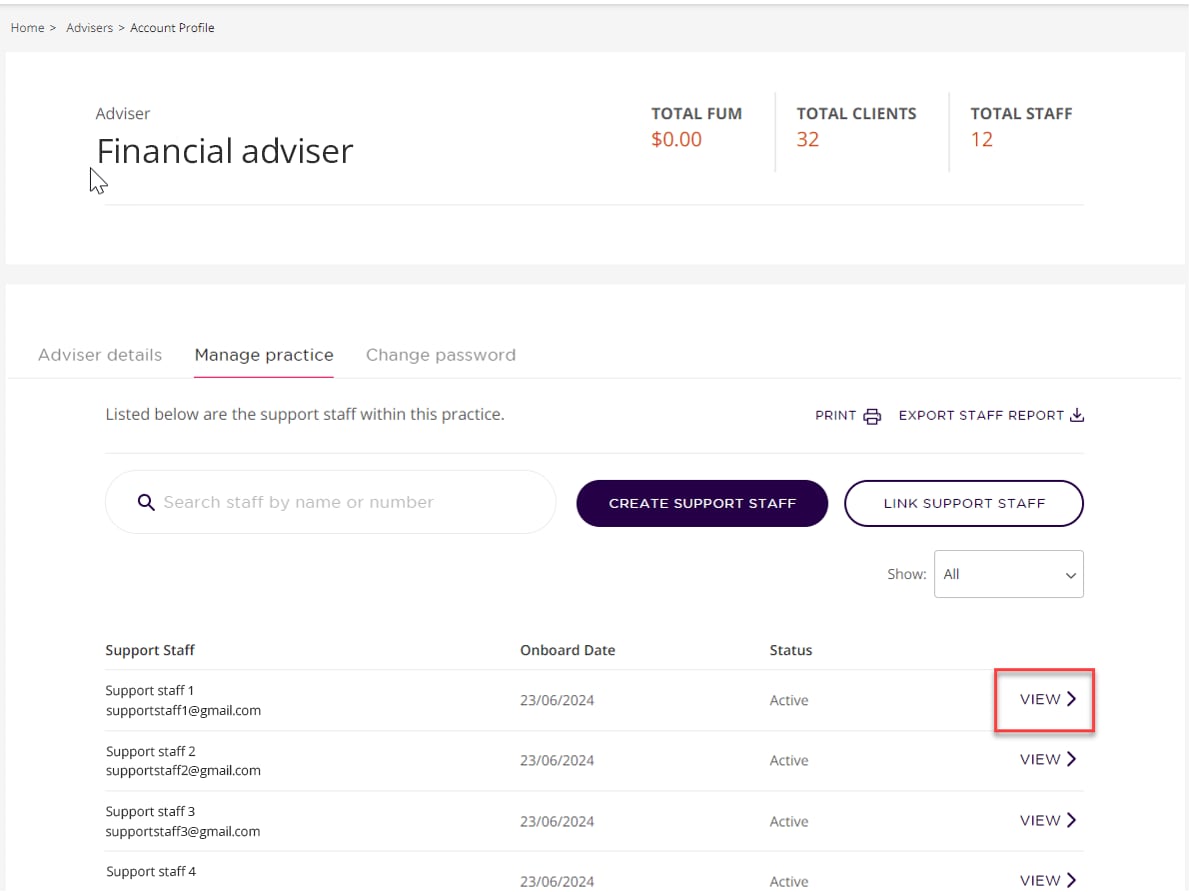
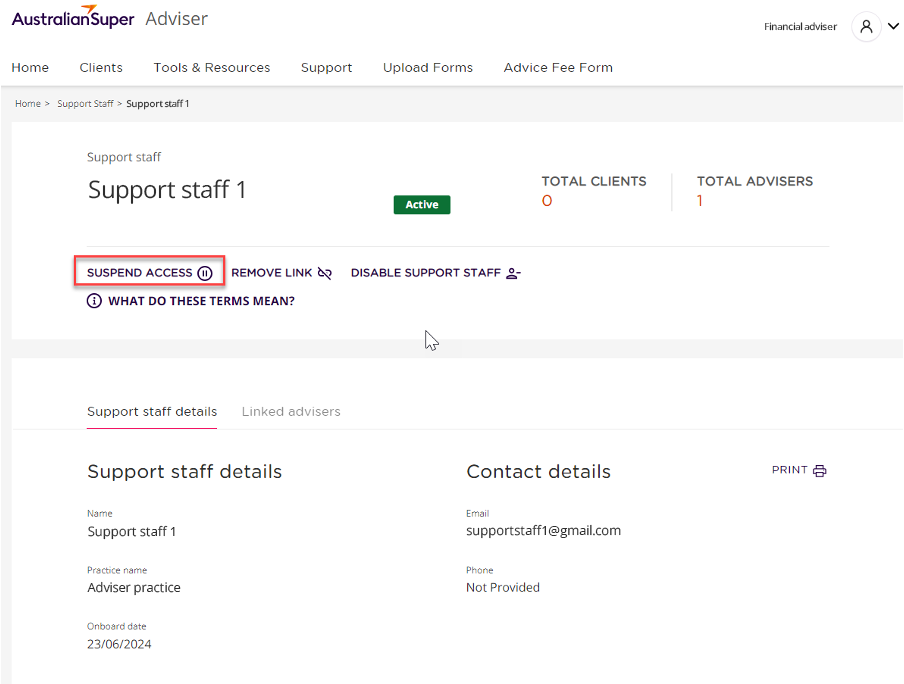
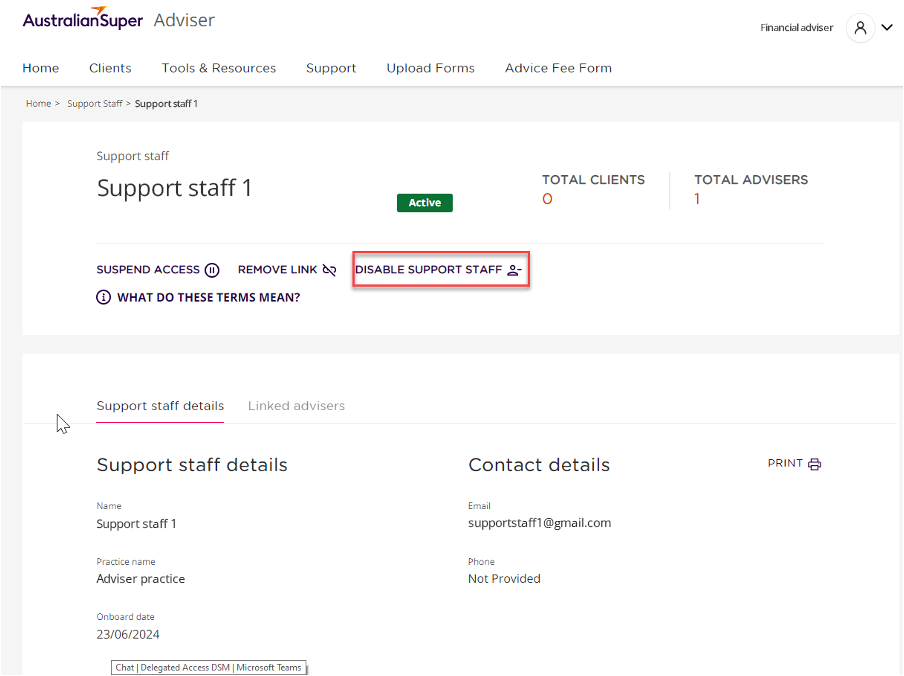
No, for added security only the account holder can manage their own Trusted Devices. However, Advisers can create or link to new support staff. They can also suspend access, remove a link or disable support staff access. -
Is trusting a device mandatory?
No, trusting a device is optional. For example, you might be using a different laptop for a day or two, so you may not want to trust that device. So if you prefer, you can continue to receive a code each time you log in to a particular device. -
How do I view and remove my trusted devices?
In the Adviser Portal, you’ll have the ability to view and remove your trusted devices at any time.
- Log into the portal
- Click on your account name in the top right corner
- Select “My account details”
- Select “Account security” tab
- Select “Manage devices”
- Choose the device you want to remove.
We’re here to help.
If you have any questions or would like to know more, please email us at adviserenquiries@australiansuper.com.
This article is accurate as at the date of publishing: 10 April 2026.
We've mandated multi-factor authentication to the Adviser Portal
To help keep your clients’ accounts secure, AustralianSuper has implemented multi-factor authentication (MFA) to the Adviser Portal as a mandatory security measure.
You’ll now need to enter a one-time code sent to your mobile phone when you log in.
If you're an adviser, Licensee, or support staff who hasn't yet added a mobile number, and now find your Adviser Portal access locked, please follow the instructions below to add a mobile number to your profile.
-
Our commitment to security
The introduction of MFA is an important step in enhancing the security of our members’ personal information. As a member-owned super fund, protecting our members is a top priority. We’re also aware that MFA can result in users having to verify their login multiple times per day. So we’re working on a new feature to improve the log on experience. Stay tuned for further updates.
-
How advisers can add a mobile number
To add a mobile number to your Adviser Portal profile, you’ll need to call us on 1300 362 453 weekdays from 9am-5pm (AEST). For privacy and security reasons, we'll need to verify your identity before changing any details.
Please note that we cannot accept email as a method of adding or updating a mobile number.
-
How to add a mobile number for support staff
Mobile numbers can be added to a support staff account in two ways:
- Advisers can add it in the Adviser Portal:
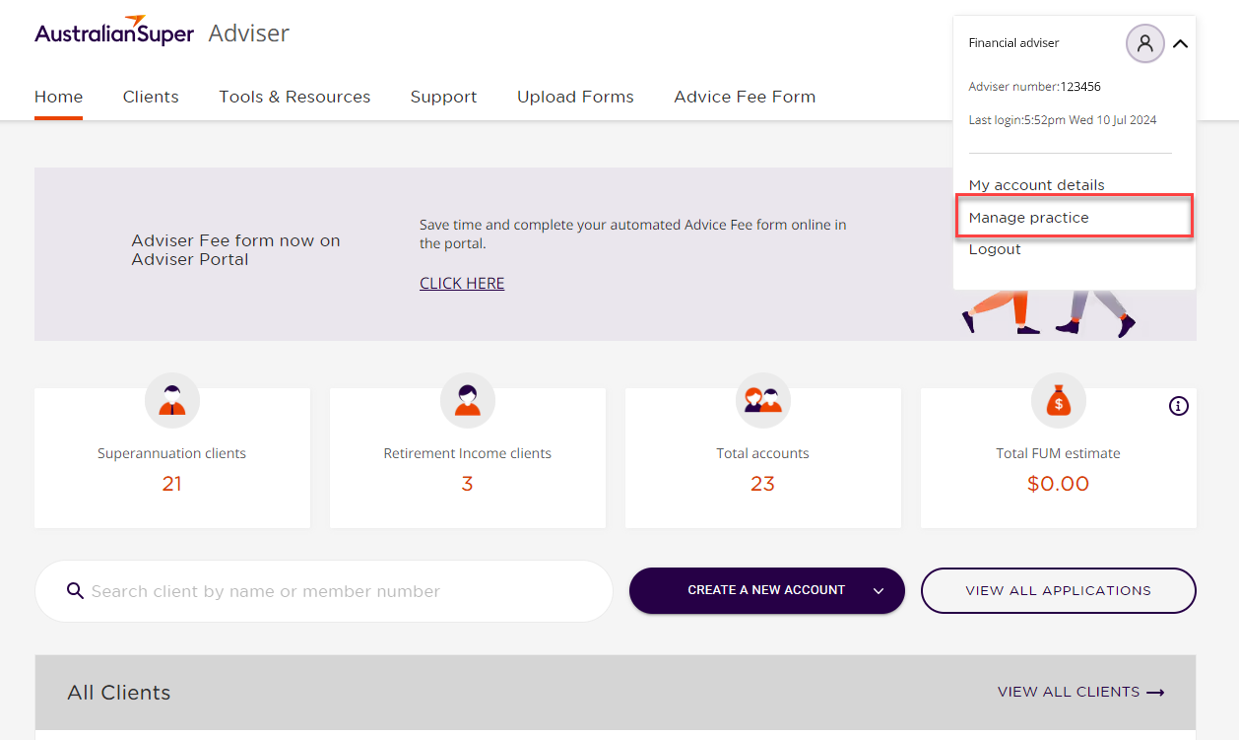
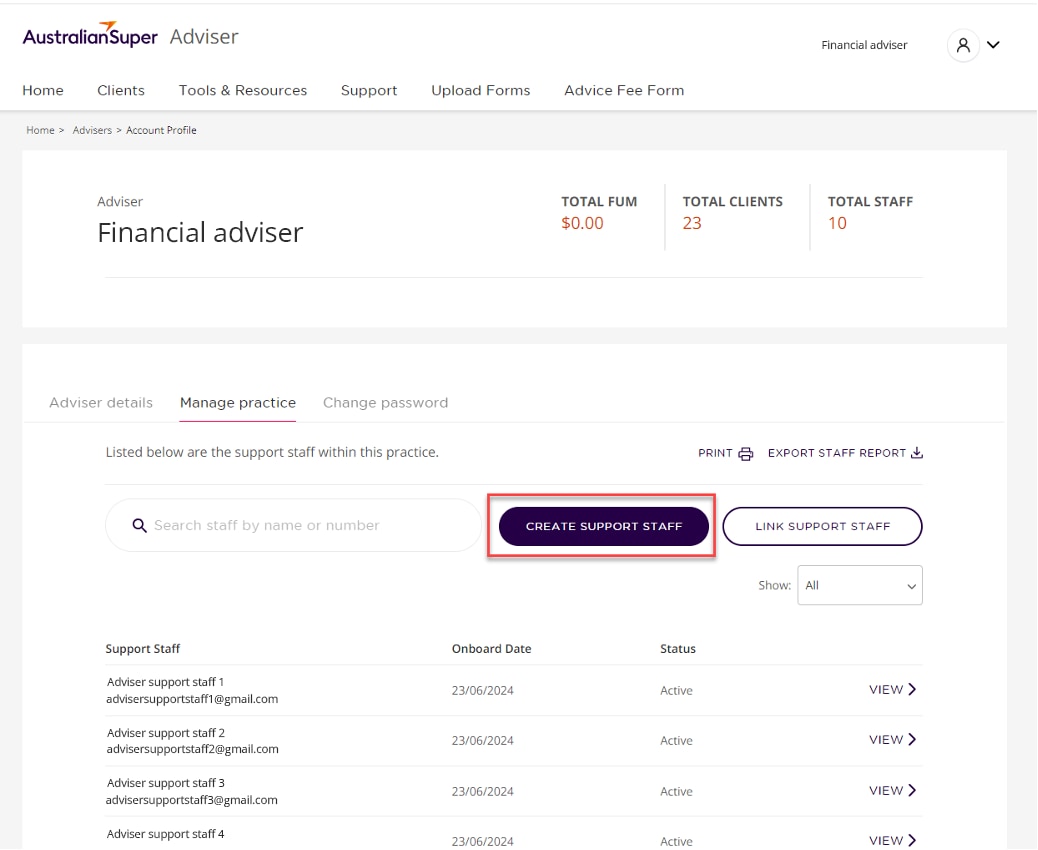
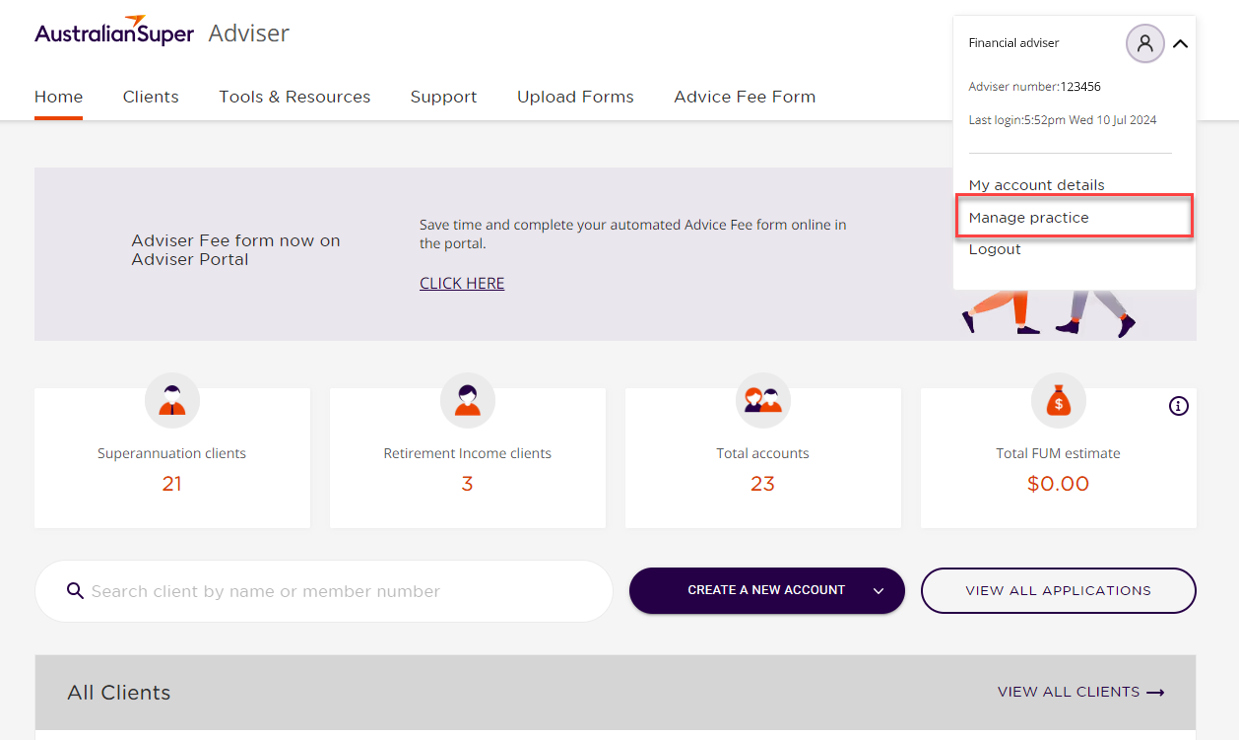
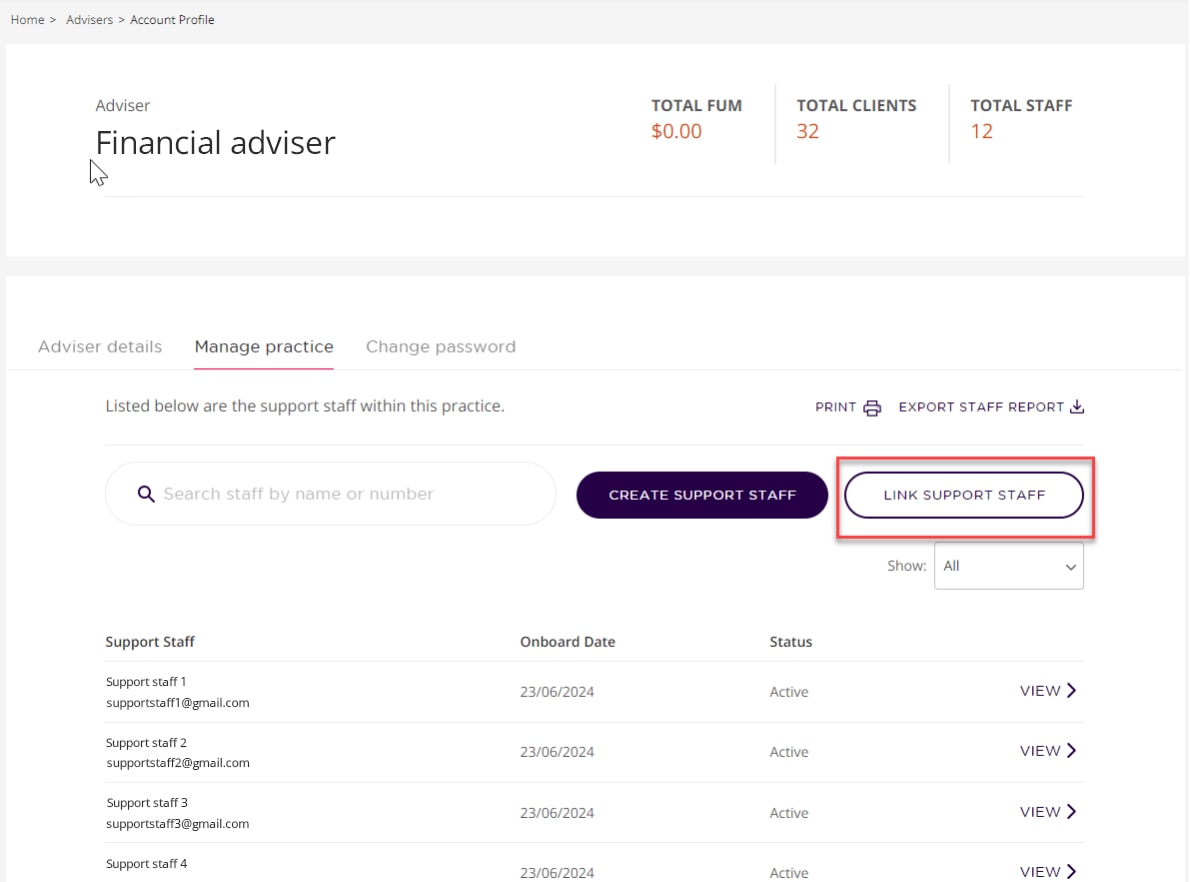
- Navigate to 'My account details' and click on the 'Manage Practice' tab. Here you’ll find a list of your support staff and their contact details.
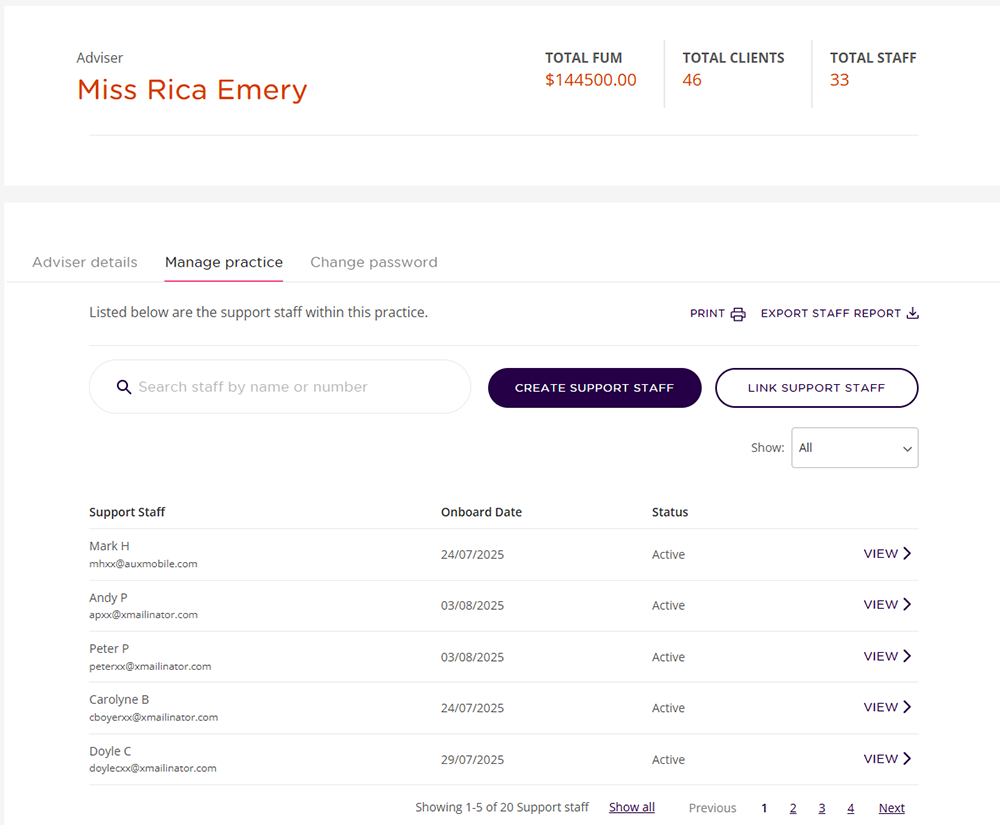
- Click 'view' to see your support staff’s profile, then click 'add mobile'.
- Add your support staff’s mobile number.
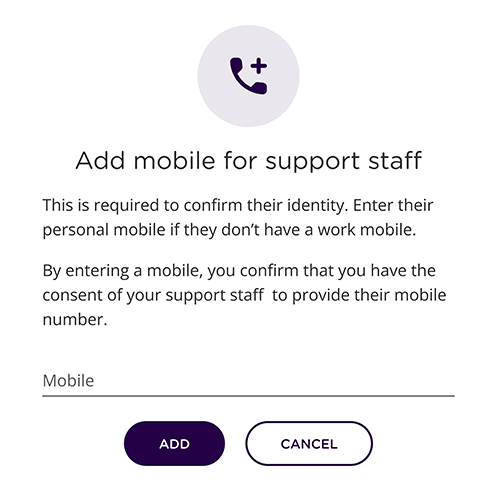
- Support staff can call us on 1300 362 453 weekdays from 9am-5pm (AEST). For privacy and security reasons, we'll need to verify their identity before changing any details.
Please note that we cannot accept email as a method of adding or updating a mobile number.
-
Update a mobile number for support staff
If your support staff need to update their mobile number recorded in the Adviser Portal, there are two options available:
- You can call the Adviser Services team and update the mobile number on their behalf. We’ll need to verify your identity before changing any details.
- Alternatively, your support staff can call to speak to the Adviser Services team to update their mobile number. For privacy and security reasons, each user must call to update their own mobile number so we can verify their identity.
Our Adviser Services team are available on 1300 362 453 or +61 2 8348 1417 for international callers, weekdays from 9am-5pm (AEST).
Please note that we cannot accept email as a method of updating a mobile number.
-
Check your recorded mobile number
Log in to the Adviser Portal to check your mobile number.
You can do this by:
- Navigating to the top right corner of the Adviser Portal home screen and clicking on the drop-down arrow next to your name.
- Select 'My account details' to view your recorded mobile phone number under Contact details.
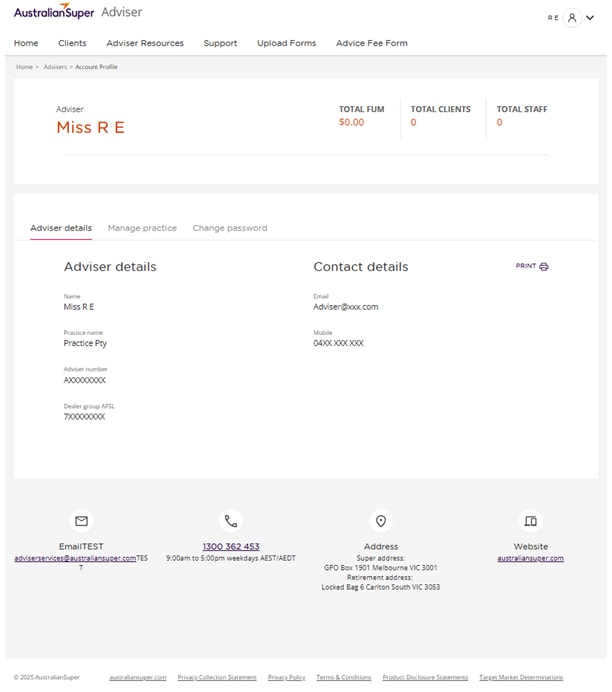
If your mobile number is correct, you don’t need to do anything.
-
Update your existing mobile number
If your mobile number is incorrect, please call us on 1300 362 453 weekdays from 9am-5pm (AEST). For privacy and security reasons, we'll need to verify your identity before changing any details.
Please note that we cannot accept email as a method of updating a mobile number.
We’re here to help.
If you have any questions or would like to know more, please email us at adviserenquiries@australiansuper.com.
This article is accurate as at the date of publishing: 26 March 2026.Important document updates for Advisers from 30 May 2026
We’re releasing updated PDSs, IBRs1 and guides effective 30 May 2026. As distributors of our products, it’s important that you dispose of all previous versions to ensure your clients receive the most current versions, some of which include join forms. Please begin using the updated documents and join forms from 30 May 2026.-
Documents being updated
From 30 May 2026, the following updated documents will be available:
- AustralianSuper plan PDS (for choice2 members)
- AustralianSuper plan PDS (for deemed3 members) not available online
- Personal Plan PDS
- Super Options PDS
- AustralianSuper Select PDS
- Investment guide IBR
- Fees and costs IBR
- Providing your TFN IBR
- Tax and super IBR
- Insurance in your super guide
- Insurance in your super guide for AustralianSuper Select
- Incorporation by reference
- A choice member is someone who actively chooses AustralianSuper as their default fund
- A deemed member is someone who joins AustralianSuper by default through their employer
Clearer advice fee labels across member and adviser reporting
From 1 July 2026, we’re improving how advice fees are described across our digital and paper reporting to make it clearer for members and easier for advisers to reconcile and explain.
-
What is changing
The current catch-all transaction label “Advice fee” will be replaced with three specific transaction labels that match the existing Paying an advice fee form:
- One-off advice fee,
- Fixed-term advice fee, and
- Ongoing advice fee.
These labels will display in the Member App, Member Portal, and the Adviser Portal. They’ll also show in exit and annual statements1 – as well as other ad hoc transaction reporting.
1. If the advice fees are being deducted from your client’s Member Direct Cash account, the three specific advice fee labels will appear in the Member Direct Portal. However, in their exit and annual statements, the three specific advice fees will continue to be shown collectively under “Advice fees”.
-
Benefits of the change
For advisers and support staff, the change provides clearer transaction visibility, faster matching to the correct fee authority, and simpler client conversations.
For your clients who are AustralianSuper members, the improved descriptions help them better understand the nature and frequency of any deductions from their super, reducing confusion and supporting transparency.
We’re here to help.
If you have any questions about this change, please contact the Adviser Services team.
This article is accurate as at the date of publishing: 20 May 2026.Improved accumulation join process in the Adviser Portal
We’ve listened to your feedback and improved the way your clients apply to join AustralianSuper when it’s done through the Adviser Portal.
These changes will increase client engagement, reduce your workload, and enhance compliance throughout the (accumulation account) application process.
-
What’s changed for your clients?
- Easier to review and validate their application details, reducing the risk of errors
- Improved messaging at key points throughout the application process
- Clearer timeframes around completion dates
- The PDS and TMD will be presented directly to them
- They’ll directly approve the ‘Declaration and acknowledgement’ section, reducing reliance on the Adviser
- Before reviewing their application, clients will need to verify their identity using a one-time-password (mobile number will be a mandatory field).
-
What’s changed for Advisers and Support staff
- Data quality in the applications will improve, reducing the need for follow ups
- A wider range of ‘Status’ types in the Adviser Portal, for a clearer overview of all join applications at any point in time
- A new ‘Action’ column in the Adviser Portal, making it easier to understand the next steps in the process
- Improved messaging during the process, enabling you to assist your client if required.
-
We’re here to help
- If you’d like a walk-through of the improved accumulation join process, email adviserservices@australiansuper.com
- For general troubleshooting, email Advice Operations at adviserenquiries@australiansuper.com
- To set up Adviser Portal access, scroll to the top of this page and select the dropdown option from the ‘Login’ button.
And remember, if your client needs support during the application process (e.g. they didn’t receive a one-time-password for verification) we’ll communicate with both you and your client, to make it easy for you to provide them with assistance.
This article is accurate as at the date of publishing: 29 January 2026
We’re updating the Member Direct investment menu - effective 1 April 2026
AustralianSuper reviews the Member Direct investment menu annually to ensure we offer a range of suitable investments. As a result of a recent review, we’re adding 6 new ETFs, re-opening 2 ETFs that are currently closed, and closing 1 LIC. These updates will be effective from 1 April 2026.
-
These new ETFs are being added to the menu
ASX Code ETF Name Category/Channel Investment Limit AQLT Betashares Australian Quality ETF Australian Shares No Limit DACE Dimensional Australian Core Equity Trust - Active ETF Australian Shares 50% DHHF Betashares Diversified All Growth ETF Diversified No Limit FSML Firetrail Australian Small Companies Fund – Active ETF Australian Shares 50% PGA1 Plato Global Alpha Fund Complex ETF International Shares - Developed Markets (Global) 50% URNM Betashares Global Uranium ETF International Shares - Developed Markets (Region/Sector) 25% -
These closed ETFs are re-opening and will be added to the menu
ASX Code ETF Name Category/Channel Investment Limit DJRE SPDR Dow Jones Global Real Estate ESG Tilted ETF Property & Infrastructure 50% IOO iShares Global 100 ETF International Shares - Developed Markets (Region/Sector) No Limit -
This LIC is being closed to new investment
ASX Code LIC Name Category/Channel Investment Limit MOT MCP Income Opportunities Trust Listed Investment Companies (LICs) 50%
You can view a copy of the updated investment menu from 1 April 2026.
This article is accurate as at the date of publishing: 18 March 2026.Important updates to the Member Direct investment option
From 28 March 2026, there will be several important updates to the Member Direct (MD) investment option.
-
If your clients have this option, they’ll be informed that we’re
- changing the research provider from UBS Securities Australia Limited (‘UBS’) to Morningstar Australasia Pty Ltd (‘Morningstar’) to expand research coverage of ASX listed securities
- reducing Portfolio administration fees for ‘Term Deposits’ and ‘Shares, ETFs & LICs’ levels of access
- reducing Brokerage fees when buying and selling shares, ETFs or LICs
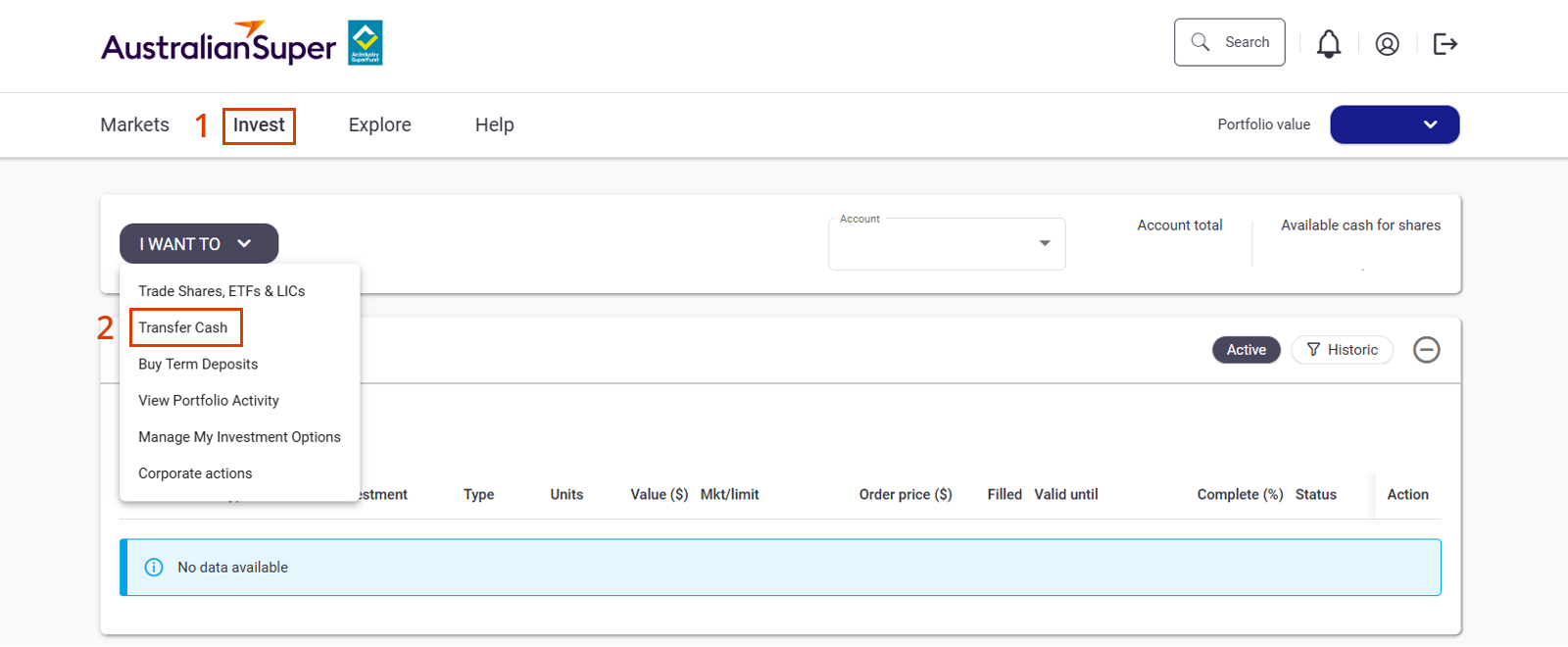
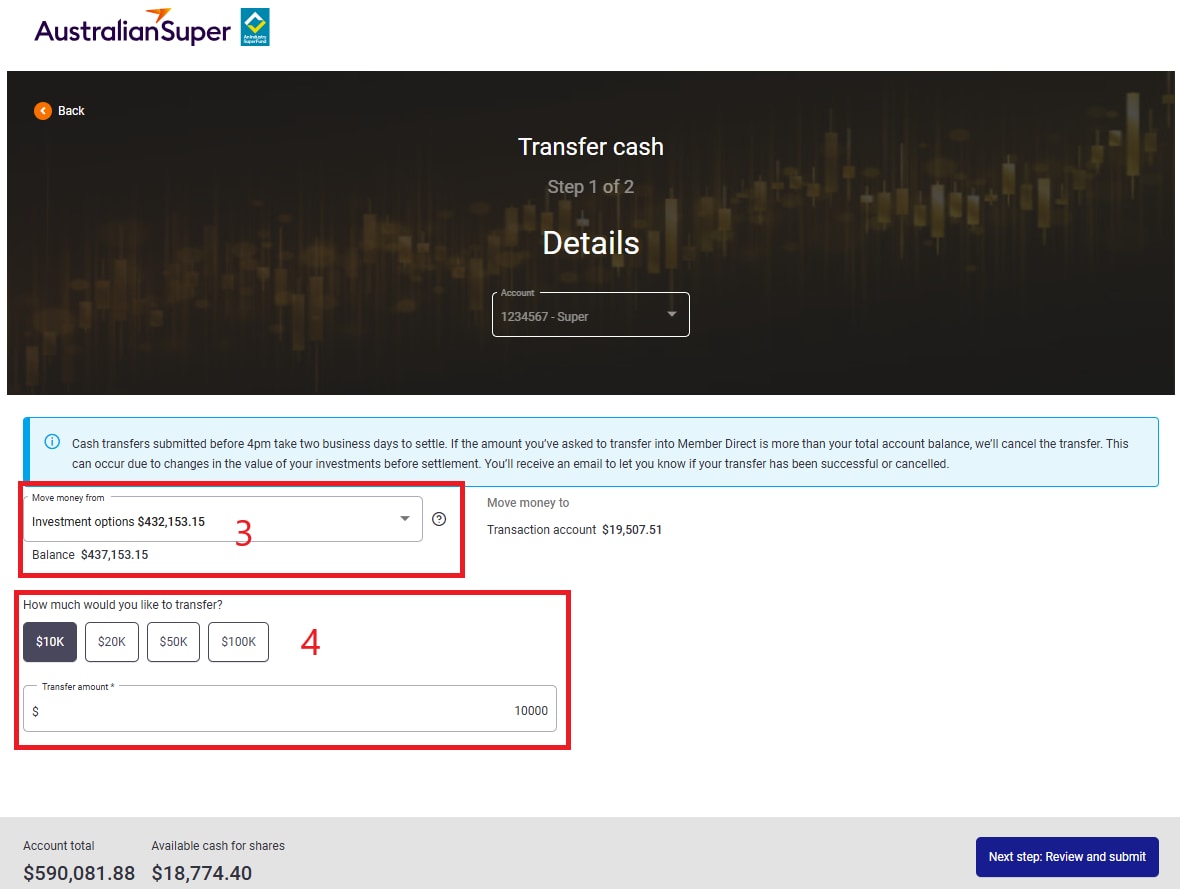
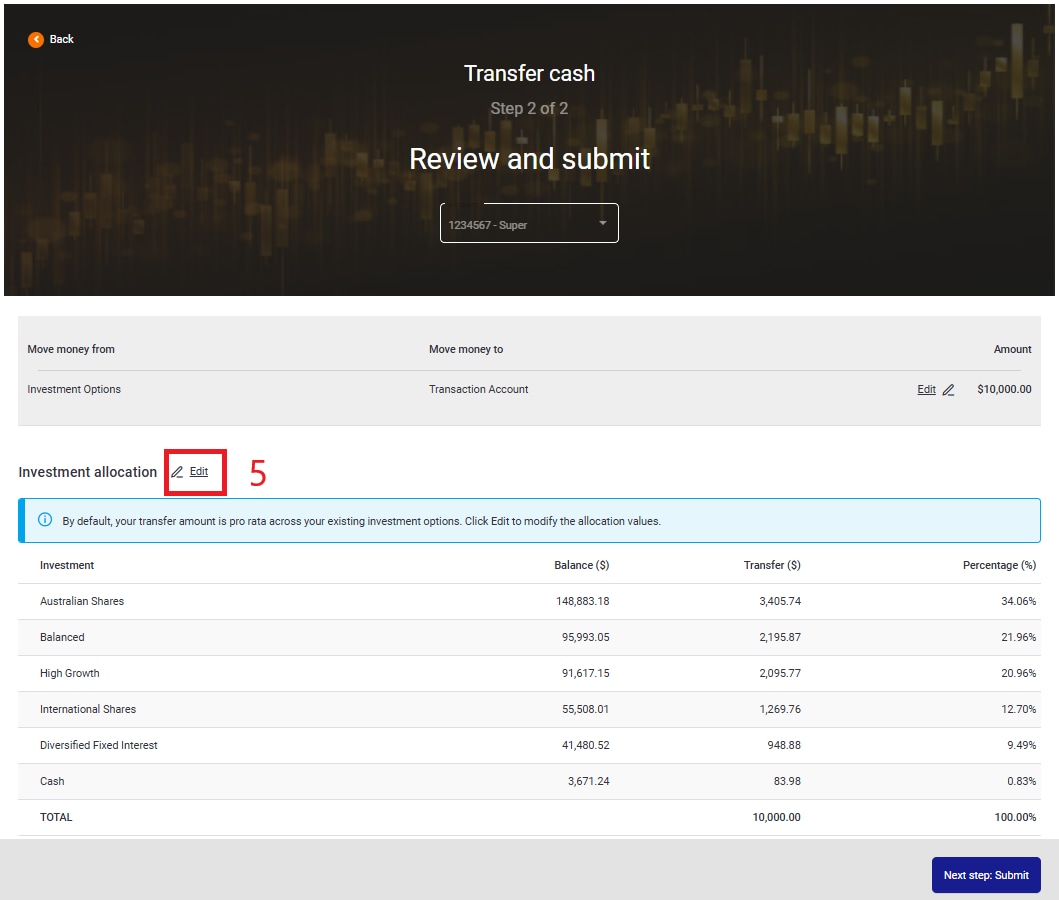
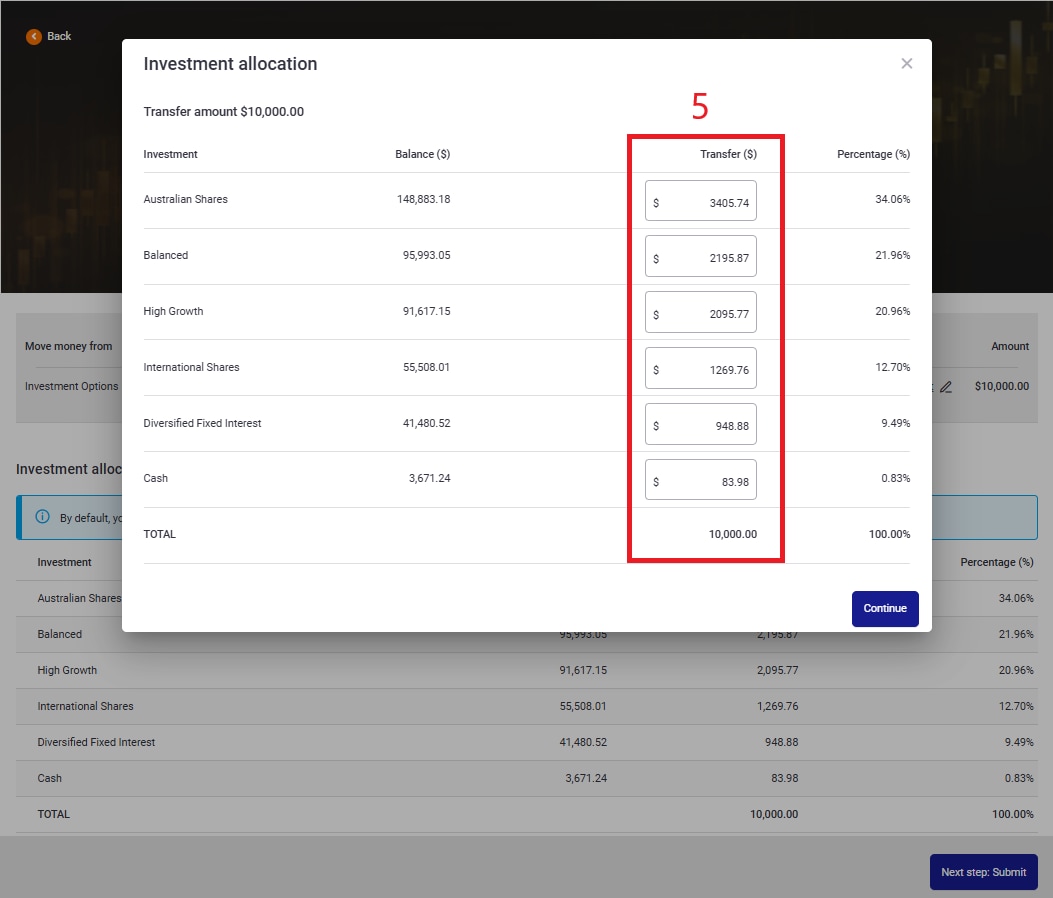
- enhancing the cash transfer process to allow members, and their advisers, to specify dollar amounts to be transferred into or out of AustralianSuper’s other investment options when actioning a cash transfer from or to the MD Cash account
- specifying the order in which we’ll action the early redemption of Term Deposits when we dispose of or rebalance their MD investments
- updating the Terms and Conditions for using the AustralianSuper Member Direct online platform.
-
What this means for your clients with MD
MD online platform
You or your clients won’t be able to access the MD online platform between 11pm AEDT on Friday 27 March 2026 and 1pm AEDT on Saturday 28 March 2026 while we update the system. We encourage members to log in once the system is back online to familiarise themselves with the changes, including reading all explanatory notes and disclaimers.
Re-submission of orders
To help us manage the change, any remaining open orders as at 11pm AEDT on Friday 27 March 2026 will be cancelled. This includes open or unfilled 30-day limit orders, and open part-filled at market orders.
Accordingly, members will be advised not to set up any limit orders after market close (4pm AEDT) on Friday 27 March 2026 as these will be automatically cancelled at 11pm AEDT. If required, they can set up new limit order requests once the platform is back online on Saturday 28 March 2026.
Fee changes
If members have selected the Cash Account level of access their fees won’t change. In all other cases, their Portfolio administration fee and any Brokerage fees will reduce from Saturday 28 March 2026.
-
What advisers need to do
When you first access the MD online platform from 28 March 2026, you’ll need to read and accept the updated Terms and Conditions for using the AustralianSuper Member Direct online platform available on our Member Direct page.
In addition we’ll also be updating the:
- MD investment option guide, Fees and Costs IBR and the Choice Income PDS,
- MD investment menu on, or around 1 April 2026 with additions and deletions as part of the annual review,
- TTR Income PDS, as the associated join form is being refreshed and the Binding death nomination form is being updated.
As distributors of our products, it’s important that you:
- dispose of all previous versions of the documents mentioned above (including any join forms) to ensure your clients receive the most current versions, and
- use the updated documents (including any join forms) from 28 March 2026.
-
What your clients with MD need to do
When your clients first access the MD online platform from 28 March 2026, they’ll need to read and accept the updated Terms and Conditions for using the AustralianSuper Member Direct online platform, available on our Member Direct page.
If they wish to change their level of access to take advantage of the reduced fees, they can log into MD and make the change in their account settings once the platform is back online on Saturday 28 March 2026.
If your client is not comfortable with the changes and they wish to cancel their MD account, they can log into MD and make the change in their account settings before 4pm AEDT on Friday 27 March 2026.
-
We’re here to help
For more information, including details of fee reductions , please refer to the SEN titled Important updates to the Member Direct investment option February 2026.
If you have any questions, email adviserservices@australiansuper.com or call 1300 362 453 weekdays from 9am – 5pm AEST/AEDT.
Changes to insurance costs from 30 May 2026
On 30 May 2026, the cost of insurance cover1 is increasing2 for AustralianSuper members in the AustralianSuper plan, Super Options and the Personal Plan. This means that some of your clients may be impacted.
-
Why is the cost of insurance increasing
Every year we review the insurance we offer and what it costs. As part of the review, the cost of members’ insurance cover may change - increase or decrease3. This year the increases are due to a rise in Death, Total & Permanent Disablement (TPD) and Income Protection claims paid over the past year.
AustralianSuper is a profit-for-member super fund, so members only pay for what it costs to provide their insurance.
-
What are the average increases to weekly insurance costs
Cover Average % increase Death 20% TPD 40% Income Protection with a 60-day or a 30-day waiting period Benefit payment period up to two years 38% Benefit payment period up to five years 9% Benefit payment period up to age 65 No change You’ll also find a summary of the new costs on pages 2 to 4 of the Significant Event Notice (SEN) titled Important changes to insurance costs that we’re sending to members.
-
What if my client doesn’t have insurance cover
If they don’t currently have cover4, they don’t pay for it. But we still need to tell them about the new costs. That’s because their basic cover may start in the future (if they become eligible), or they could be thinking about applying for cover or transferring cover from another super fund or insurer.
-
How can my client check their insurance cover
Before they make any decisions about their insurance or super, they can check their cover by using the AustralianSuper app or logging into their account and going to Insurance, then Manage insurance.
-
How can my client calculate their costs
To calculate their new weekly costs, your client can use our Insurance calculator. It compares the cost of cover before, and from 30 May 2026. They can also calculate them manually at australiansuper.com/InsuranceCosts
-
Where do I get more information
Please refer to the SEN which includes a summary of the new costs for Death, TPD and Income Protection cover.
There is also information about work rating and a link to the work rating tool.
Your client can refer to page 6 of the SEN for help and access to advice about insurance including links to forms, calculators, guides and contact details
-
Disclaimers
- AustralianSuper insurance is provided by TAL Life Limited (the Insurer) ABN 70 050 109 450, AFSL 237848.
- The cost of cover is increasing for all cover types except Income Protection with a benefit payment period up to age 65 (which isn’t changing).
- From 27 May 2022 to 29 May 2026, overall insurance costs decreased between 17% to 37% for eligible AustralianSuper plan and Super Options members who received basic age-based cover. Eligible AustralianSuper plan and Super Options members receive basic age-based Death and TPD cover. Eligible AustralianSuper plan members also receive basic Income Protection with a benefit payment period up to two years and a 60-day waiting period.
- If your client doesn’t know whether they have cover or not, they can use the AustralianSuper app or log into their account to find out.
Earnings tax increase for super balances over $3m
From 1 July 2026, a significant change to the taxation of large superannuation balances will come into effect with the introduction of Division 296 – Better Targeted Super Concessions. Transitional arrangements will apply for the 2026-27 financial year.
-
Who is affected?
The measure is designed to reduce tax concessions on very large super balances, while leaving the existing framework unchanged for the vast majority of Australians. This change will affect around 80,000 to 90,000 Australians, or roughly 1 in 200 people with super1.
1. Source: superannuation.asn.au/understanding-the-listo-and-division-296-superannuation-tax-changes/
-
What are the tax rates?
Under Division 296, individuals with a total superannuation balance above $3 million will be subject to additional tax on the realised investment earnings attributable to the portion of their balance above that threshold.
- For the portion of their balance greater than $3 million and up to $10 million, an additional 15% tax will apply to the attributable earnings.
- For the portion of the balance above $10 million, a further 10% may apply to the attributable earnings.
Importantly, the tax is applied to the individual, not within the super fund and is assessed annually by the ATO. While the tax is personal, AustralianSuper members can elect to release funds from their AustralianSuper accounts to pay the liability.
-
Considerations for advisers
For financial advisers, Division 296 introduces new considerations when supporting high balance clients, including monitoring total super balances across multiple funds, managing the timing of realised earnings, and reviewing long term contribution and retirement strategies.
Advisers working with AustralianSuper members may also see increased demand for guidance on balance aggregation, developing and implementing transition year strategies, cash flow impacts and retirement planning decisions, as affected clients adjust to the new rules.
As 1 July 2026 approaches, early awareness and proactive conversations will be key to helping impacted members navigate the change with confidence.
For more information, please visit the ATO’s Better targeted superannuation concessions page.
This article is accurate as at the date of publishing: 15 April 2026.
Important changes for Advisers from 23 October 2025
We’re releasing new Choice Income and Transition to Retirement (TTR) Income Product Disclosure Statements (PDSs), join forms, Target Market Determinations (TMDs) and Investment Guide effective 23 October 2025.
-
Updated PDS documents, join forms and TMDs
As distributors of our products, it’s important that you:
-
Minimum balance to open new Retirement accounts
Please note that the minimum balance to open a:
- Choice Income account has changed from $50,000 to $10,000,
- TTR Income account has changed from $25,000 to $10,000.
-
Making it easy for your clients to refresh their income account and top-up their savings
AustralianSuper has introduced a simplified account recycling service, enabling advisers to help clients boost their retirement savings with ease.
To learn more, download the form and read our FAQs, please visit our Refresh your income account and top-up your savings page
-
Updated SuperRatings benchmarks
In July 2025, the SuperRatings benchmarks used in the investment objectives of some PreMixed investment options, to compare performance to other funds, were changed. The change removed the number of providers in each benchmark, e.g. ‘50’ was removed from the SR50 Balanced (60-76) Index.
Investment option Super and TTR From To Stable SR50 Capital Stable (20–40) Index SR Capital Stable (20–40) Index Conservative Balanced SR25 Conservative Balanced (41–59) Index SR Conservative Balanced (41–59) Index Balanced SR50 Balanced (60-76) Index SR Balanced (60-76) Index High Growth SR50 Growth (77–90) Index SR Growth (77–90) Index Choice Income From To Stable SRP50 Capital Stable (20–40) Index SRP Capital Stable (20–40) Index Conservative Balanced SRP25 Conservative Balanced (41–59) Index SRP Conservative Balanced (41–59) Index Balanced SRP50 Balanced (60-76) Index SRP Balanced (60-76) Index High Growth SRP50 Growth (77–90) Index SRP Growth (77–90) Index This article is accurate as at the date of publishing: 23 October 2025
Support staff can now create super accounts online
Previously, we announced that advisers and public trustee officers (PTOs) can open super (accumulation) accounts for their clients directly in the Adviser Portal.
To make things even easier for advisers, we’ve enhanced the portal to allow adviser support staff to pre-fill new account applications using their own login details.
-
More information
Main benefits
- Saves time for advisers who delegate this task to their support staff.
- More secure than sharing login details with others.
- Will help to open super accounts faster for clients.
How does it work?
When creating an application, the support staff will select the adviser/PTO who will review and approve (or reject) the application.
On the last page of the application, the option to ‘submit’ is replaced with ‘send for review’. The application will be sent to the selected adviser/PTO to review and approve (or reject).
Help and support
To learn more about the Adviser Portal and support staff access, please read the FAQs on our Adviser Resources page. And if you need further help, please refer to the related article, “Open super accounts online” or contact us.
Important notice about Annual Statements
AustralianSuper will send annual statements to members from September 2025. Advisers should be aware that while the closing balance shown on these statements is correct, it may not match the closing balance members see in the member portal and app.
This is due to a known issue, and AustralianSuper is actively working on a fix. We’re also adding messages to both the member portal and app to alert members about this discrepancy.
If you receive any enquiries from your clients, please explain the situation and reassure them that AustralianSuper is resolving the issue. Then direct them to refer to their annual statement to see the correct closing balance.
If you have any further questions, please contact the Adviser Services team.
This article is accurate as at the date of publishing: 11 September 2025.Important changes for Advisers effective 1 August 2025
We're releasing new Accumulation, Choice Income and Transition to Retirement (TTR) Product Disclosure Statements (PDS) effective 1 August 2025.
-
Updated PDS documents and join forms
As distributors of our products, it’s important that you dispose of all previous versions of our PDSs to ensure your clients receive the most current PDS and join form. Please begin using the updated join forms included in the new PDS.
-
Fees and costs
The confirmed fees and investment costs have been included in the August 1 Accumulation, TTR and Choice Income PDSs, and are also available on our website. -
Changes to our Socially Aware option
AustralianSuper has recently reviewed the investment exclusions (or ‘screens’) that apply to the Socially Aware investment option to better meet member expectations, specifically in relation to the areas of concern subject to screening, and to ensure as far as practical that screens apply to all assets held by the option.
Effective from 1 August 2025, the review has resulted in changes to the strategic asset allocation, investment objectives, risk levels and screens that apply.
For full details of the Socially Aware investment option, including updated details on the implementation and monitoring of screens, refer to:
- For super accounts: australiansuper.com/InvestmentGuide
- For Choice Income or TTR Income accounts: the relevant product disclosure statement at australiansuper.com/pds
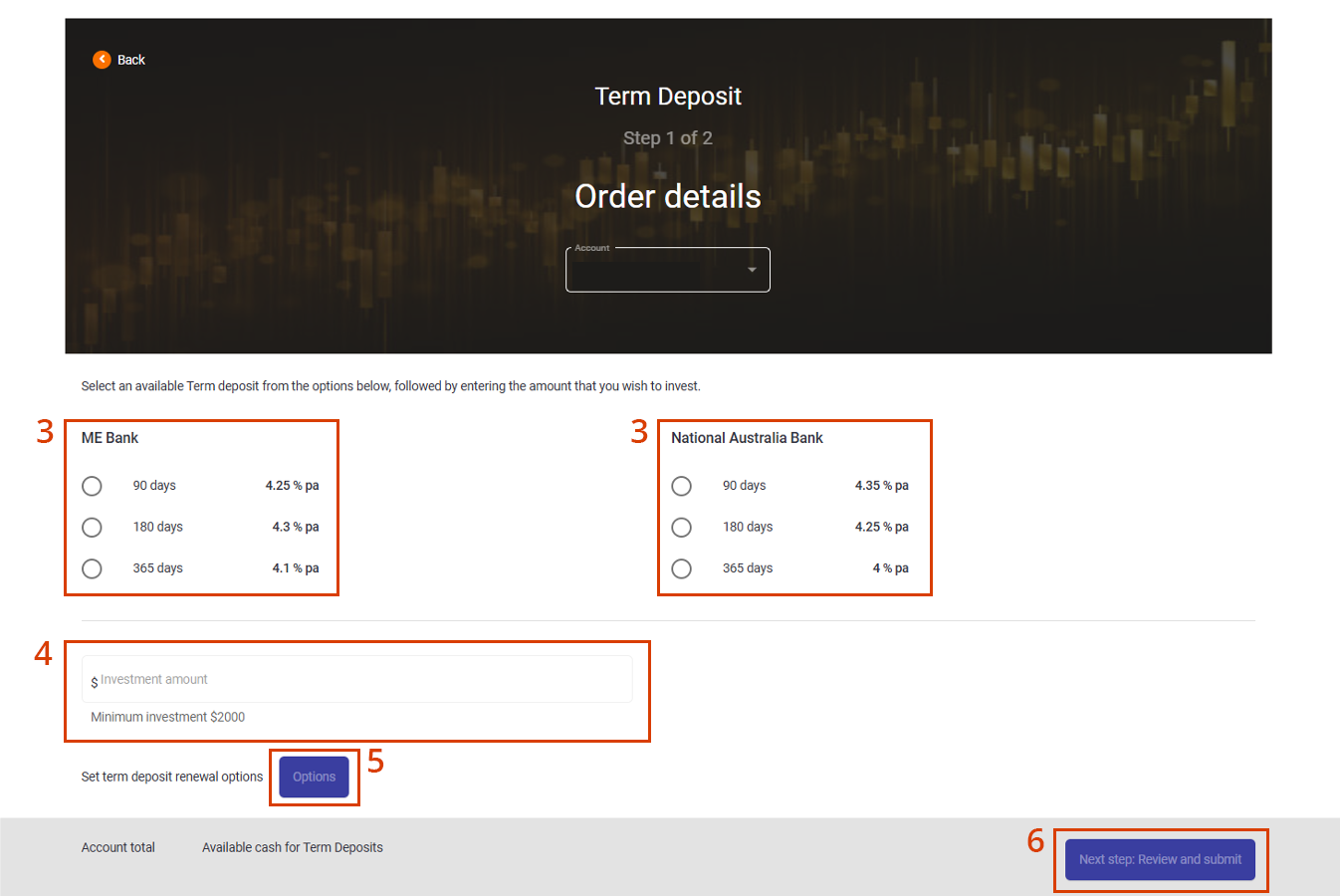
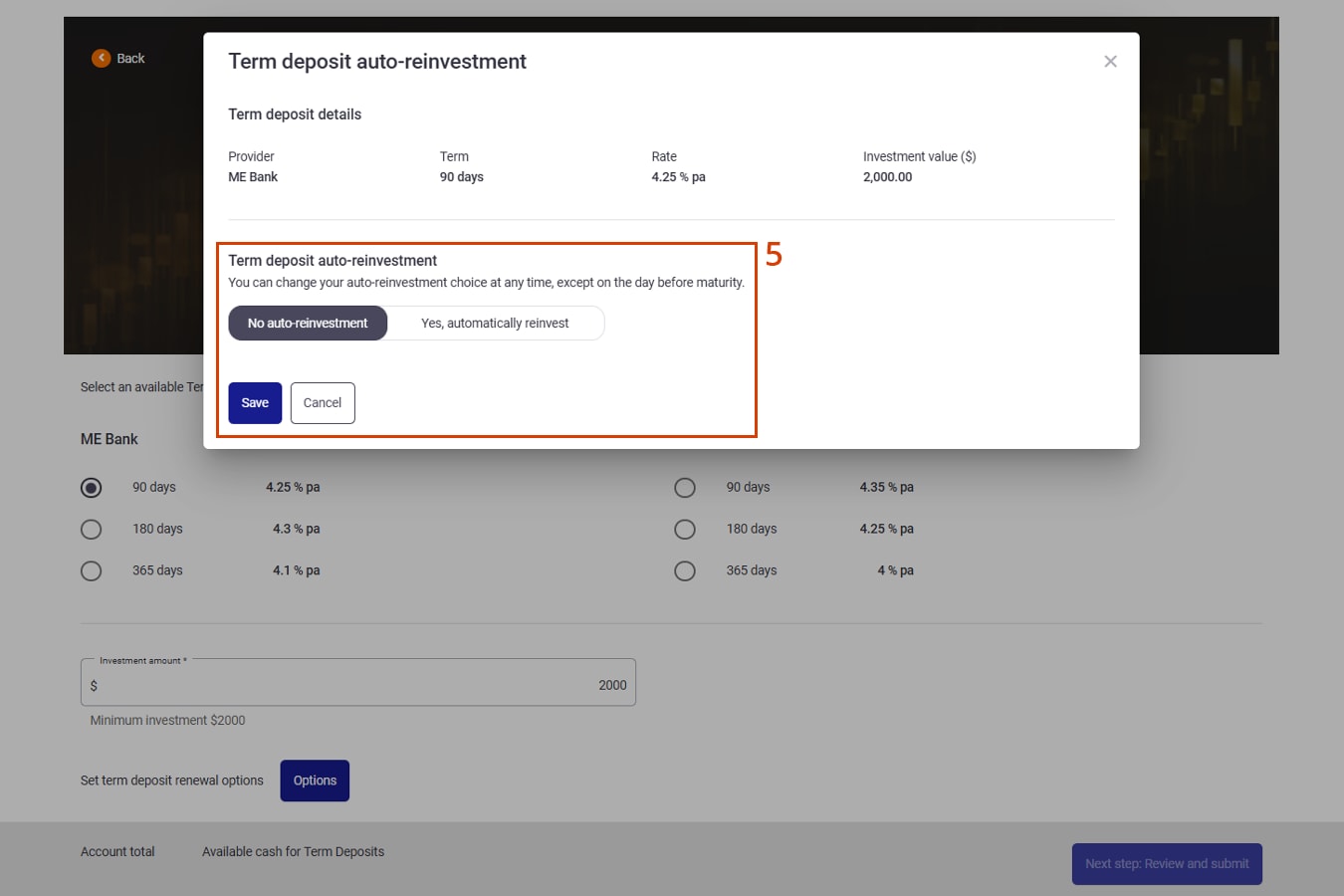
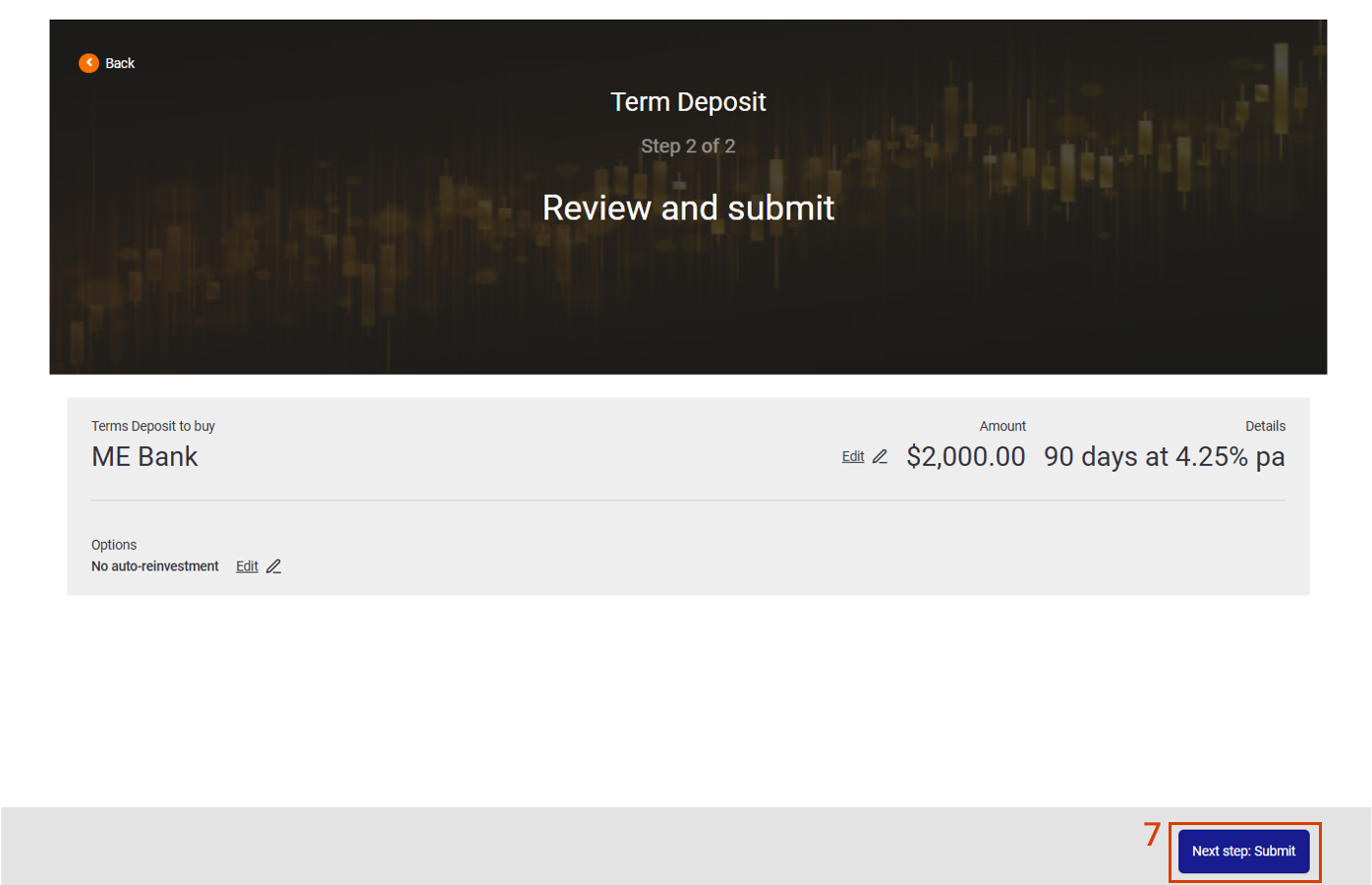
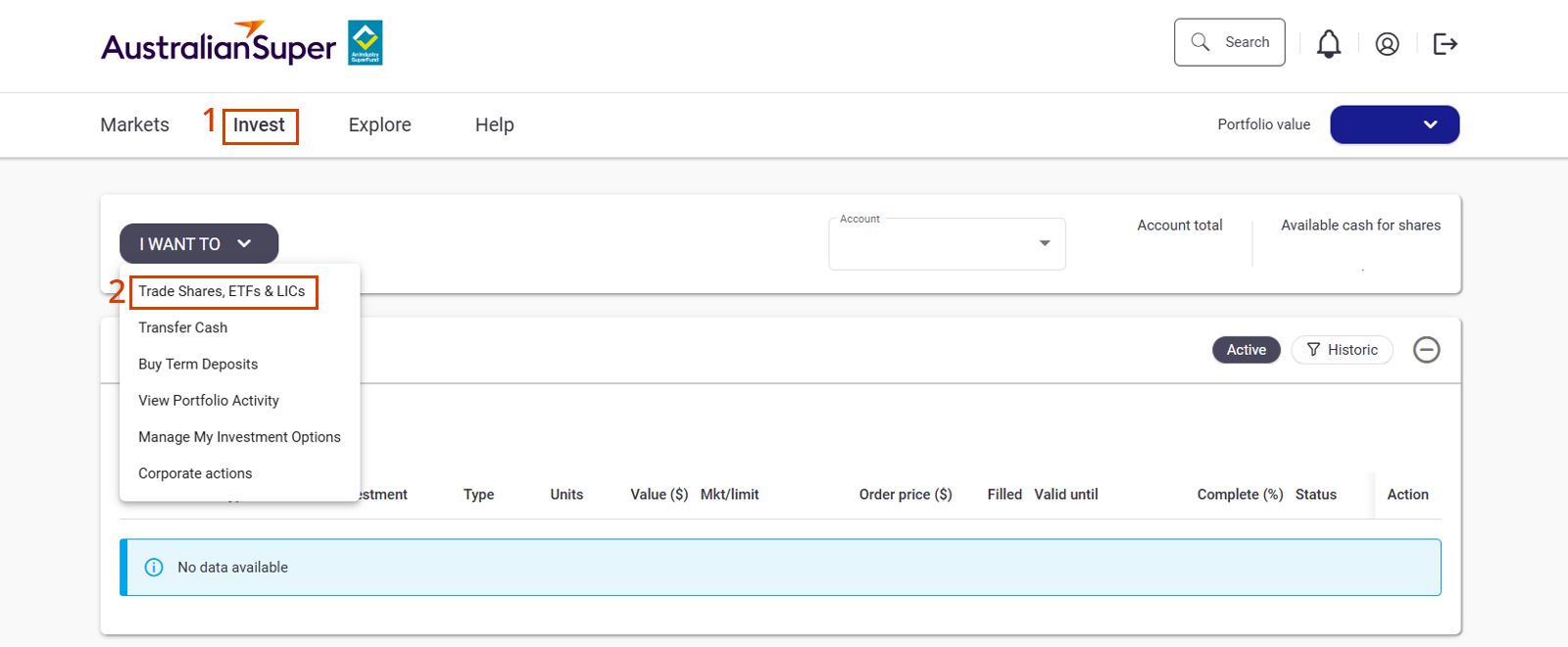
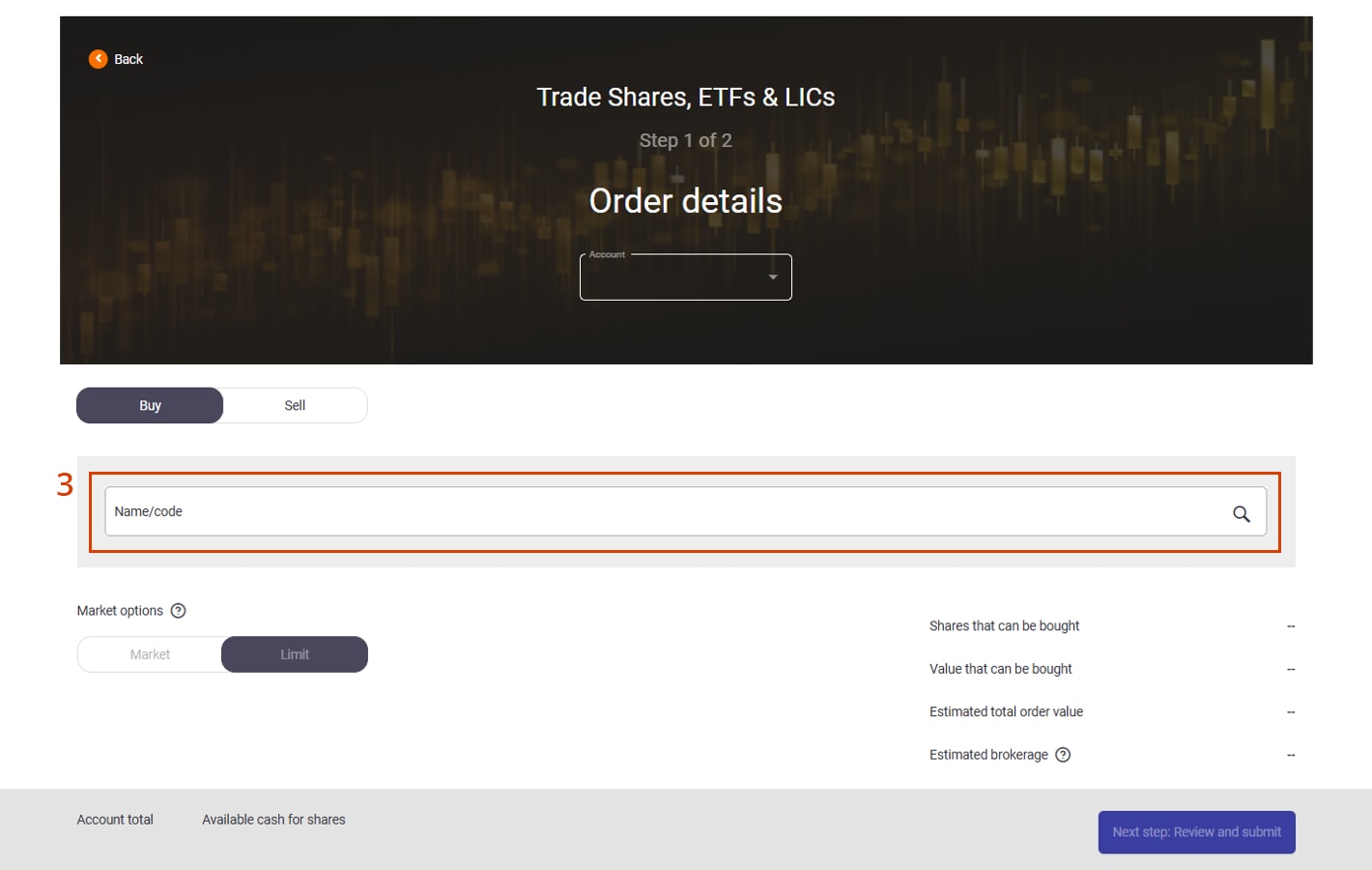
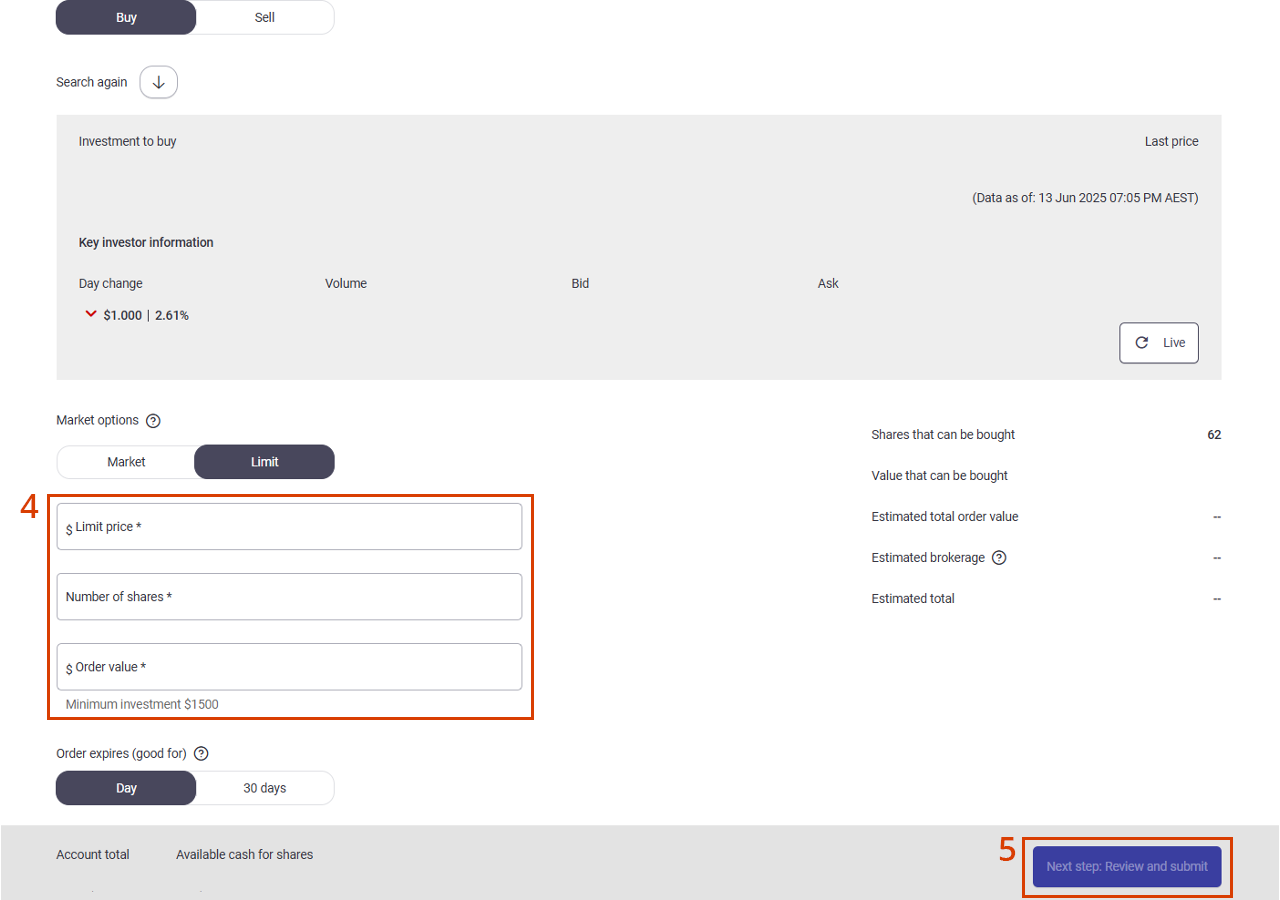
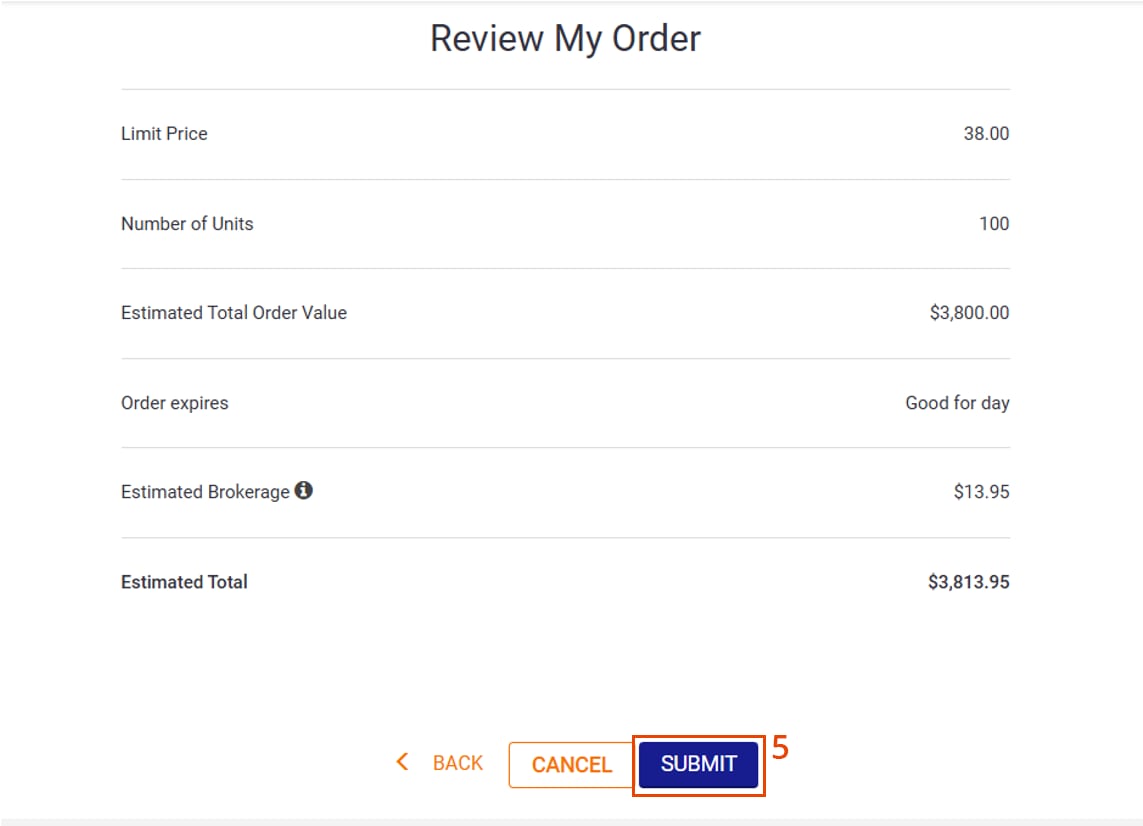
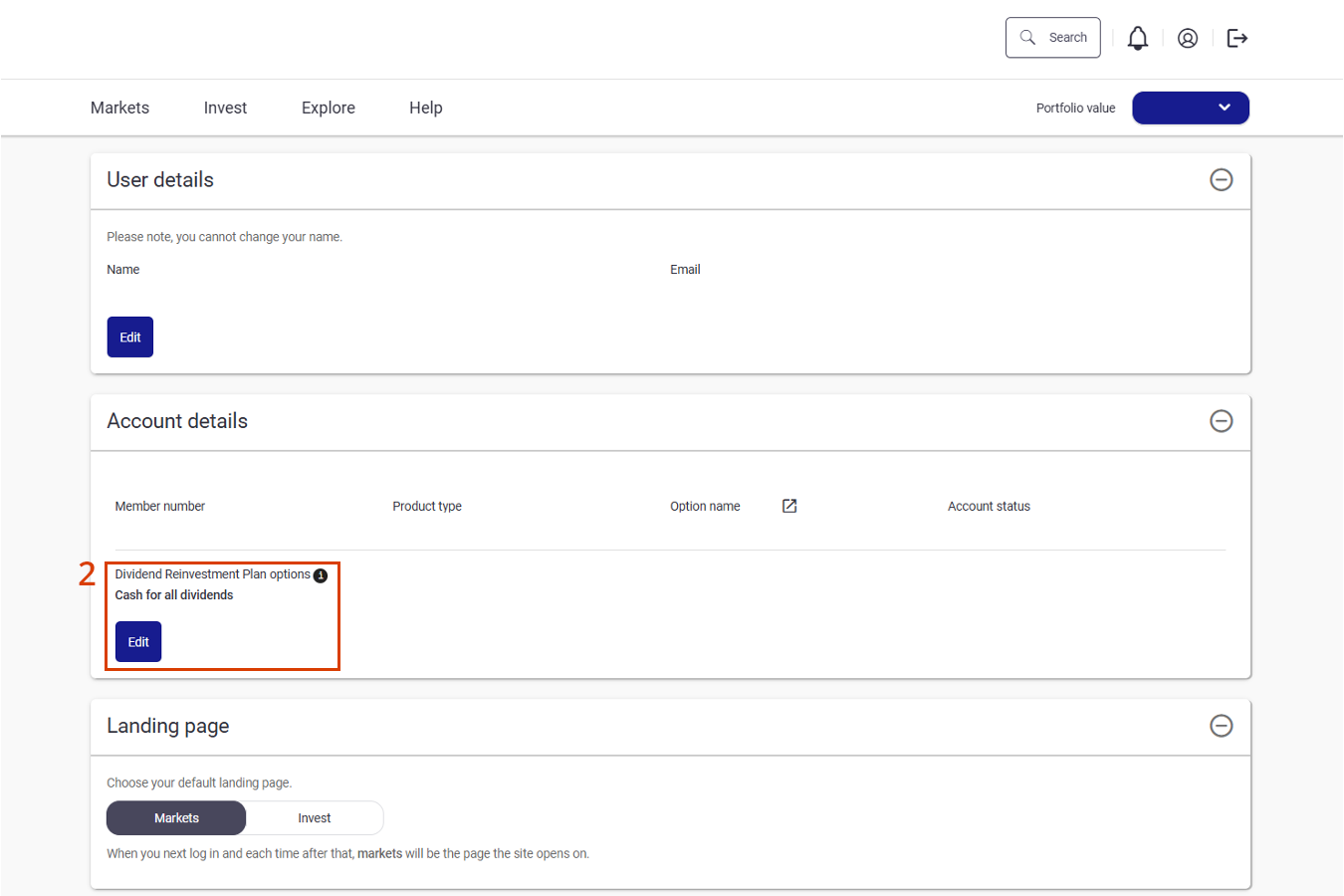
New Member Direct FAQs
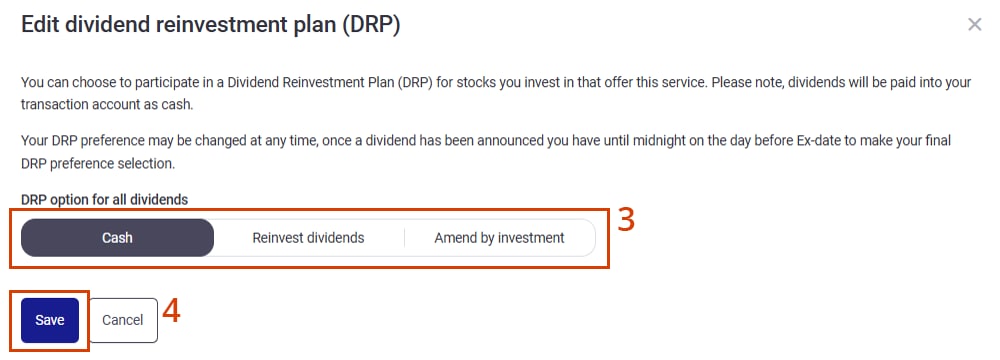
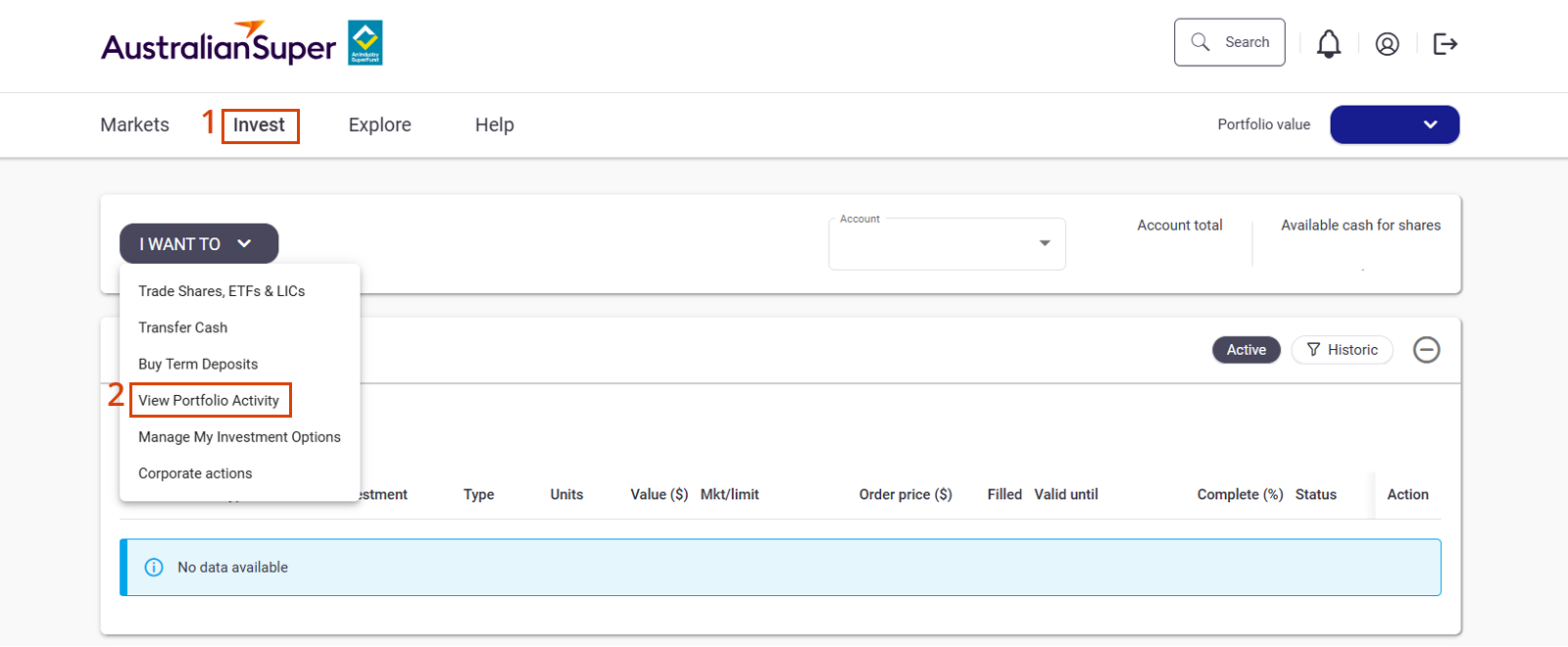
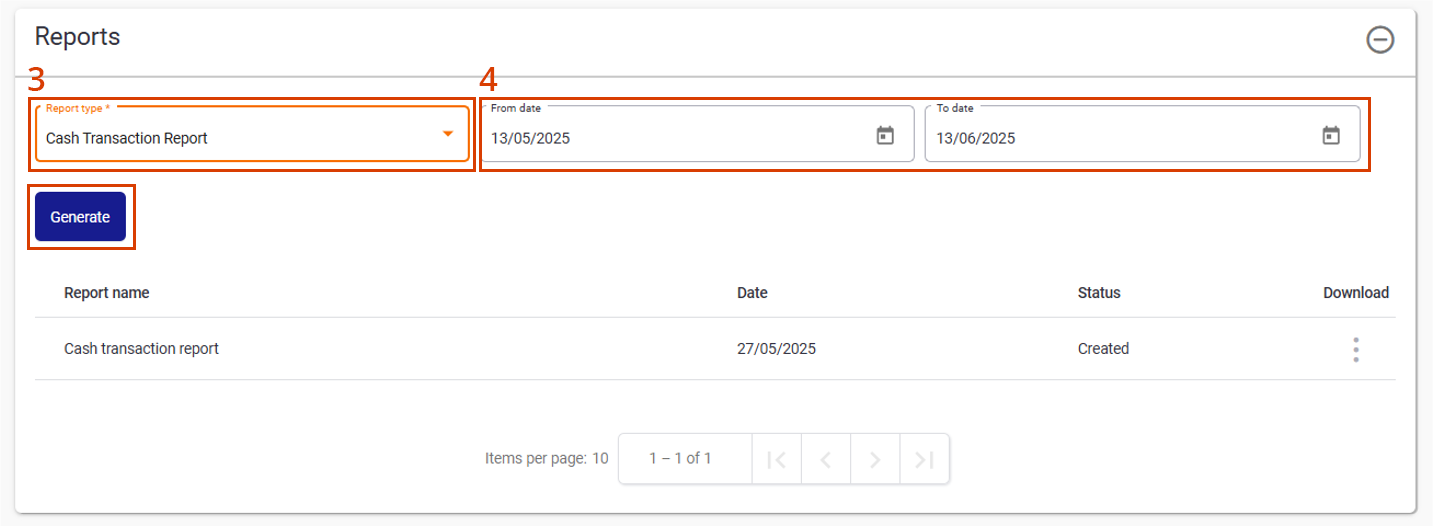
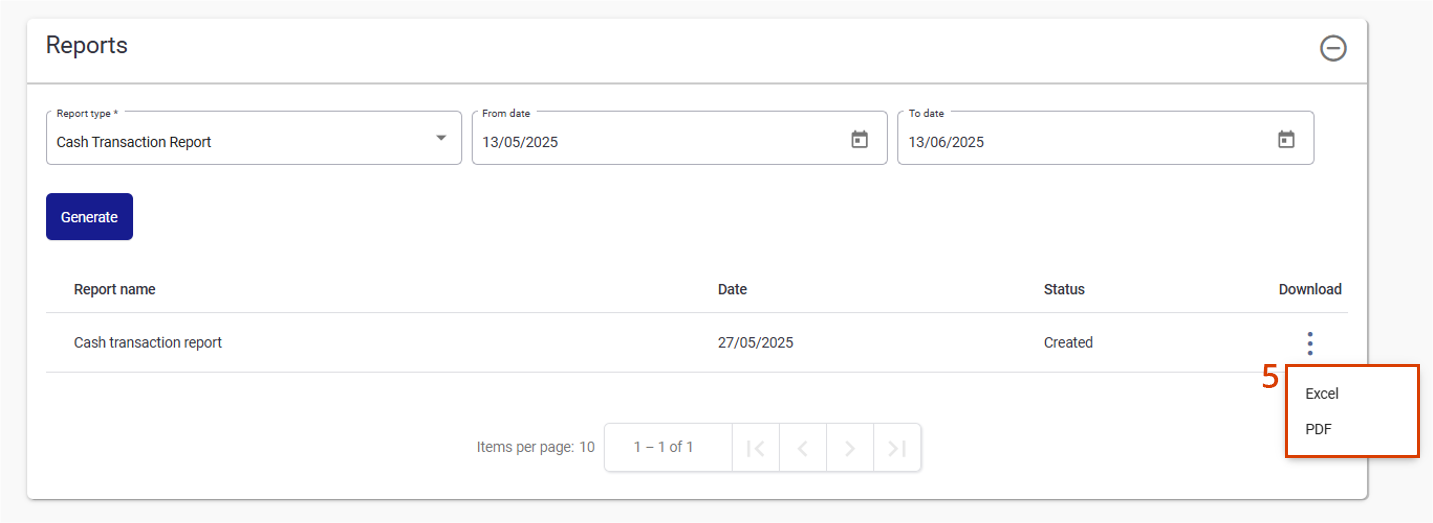
We’ve recently refreshed the Member Direct FAQs with screenshots to better guide you how to perform key tasks.
Notice of Intent (NOI) and rollover/withdrawal timing - Best practice
To support smooth processing and protect your client’s ability to claim a tax deduction, check the Adviser Portal to confirm the client’s NOI has been processed, before submitting any rollover or withdrawal requests.
This approach ensures contributions are eligible for deduction and avoids delays or unintended tax outcomes.
To find this information, go to your client’s ‘Transactions’ screen on the portal. By choosing the financial year, the description of the transaction will display as ‘Notice of Intention (NOI) tax deduction’ – see below for example:

Insurance enhancements through TAL Connect
As part of our ongoing commitment to improving member experience, we’ve introduced more efficient and user-friendly ways to lodge insurance claims and underwriting applications through our insurance provider TAL Life Limited.
-
Online claims
Members can now lodge claims for Total & Permanent Disablement (TPD), Income Protection or terminal illness through the AustralianSuper Member Portal, Member App, or by speaking with a TAL claims consultant via tele-claim.
These options provide numerous benefits, including:
- Reduced waiting time for claim forms via mail
- Intuitive forms based on member claim type and condition, and
- Direct claim lodgement to the TAL claim team.
Members can also complete a greenID check in TAL Connect for Income Protection payments. For TPD and terminal illness, additional ID checks will be required.
Paper-based claims remain available and are required for Third Party Authorities (TPAs) and restricted members.
-
Start your basic cover - new
New members can now apply online to start their basic cover before they turn 25 and their super balance reaches $6,000 (age limits and eligibility conditions apply). Members can continue to submit paper Start your basic cover application forms included in their Welcome pack.
-
Life events
Eligible members can apply for new or additional cover following certain life events, if their insurance needs have changed. Members now have 120 days to apply. A child starting primary school and a child starting secondary school have been added as life events.
-
Salary increase
Eligible members now have 90 days to apply for an increase to their Income Protection cover amount following a salary increase. Evidence requirements have also been simplified.
-
Transfer of cover
Eligible members can transfer their existing insurance cover from another super fund to AustralianSuper - up to $2m for Death and TPD, and $20,000 a month for Income Protection (subject to maximum cover limits). We can now also match long-term Income Protection benefit payment periods (certain occupations can’t have a long-term benefit payment period).
For more information about any of these insurance changes, download the Insurance in your super guide.
AustralianSuper insurance is provided by TAL Life Limited (the Insurer) ABN 70 050 109 450, AFSL 237848.
Uploading forms in the Adviser Portal
You can now upload all your forms directly through the Adviser Portal. If you haven’t already, we encourage you to start using the 'Upload forms' page in the portal for all form and client request submissions. It’s a quicker and more efficient way to get things processed.
Open super accounts online
Advisers and public trustee officers can now open super accounts for their clients directly in the Adviser Portal.
Simply select ‘Create a new account > Superannuation’ from the main dashboard page and follow the on-screen prompts.
Once submitted online, the account will automatically be set up. There are no identity verification requirements for super accounts, so this doesn’t apply for the online process like it does for our Choice Income or Transition to Retirement products.
Please note, the process requires downloading a prefilled application form. This doesn’t need to be submitted to AustralianSuper however you’ll need to obtain the client’s signature and keep the signed form on file. Like our other application forms, you may be asked to produce this in future and are expected to do so within five business days.
We’re planning to extend this enhancement to authorised support staff in the future.
Choice Income online join via Adviser Portal
There are a few ways to submit a Choice Income application to Adviser Services. The fastest way to open an account is online via the Adviser Portal.
- Online forms will only proceed with all the required information, reducing the need for unnecessary re-work.
- Applications are received quicker, so they’re processed promptly by our admin team.
- Any issues with Electronic ID are identified at lodgement stage and if certified ID is required, this can be sent directly with the application to Adviser Services to avoid delay.
If you need help with lodging an online application, please contact our Adviser Services team.
Submitting third party authorities
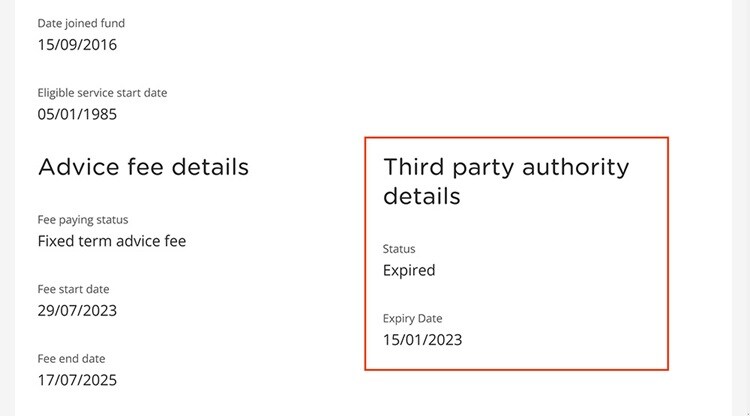
To ensure a smooth process when submitting your own third-party authority form to AustralianSuper, please follow these guidelines:
- Adviser’s email: include email address of the adviser requesting authorisation.
- Support staff authorisation: if you’d like your team to assist with client matters, please include a line on your form authorising ‘all support staff’.

















Our Adviser Services team
Our Adviser Services team includes our Adviser Services Managers, a dedicated group of experienced financial services professionals. They can support you with administrative, product or process queries you may have while working with us.
Our Adviser Partnerships team
Our Adviser Partnerships team are Fund and product experts, who are dedicated to developing and maintaining strong, long-term relationships with external licensees and financial advisers. They’ll work with you to ensure you have the right information, tools and support to grow your clients’ savings for a better future.
-
Meet our Adviser Partnerships team
 Tim Berkman
Manager, Adviser Partnerships (QLD & NT)Phone: 0402 929 972
Email: tberkman@australiansuper.comJoining AustralianSuper in 2010, Tim previously spent eight years with BT and Rothschild. Tim’s role at the Fund involves building adviser and licensee relationships across Queensland and the Northern Territory. His focus is on growing the adviser channel and supporting licensees and advisers in their work with AustralianSuper.
 Nikki Spiers
Adviser Partnerships Manager (VIC & WA)Phone: 0429 203 789
Email: NSpiers@australiansuper.comNikki joined AustralianSuper in 2017 after working for 18 years at a major dealer group as Practice and Recruitment Manager. Prior to this, she worked as a Certified Financial Planner and is a member of CPA Australia. She’s responsible for providing support on our products and services to our external advisers and licensees throughout Victoria and Western Australia.
 Claire Phillips
Adviser Partnerships Manager (NSW)Phone: 0424 970 353
Email: cphillips@australiansuper.comClaire joined AustralianSuper in February 2020 and is the key contact for external advisers and licensees in the NSW North Shore, Far North Coast, Central Coast and Newcastle regions, providing support on our products and services.
Claire has worked in financial services for 15 years in Australia and overseas and spent the past nine years working with financial planners. Prior to joining the Fund, Claire held previous Business Development roles at a number of Australia’s largest financial institutions. Ile Petroski
Adviser Partnerships Manager (NSW & ACT)Phone: 0416 278 746
Email: IPetroski@australiansuper.comIle joined AustralianSuper in 2018 and is a contact for external advisers and licensees, providing support on our products and services. He is the key contact within the Sydney CBD and metropolitan areas including East, West and South Sydney regions, as well as Central West, Southern Highlands, Riverina and ACT. He was previously at Vanguard Investments working in their Adviser Distribution team, and prior to that, at Colonial First State working across a number of adviser facing roles.
 Ben Thompson
Adviser Partnerships Manager (QLD)Phone: 0439 021 385
Email: bthompson@australiansuper.comBen has over 21 years of experience in the financial services sector, working across banking, financial advice and superannuation. He has been with AustralianSuper since 2016 working initially as a comprehensive financial planner, then Education Manager and now in his current role as an Adviser Partnerships Manager.
 Peter Bekavac
Adviser Partnerships Manager (VIC, SA & TAS)Phone: 0417 573 112
Email: pbekavac@australiansuper.comPeter has over 20 years’ experience in financial services. He has been with AustralianSuper since 2011 and was a foundation member of the Fund’s external advice channel. Prior to joining AustralianSuper he worked for one of Australia’s largest superannuation administrators, Link Group. With his broad skill set, Peter’s focus is to provide quality training and support on AustralianSuper’s products and services to advisers and support staff.